Pag. 40 / 57 0MNMPMK10NPENUB 00
4.3.2 Power connections battery side.
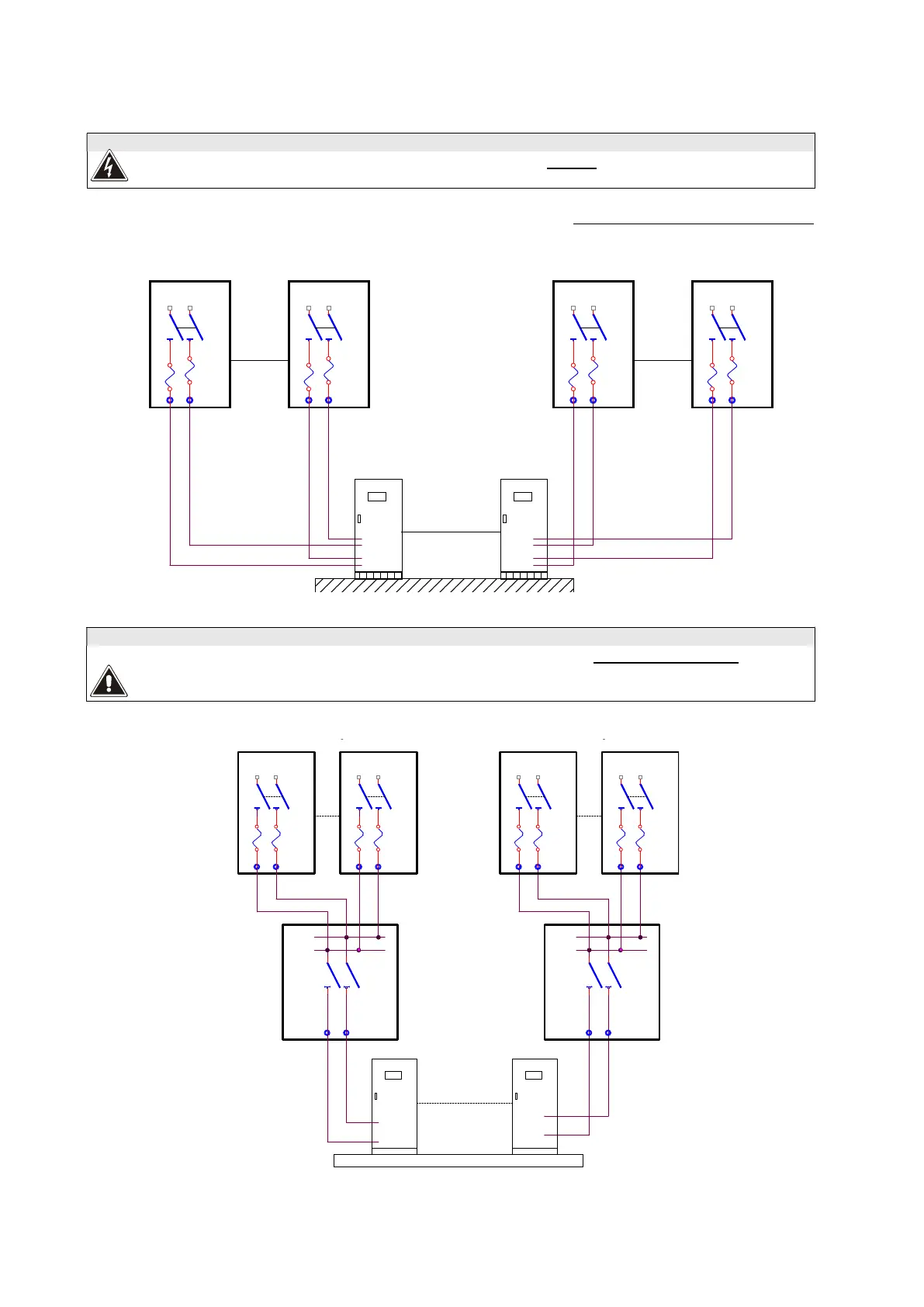
BATTERY CABINET if provided:
In order for the battery cabinet to be connected to the UPS, it must be provided with a fuses device.
Each UPS with its own battery cabinet
DISCONNECTOR CABINET
For systems with 4 or more battery cabinets, it is necessary to use a Battery switch cabinet where the
cables can be connected in parallel (consult the commercial department). For the sizing of the cables and
for the connection procedure refer to the “INSTALLATION DRAWING” attached to the battery cabinet.
max 8 UPS
-
+
Battery cabinet
SWBAT
Battery cabinet
+
-
SWBAT
Battery cabinet
-
+
-
+
Battery cabinet
SWBAT
-
+
max 3 battery cabinet
SWBAT
-
+
max 3 battery cabinet
+
Battery switch cabinet
+
-
-
SW
Battery cabinet
Battery cabinet
Battery cabinet
Battery switch cabinet
max 8 UPS
+
-
-
+
Battery cabinet
SWBAT
+
-
SWBAT
-
+
+
+
-
-
SW
SWBAT
-
+
SWBAT
-
+



 To Next Page