11
Remote Control (Cont.)
Using the remote control
Inserting batteries
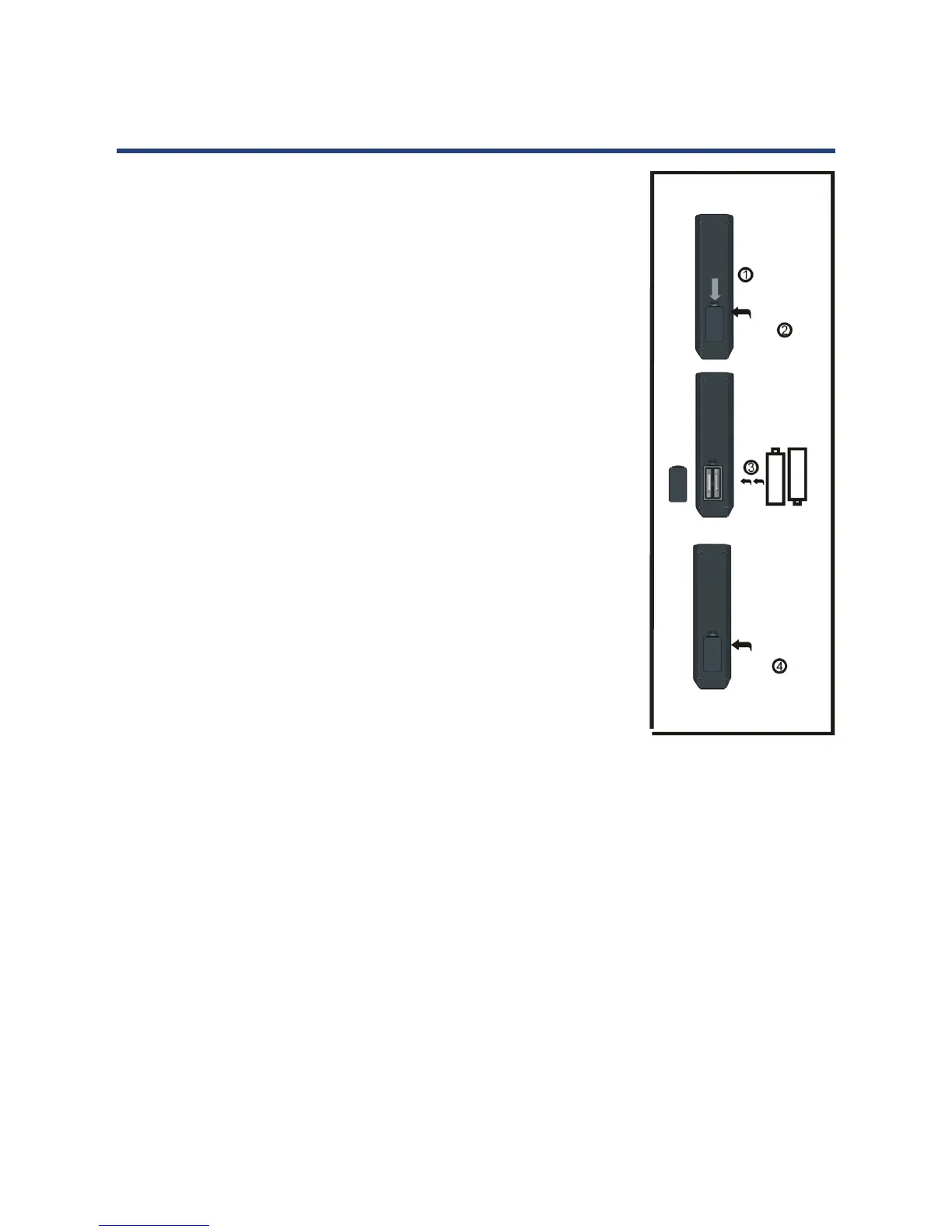
Install the batteries as illustrated in Fig. 1, right.
• Open the cover at the back of the remote control unit
completely.
• Insert two AAA size batteries according to the polarity markings
(+ / -) inside the compartment. Make sure the batteries are
correctly aligned and properly pushed into place so they can
power the remote control unit.
• Slide the cover back into position.
NOTE: When testing the remote control unit after replacing the
batteries, make sure the TV is properly connected to the
mains power supply.
Battery service life
• The service life of batteries depends on usage and
environmental conditions. They should normally last for about
one year.
• If the remote control fails to work even when it is operated near
the player, replace the batteries.
Precautions when using batteries
• Do not use old and new batteries together.
• Do not use different types of battery (for example, Manganese
Fig. 1
Push
Open
Press
and Alkaline batteries) together.
• Note that there are chargeable and non-chargeable batteries. Do not attempt to charge
non-chargeable batteries.
• Remove the batteries from the remote control unit if you do not intend to use the unit for
a long time.
• When discarding used batteries, follow any guidelines for recycling and disposal of
batteries that apply in your local area.
• Keep batteries away from children and pets.
• Never throw batteries into a fire or expose them to fire or other sources of extreme heat.



 To Next Page