9
Remote Control
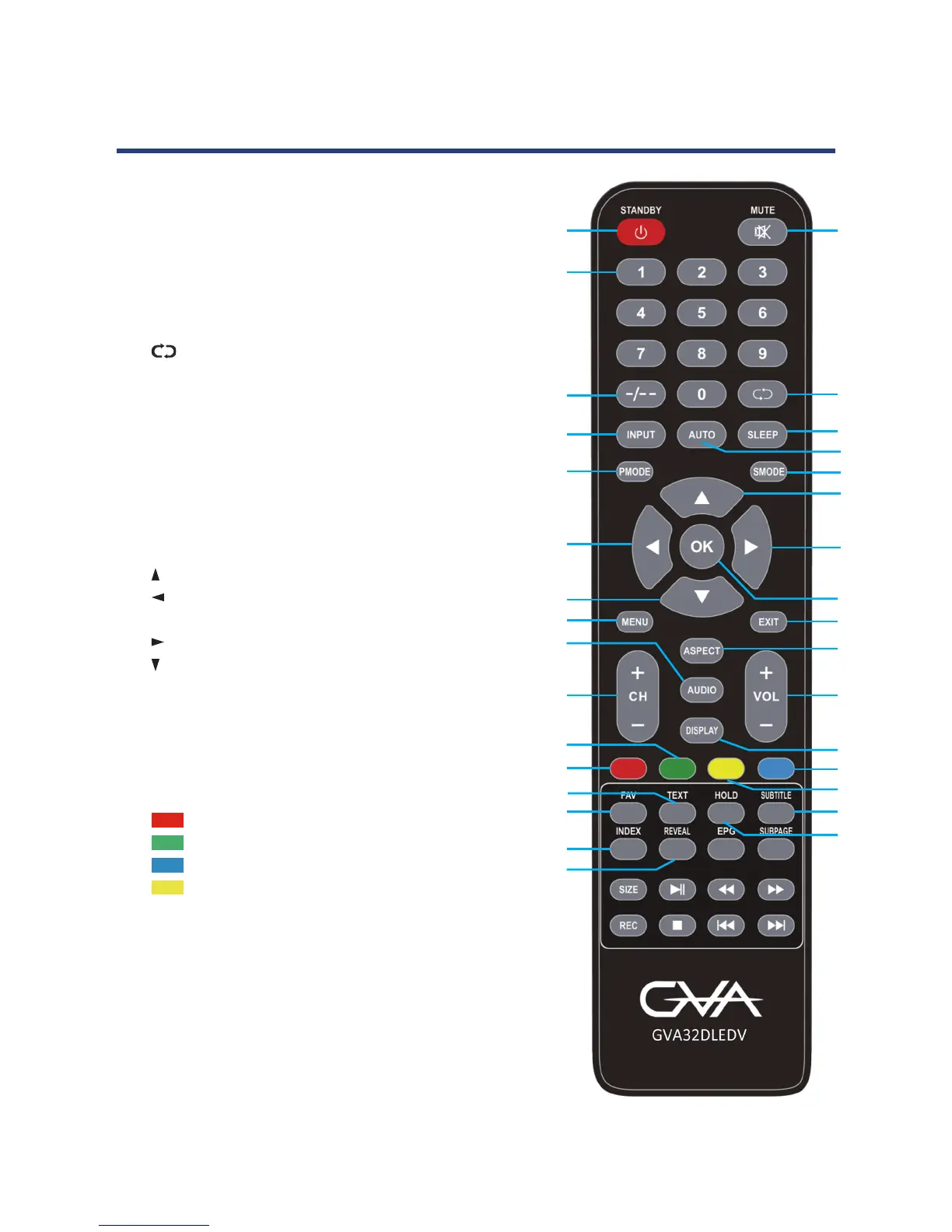
1 STANDBY: Set the unit in standby mode; press
it again to switch it on.
2 MUTE: Mute the sound.
3 NUMBER BUTTONS (0-9): Input the number
information, such as channel number and so
on.
4 -/-- : Switch the digit.
5 : Return to previous channel.
6 ASPECT: Press repeatedly to select the
desired screen aspect ratio.
7 INPUT: Select signal source.
8 AUTO: Auto adjusting in PC mode.
9 VOL +/-: Turn the volume up/down.
10 CH+/-: Play the next/previous channel.
11 AUDIO: Switch the avilable sound track (TV).
12 DISPLAY: Display information of the current
program.
13 : Up navigation button.
14 : Left navigation button.
15 OK: Conrm selection.
16 : Right navigation button.
17 : Down navigation button.
18 MENU: Display the main menu; press it again
to return to the previous menu page.
19 EXIT: Exit the menu page (TV).
20 P-MODE: Switch the picture mode.
21 S-MODE: Switch the sound mode.
22 SLEEP: Set the sleep time as desired.
23 RED button (TV)
24 GREEN button (TV)
25 BLUE button (TV)
26 YELLOW button (TV)
27 FAV: Enter the favourite channels list.
28 TEXT: Display the available TELETEXT. *
29 HOLD: Hold the TELETEXT.*
30 SUBTITLE: Enable/disable subtitles.
31 INDEX: Display the record list in DTV mode.
32 REVEAL: Hide TELETEXT or display hidden
characters.*
10
Remote Control
(Cont.)
SIZE: Switch TELETEXT size (TV) *.
SUBPAGE: Enter TELETEXT sub-page. *
: Start or pause playing.
33
: Move fast forward.
34
: Move fast backward.
35
36
: Stop playing.
: Play next le.
: Play the previous le.
* NOTE:
Teletext or Austext is no longer available, nor is
there any plan for a replacement teletext service
in Australia. For more information, please visit the
websites of the Australian channel providers.
However, one teletext option, “closed captions”,
is still working on most Australian television
channels. This service allows you to activate
subtitles while watching normal television
programs that provide it.
EPG: Display electronic program guide
information.
To start recording(In PVR Mode).REC:
37
38
39
40
41
42



 To Next Page