16
Controls and Connections (Cont.)
HDMI connection
Composite video (CVBS) connection
16
Controls and Connections
(Cont.)
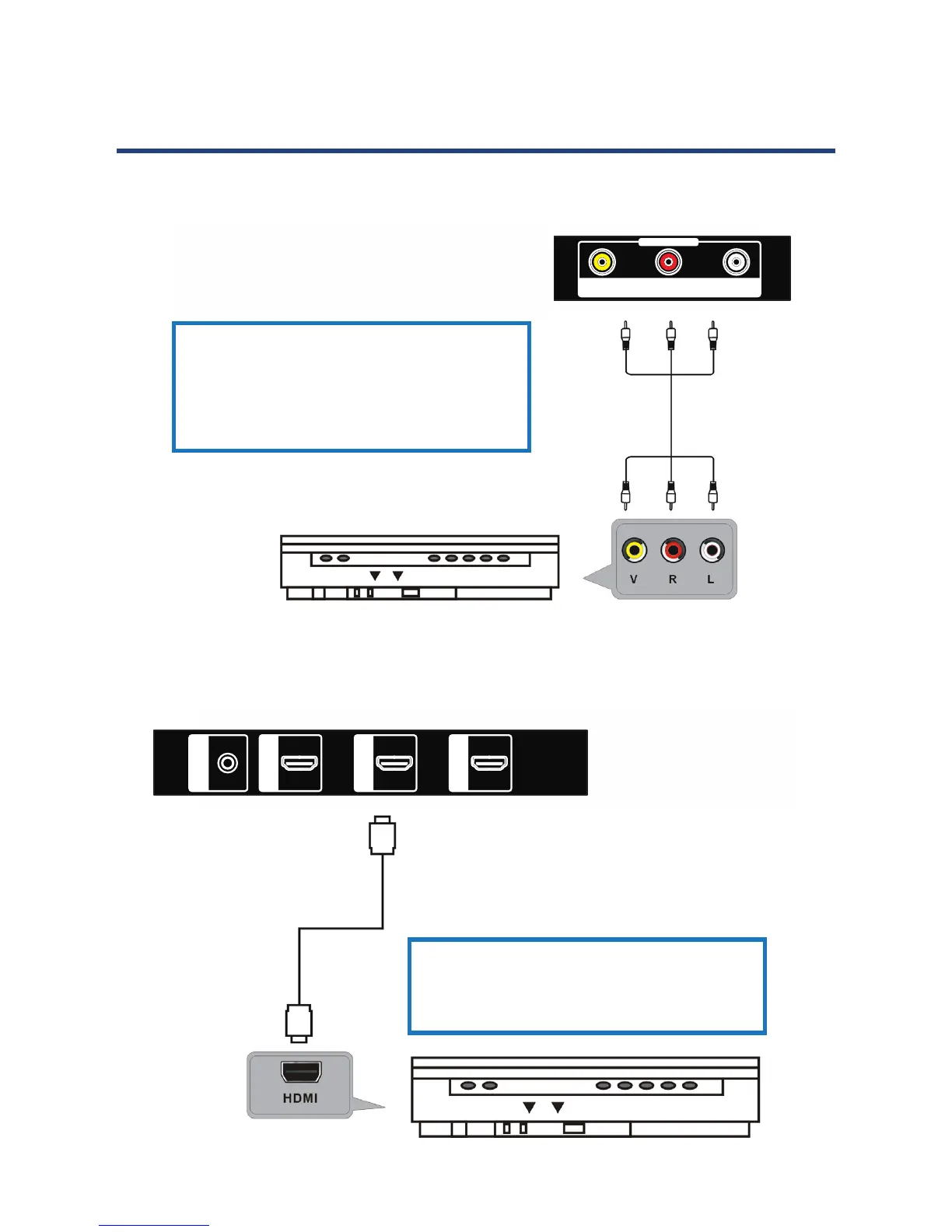
HDMI connection
Use an HDMI cable to connect the
unit with other devices to receive high
denition multimedia signal.
HDMI cable
(not included)
Composite video (CVBS) connection
For basic connection, use the composite
Audio L/R (white/red) and CVBS (yellow)
cable to connect the unit with other
devices.
AV cable
(not included)
Back of DVD/VCR
AV IN
VIDEO R --AUDIO-- L
PHONE
EAR
HDMI1
HDMI2
HDMI3
16
Controls and Connections
(Cont.)
HDMI connection
Use an HDMI cable to connect the
unit with other devices to receive high
denition multimedia signal.
HDMI cable
(not included)
Composite video (CVBS) connection
For basic connection, use the composite
Audio L/R (white/red) and CVBS (yellow)
cable to connect the unit with other
devices.
AV cable
(not included)
Back of DVD/VCR
AV IN
VIDEO R --AUDIO-- L
PHONE
EAR
HDMI1
HDMI2
HDMI3



 To Next Page