65
hager
GB
The various modes
4
Two modes can be used for setting the parameters of the
Room Controller.
The Settings mode
In this mode, the following parameters can be set:
- Time - date
- Alarm clock
- Alarm bell
- Contrast
- Backlighting
- Touch pad beep
- Date format
- References
The Configuration mode
In this mode, the following parameters can be set:
- Labels
- Display
- Language
- Reset to zero
If no entries are made after 10 minutes, the Room
Controller automatically leaves the Settings or
Configuration mode.
64
A temperature measurement sensor is built into the
Room Controller. The measured value can be displayed
on the screen.
The Room Controller is fitted with an
alarm clock with different alarm
bells.
• To stop the bell, press any touch
pad.
3.3 The local temperature sensor
3.4 The alarm clock
Description
3
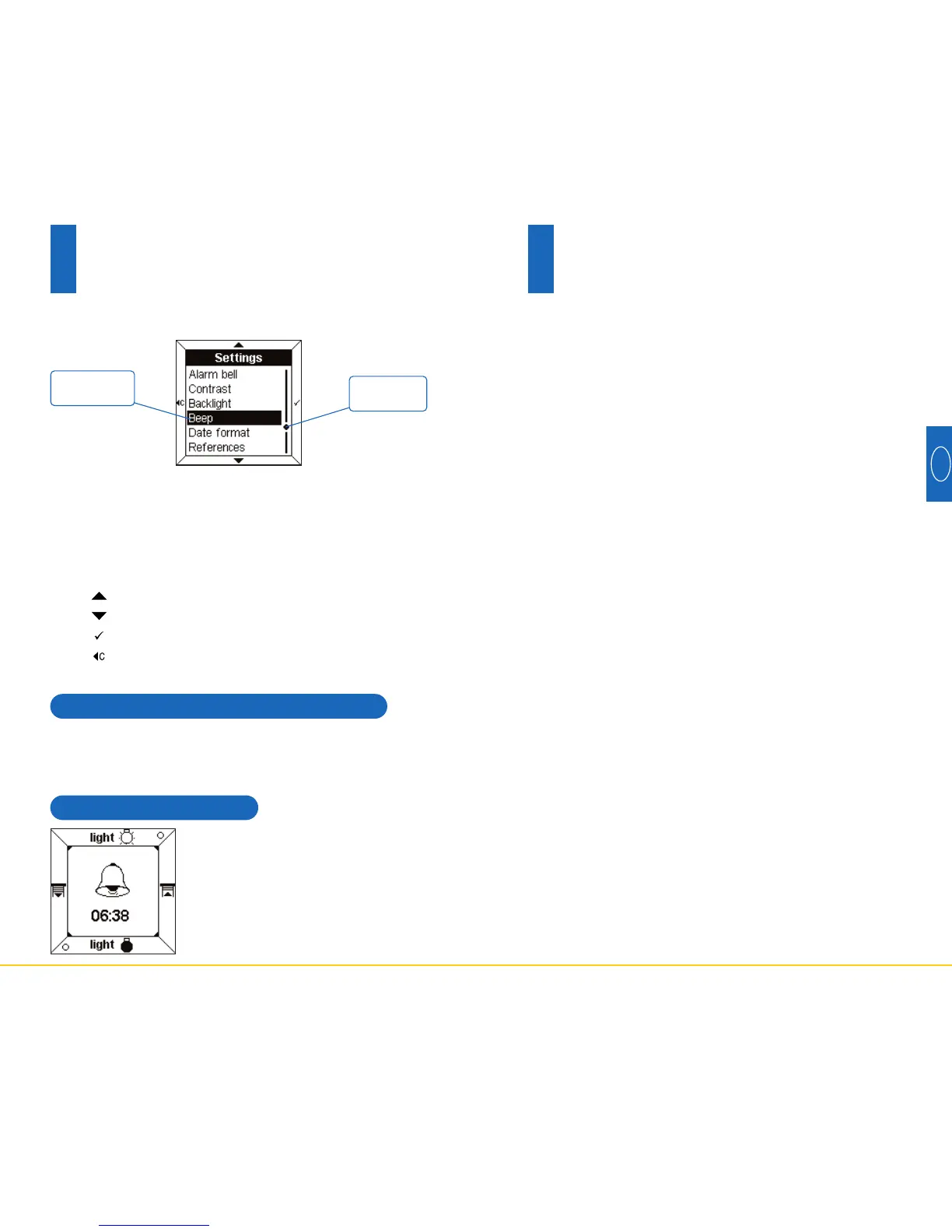
Display of a configuration or Settings menu
When displaying a menu, the parameters are listed on
the central display.
The parameter selected is displayed in reverse colour.
A cursor on the right of the central display indicates the
position of the selection in the list.
The touch pads perform the following functions:
-
:
selects the upper parameter in the list.
- : selects the lower parameter in the list.
-
:
confirms the selected parameter.
-
:
returns to the previous display, without confirmation.
Position
cursor
Parameter
selected



 To Next Page