77
hager
GB
In this example:
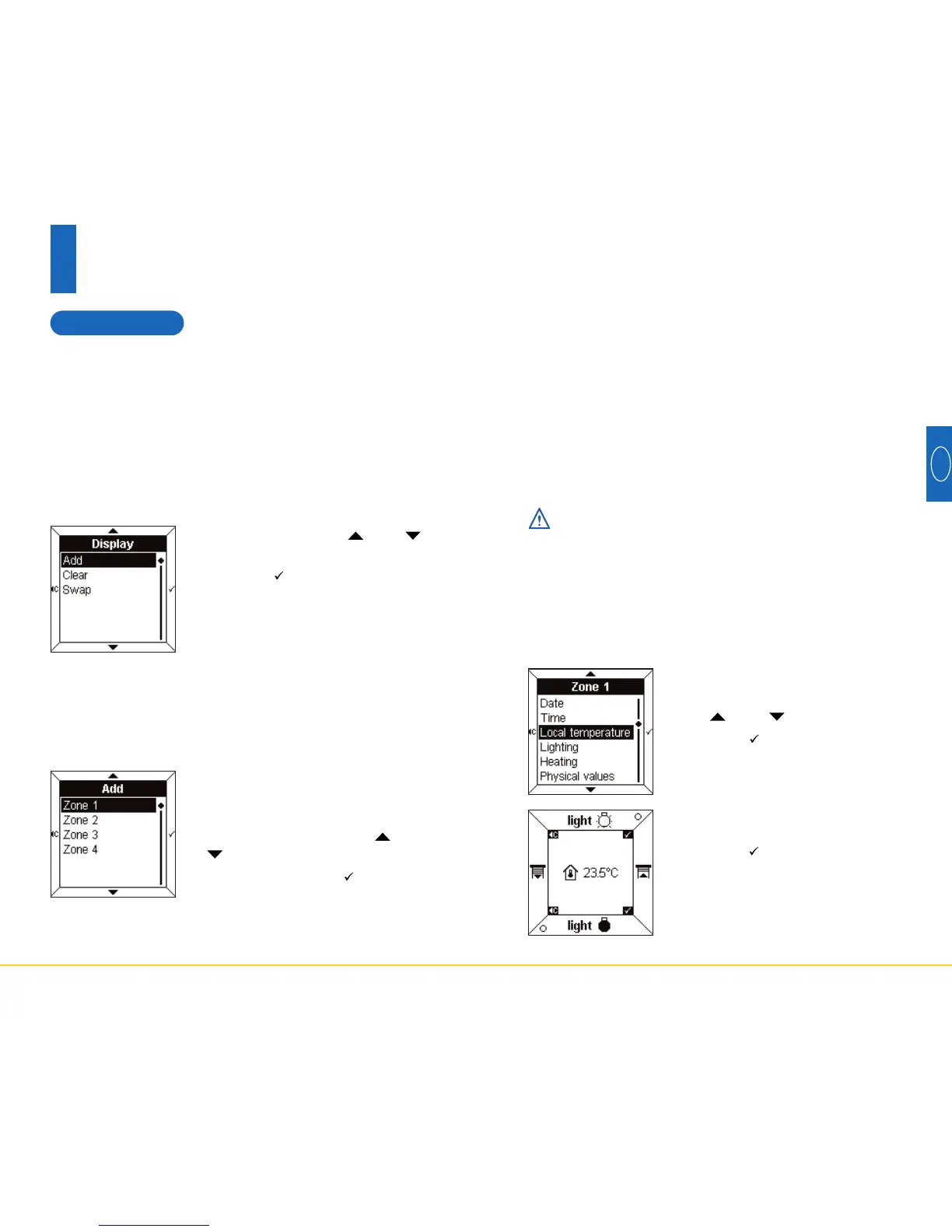
• Select Local temperature using
the and touch pads.
• Press the touch pad to confirm.
To display data
The temperature and its icon
appear in the central display.
• Press the touch pad to confirm.
The Room Controller then returns
automatically to the screen To
add a zone.
➜
Date, time, local temperature
These 3 parameters are used in the same way.
The following data can be displayed:
- Date
- Time
- Local temperature
- Lighting
- Heating
- Physical values
- Logical functions
- Other values
Before it can be displayed on the screen, the selec-
ted data must correspond with the EIB configuration.
For example, in order to display heating data on the
screen, the BCU must be configured to return to
heating status.
76
6
Configuration mode
6.2 Display
This menu is used to configure the data contained in the
central display.
Up to four lines or “zones” can be displayed. It is possi-
ble to add, delete or change a zone.
The Swap parameter enables the order of the zone
display to be changed.
• Select Add using the and
touch pads.
• Press the touch pad to access
Select a zone.
To add a zone
Four zones are available.
These correspond to the lines avai-
lable in the central display.
• Select a zone using the and
touch pads.
• Press the touch pad to access
the Data Display.
To select a zone
When all the zones have been allocated, you must
first Clear an existing zone before a new zone can be
added.


 To Next Page
 Loading...