81
hager
GB
Faults and maintenance
7
7.1 Error messages
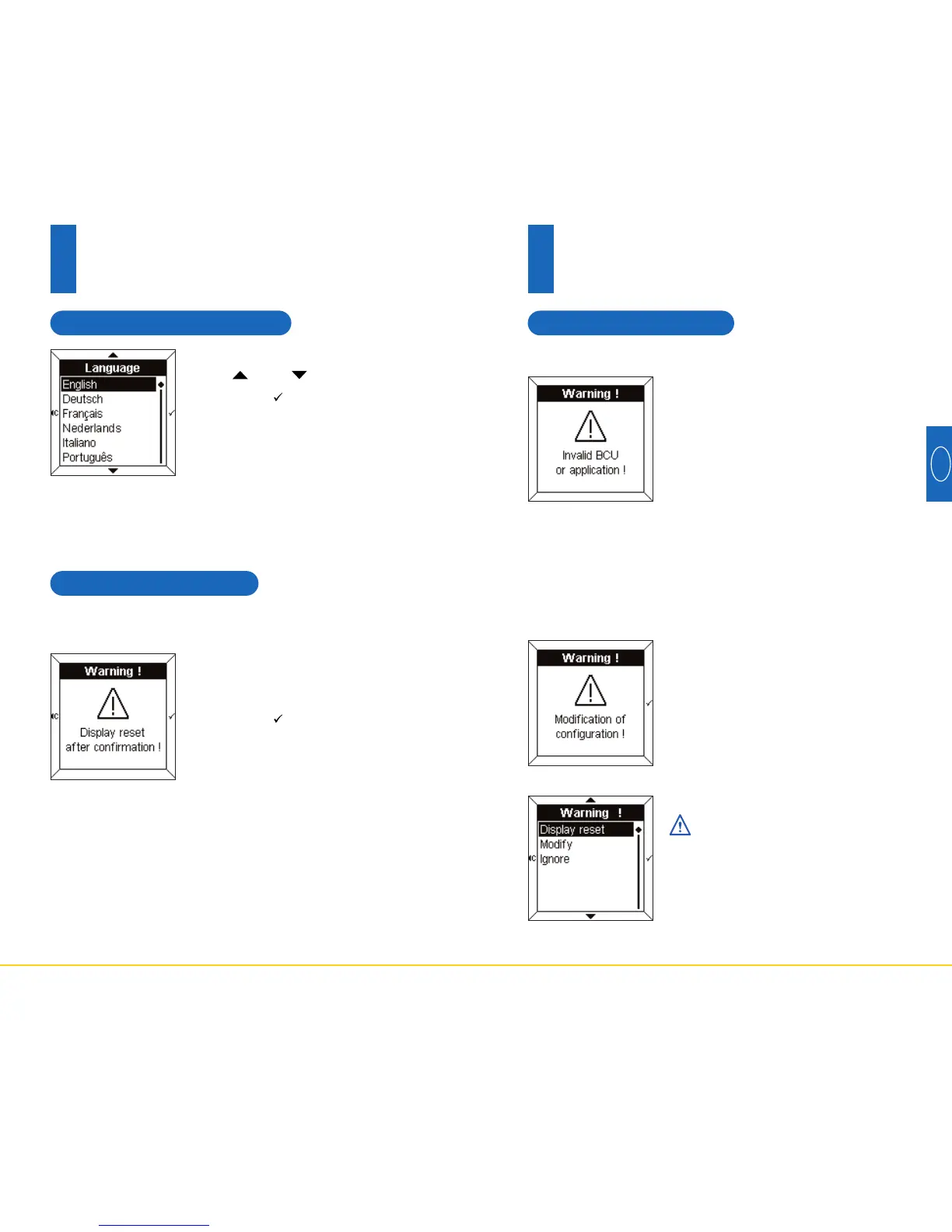
If this message is displayed, dis-
connect the front face then recon-
nect it. Check:
- that the BCU used cor-
responds correctly with the
BCU TX450 of the Room
Controller.
- that the application software
corresponding to the Room
Controller has been correctly
downloaded.
Wrong BCU or bad application
This message is displayed when
the Room Controller detects a diffe-
rence between the configuration of
the BCU and the front face.
In this case, it is possible:
- to reset to zero the front face,
- to modify the zones indicated
into reverse colours,
- to ignore the modified zones.
Check for consistency bet-
ween the BCU configuration
and the front face.
Detection of modifications in the configuration
80
6.3 Choice of language
• Select the desired language using
the and touch pads.
• Press the touch pad to confirm
and return to the Configuration
screen.
The desired language must be selected when first
commissioning.
6.4 To reset to zero
Awarning message indicates that,
after confirmation, the values will
be reset to zero.
• Press the touch pad to confirm
and return to the Configuration
screen.
This menu is used to reset the Room Controller to its
default values.
6
Configuration mode



 To Next Page