For further information, refer to the TX100 user
manual, paragraph on "Menu operation, measure-
ments and settings".
79
hager
GB
➜
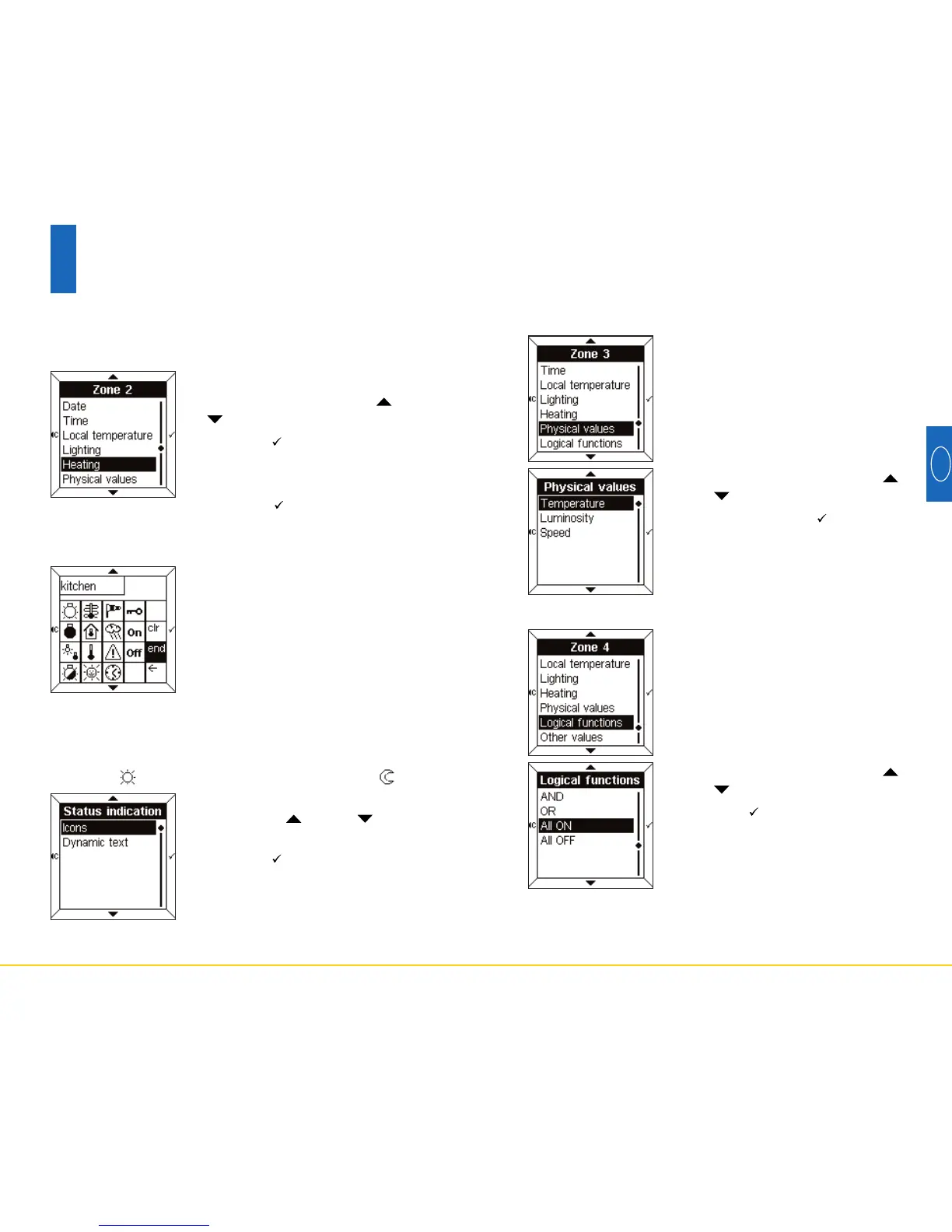
Physical values
• Select a parameter using the
and touch pads.
• Press the touch pad to confirm.
This menu is used to measure, by
means of sensors in the installation,
the external temperature, the lumino-
sity or the wind speed.
• Select a parameter using the
and touch pads.
• Press the touch pad to confirm.
• Enter either text or an icon (see
paragraph 6.1).
➜
Logical functions
This menu is used to display a
summary of the status of several
items in the installation.
For example, all the lights on the
1st floor are out.
78
6
Configuration mode
In this example:
• Select Heating using the and
touch pads.
• Press the touch pad to confirm.
The screen then displays a request
to enter text and/or an icon.
• Press the touch pad to access
Text entry.
➜
Lighting, heating, other values
• Enter text and/or an icon (see para-
graph 6.1).
• Press the end touch pad to access
Status Indication.
• Select Icons or Dynamic text
using the and touch
pads.
• Press the touch pad to confirm.
Status Indication is displayed either in the form of an
Icon, or in the form of Dynamic text to be entered.
One could, for example, associate the word "Comfort"
with icon , and the word "Reduced" with icon .
These 3 parameters are used in the same way.


 To Next Page
 Loading...