75
hager
GB
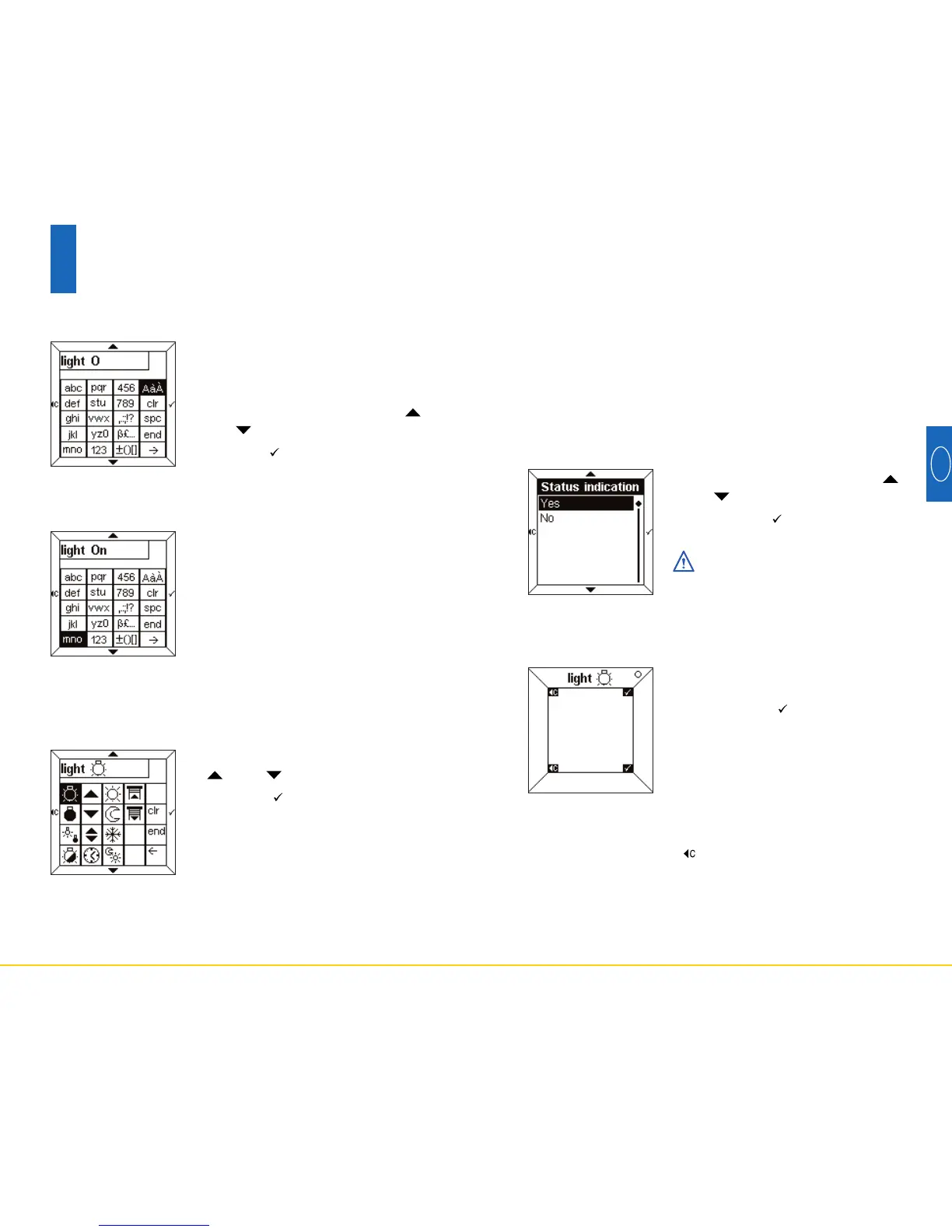
• Select Yes or No using the
and touch pads.
• Press the touch pad to
confirm.
This indication is only valid
for switch or timer functions.
To select a status indication
The word “light”, its icon and status
indication then appear in the label.
• Press the touch pad to
confirm.
The Room Controller then returns
automatically to the screen To
Add/Clear a label.
A status indication may be added to each label to repre-
sent the status of the function.
The status indication is shown by the following symbols:
•
Illuminated
°
Extinguished
It is possible to return to the top of the configuration
menu by pressing the touch pad.
Label confirmation
74
6
Configuration mode
When the text has been entered:
• Press the end touch pad to
access Status Indication directly
or
• Press the
__
>
touch pad to access
the Icons table.
• Select the desired icon using the
and touch pads.
• Press the touch pad to confirm
the icon.
• Press the end touch pad to
access Status Indication.
To enter an icon
The text entered is repeated above the table.
For example, to enter the letter “O” in
upper case:
• Enter the letter “o” as shown above.
• Select the AàÀ box using the
and touch pads.
• Press the touch pad rapidly until
an upper case “O” is displayed.
➜
To enter an upper case or accented character


 To Next Page
 Loading...