GB
18
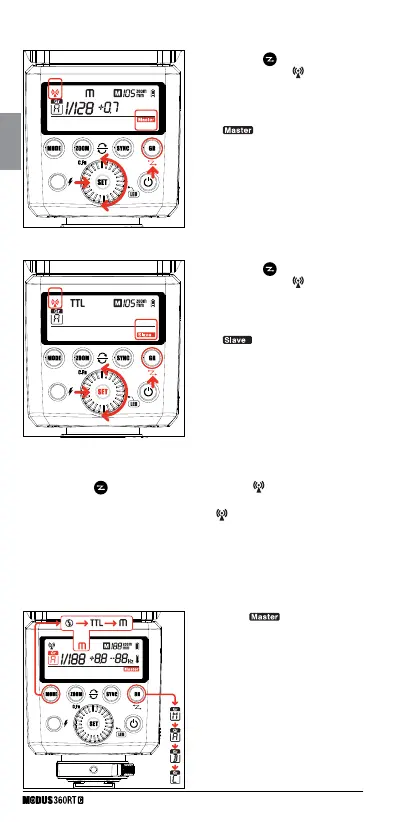
• Master Unit Setting
• Slave Unit Setting
• On Camera Setting
• “Master” Group - Mode setting
• Press the < > button for 2
seconds so that <
wireless
icon > is blinking.
• Turn the <Select Dial> until the
<
icon> is displayed on
the LCD panel.
• Press < SET > button
• Press the <
> button for 2
seconds so that <
wireless
icon > is blinking.
• Turn the <Select Dial> until the
<
icon> is displayed on
the LCD panel.
• Press < SET > button
• Press the <
> button for 2 seconds so that < wireless icon > is
blinking.
• Turn the <Select Dial> until only the <
wireless icon > is blinking
on the LCD panel.
• Press < SET > button
1) On the “
” unit, press the
<GR> button to select groups:
Groups A, B, and C are for the off
camera slave units. The master
unit is also in group A. Then press
the < MODE > button to select the
“Flash Mode” (OFF/TTL/M mode)
for that particular group. Repeat
this for all groups to the desired
lighting arrangement.



 To Next Page