GB
24
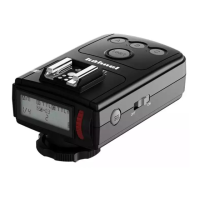
The Viper Mini transmitter is included in the Modus360RT Wireless
Kit and is available as an accessory also. The Viper Mini is a light
weight 2.4GHz transmitter which allows wireless control of off camera
Modus360RT speedlights when it is fitted to the camera hot shoe.
DCM (Digital Channel Matching)
1. DCM (Digital Channel Matching). Carry out the DCM matching (see
page 19).
2. Set the Modus 360RT to wireless as a Slave Unit - Group A (see
page 18).
3. Press Viper Mini <test> 01 button to confirm that Modus Speedlight
is triggered wirelessly.
Viper Mini group Mode Setting
Press buttons A or B or C to change the <MODE> setting of each
group to <TTL>, <M> manual or <blank> OFF.
Take a test photograph now and the Viper Mini transmitter will send a
wireless signal to each Modus 360RT and to each CANON Speedlight
connected to a Viper TTL receiver. The Speedlight will then be set
automatically to the same Viper Mini selected group mode setting.
Power Control setting for Manual and TTL FEC
From the Viper TTL transmitter you can adjust the power level and the
FEC of each group.
4. Press <SEL> 03 select button and all three icons <A>, <B> and
<C> will flash.
5. Press one button A or B or C to select which group you want to
adjust the power. Now only the selected group icon <A or B or C>
will flash
Wireless Flash
Photography:
(2.4GHz)
using Viper Mini Transmitter
5
• The Viper Mini LCD 05 will show the setting of each group
• A group is turned OFF if the LCD is not showing the group
• A group is in Manual mode when <M> is displayed next to the group
• A group is in TTL mode when <TTL> is displayed next to the group
• Each group A , B or C is set independently and it is possible to use
simultaneously different settings for each group (e.g. Group A may be
in <M>, Group B in <TTL> and Group C turned OFF)



 To Next Page