GB
25
6. Use the adjust dial to set the power output in < M > mode and
FEC in <TTL> mode.
7. Press the <SEL> button to save your selection.
Multi Mode
• Press and hold the < Group A > button to select the Multi mode
< > . Use the < SEL > button, Group Buttons and adjust dial to
set the number of flashes, flash frequency and power output. Press the
< SEL > button again to save selection.
Other Applications
6
• For more detail on operation of the viper Mini visit www.hahnel.ie
Sync Modes
• Press and hold the < Group B > button to select the High Speed
sync <
> icon will switch on.
• Press and hold the < Group B > button again to switch to rear
curtain sync: The <
> icon will switch on.
• Press and hold the < Group B > button again to revert to front
curtain again.
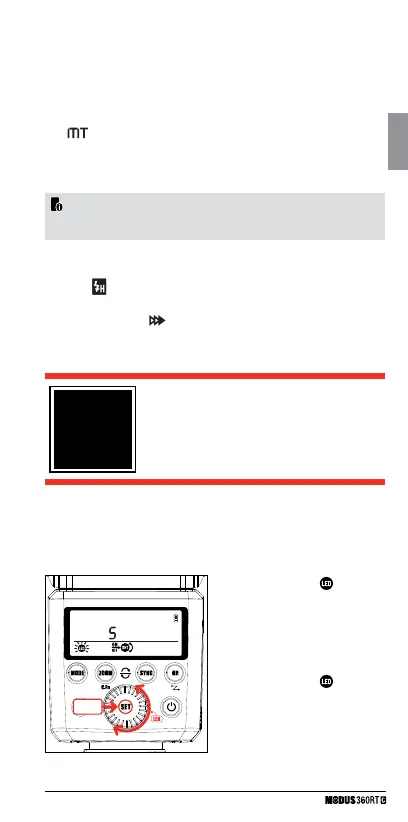
Illuminating for video shooting – LED light
You can use the LED light of the Modus 360RT as a light source
for video shooting. It helps create natural lights and shadows in an
environment with poor lighting and add more 3D effects in video.
+ 2 Sec.
1 Long press < SET /
> button
for more than 2 sec. to enter the
“LED-Menu”.
2 Now short press < SET > button to
turn ON / OFF LED.
3 Use the Select Dial to change the
LED light power from 1 to 5.
4 Long press < SET /
> button
again the exit the “LED – Menu”.



 To Next Page