32
Operation
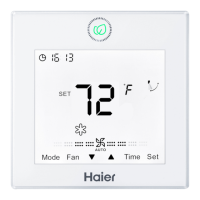
(1) In off and non screen saving state, press Mode key for 5s,
it will display 8 segment on the top-left corner of current mode
circulation, default value being 0. Press Up/Down key to shift
between 0, 1, 2, 3, then press Set key to conrm value. It will
follow the altered mode circulation after turning on the unit
again.
Corresponding mode of different value.
0-------------[Intelligent] [Heating] [Dry] [Cooling] [Fan]
1-------------[Heating] [Dry] [Cooling] [Fan]
2-------------[Dry] [Cooling] [Fan]
3-------------[Heating] [Dry] [Cooling] [Fan]
(2) If modes are reduced and the mode that is set before
turning off is not in the newly set mode circulation, the initial
mode is fan.
(3) The intersection of mode circulation set by wired controller
and indoor unit is valid.
(4) Fresh Air unit can execute mode setting, it will execute
the intersection with three modes of Fresh Air unit (cooling/
heating/fan mode)
(5) This setting is ground oor setting and will be memorized
whether non-volatile memory invalid or valid.
Mode Setting (Only valid for part of models)


 To Next Page