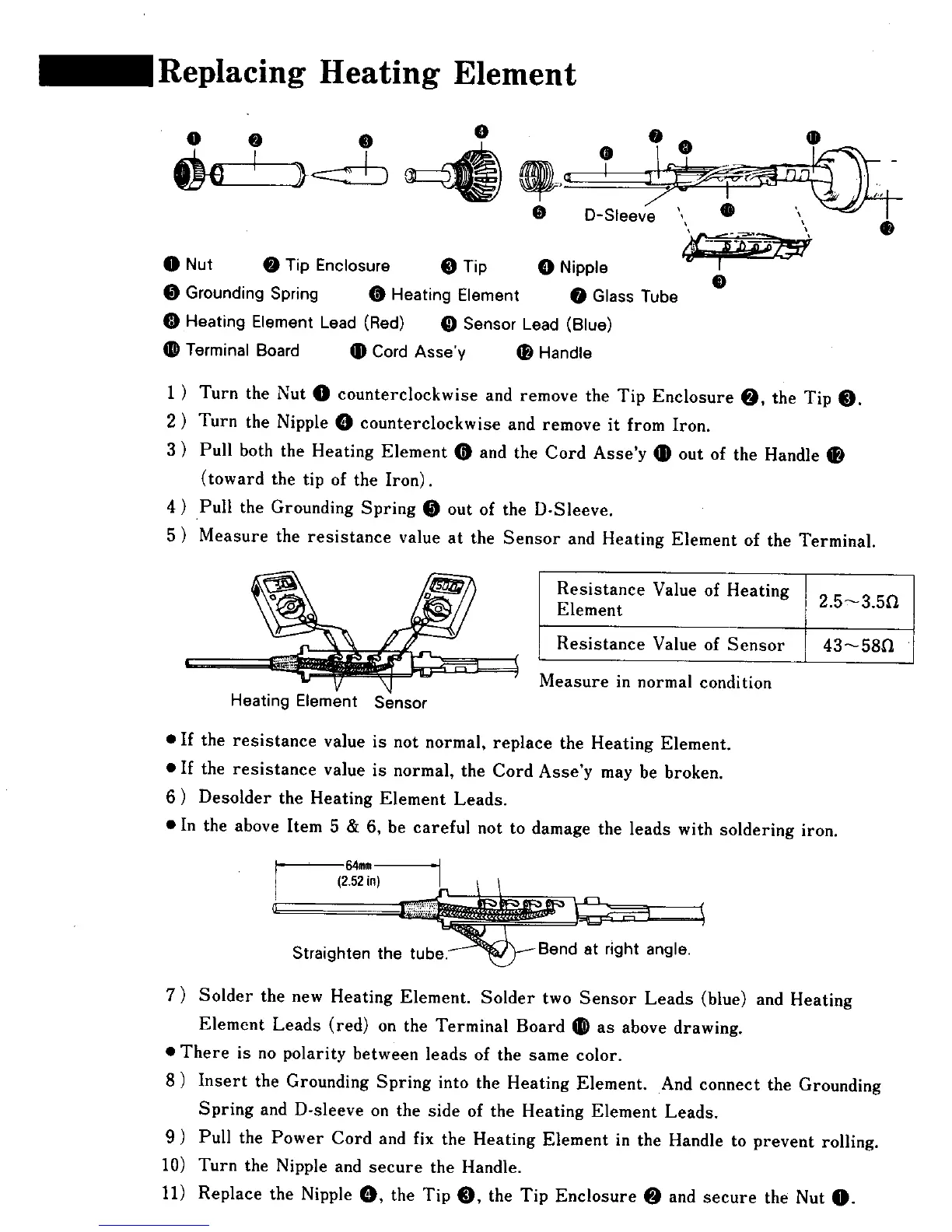
g Heating Element
IP D-Sleeve , "J' , -- i
O Nut O Tip Enclosure O Tip O Nipple
O
Grounding Spring _ Heating Element _ Glass Tube
Heating Element Lead (Red) _ Sensor Lead (Blue)
Terminal Board _ Cord Asse'y _ Handle
1 ) Turn the Nut O counterclockwise and remove the Tip Enclosure O, the Tip 0.
2 ) Turn the Nipple O counterclockwise and remove it from Iron.
3 ) Pull both the Heating Element _ and the Cord Asse'y _ out of the Handle
(toward the tip of the Iron).
4 ) Pull the Grounding Spring _ out of the D-Sleeve.
5 ) Measure the resistance value at the Sensor and Heating Element of the Terminal.
Resistance Value of Heating 2.5_3.5fl
Element
] Resistance Value of Sensor 43_58Q
Measure in normal condition
Heating Element Sensor
• If the resistance value is not normal, replace the Heating Element.
• If the resistance value is normal, the Cord Asse'y may be broken.
6 ) Desolder the Heating Element Leads.
• In the above Item 5 & 6, be careful not to damage the leads with soldering iron.
64mm
I (2.52in) I 1 1
Straighten th
7) Solder the new Heating Element. Solder two Sensor Leads (blue) and Heating
Element Leads (red) on the Terminal Board _ as above drawing.
• There is no polarity between leads of the same color.
8 ) Insert the Grounding Spring into the Heating Element. And connect the Grounding
Spring and D-sleeve on the side of the Heating Element Leads.
9 ) Pull the Power Cord and fix the Heating Element in the Handle to prevent rolling.
10) Turn the Nipple and secure the Handle.
11) Replace the Nipple _, the Tip _, the Tip Enclosure O and secure the Nut O.











 To Next Page