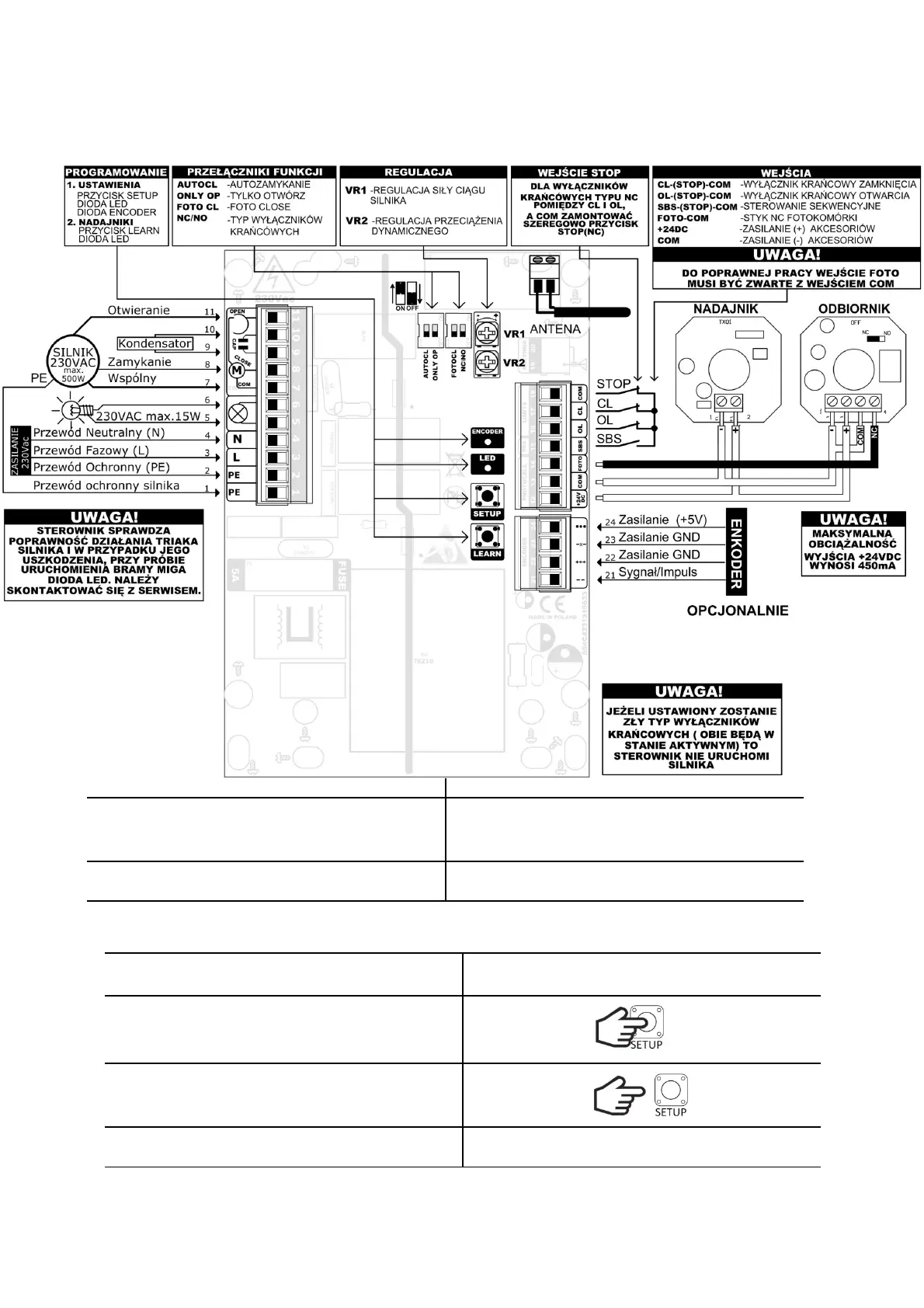
SETTING PROGRAMMING
Programming the controller is done using the SETUP, LEARN buttons, LED and ENCODER
diodes and 4 function switches located on the controller board.
Programming can only take place when the gate is in stop state. If we start programming
the controller during the auto-closing time countdown, the countdown will be stopped and to
close the gate, press the SBS button or the remote-control transmitter.
TRAFFIC LIGHTS
While the gate is moving, the traffic lights can work in two modes: continuous light and flashing (slowly
when the gate opens, and quickly when the gate closes). In addition, it can act as an auxiliary lighting
for a driveway or garage with delayed switch-off.
Programming should be performed with the AUTO CL switch turned off.
SETTING THE LIGHT OFF DELAY
We set it in the range from 0s to 25min with a step of 15s. Default: 0s
If the AUTO CLOSE function is enabled, set the
AUTO CL switch to the OFF position.
Hold down the SETUP button for less than 3s.
When the button is pressed, the LED lights up.
Release the SETUP button.
The LED will flash rapidly.
Within 5s, start setting the time.
Press SETUP x times. One press corresponds to
15s. Each pressing is signaled by the lighting of the
diode. If the button is not pressed within these 5s,
the controller will set the time to 0s.
After 3s from the last press, the LED will flash 3
times. The controller will remember the settings
and return to normal operation.
Set the AUTO CL switch to the desired position.
FLASHING ON / OFF (Default: enabled)
If the AUTO CLOSE function is enabled, set the
AUTO CL switch to the OFF position.
Hold down the SETUP button for less than 3s.
When the button is pressed, the LED lights up.
Release the SETUP button.
The LED will flash rapidly.


 To Next Page