29
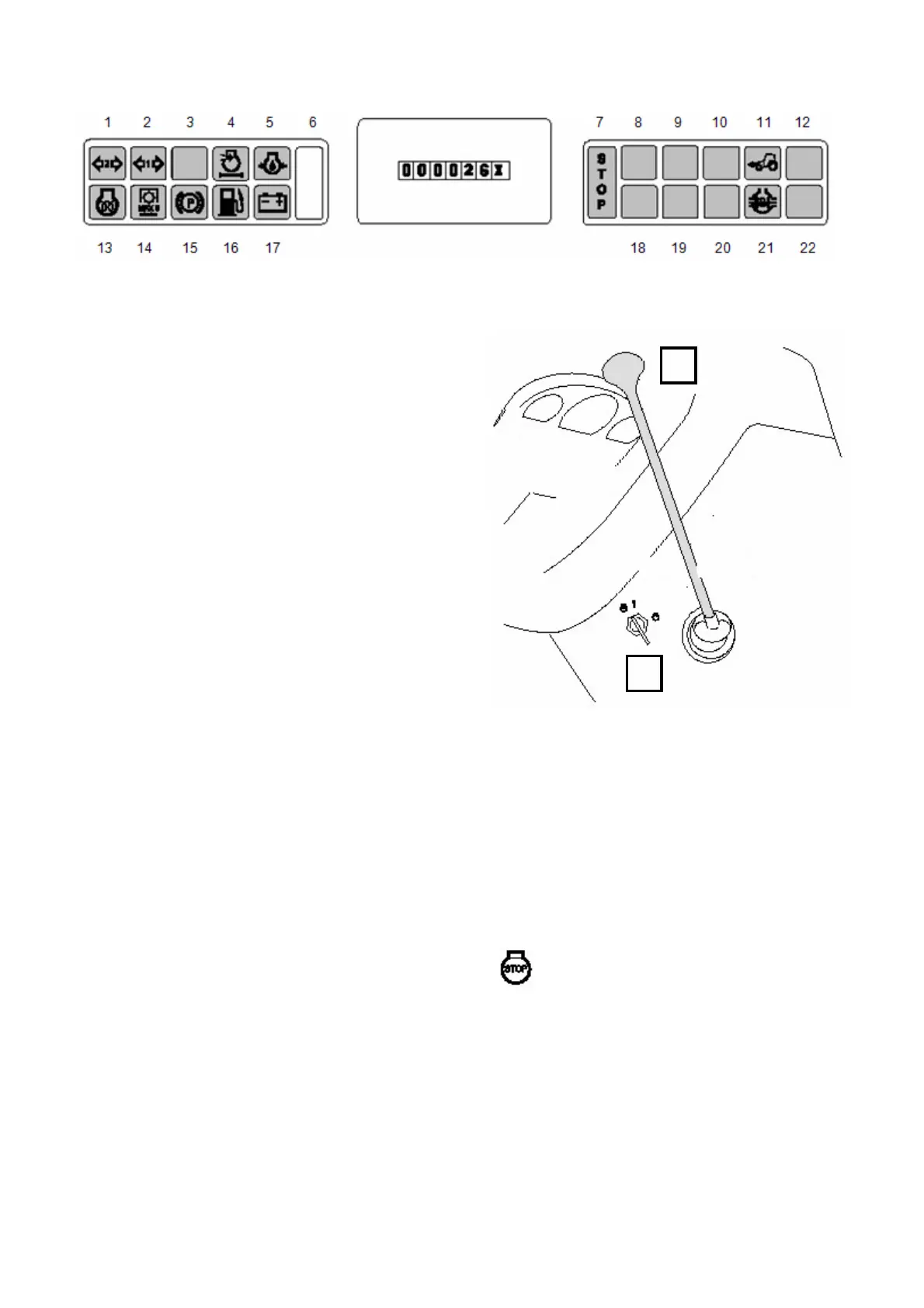
4.2.2.2.6.Indicator lights on instrument panel (6)
1. Direction indicator warning light for second trailer
(green, if one of the bulbs on the combination has
failed, this light will not come on)
2. Direction indicator warning light for first trailer
(green, if one of the bulbs on the combination has
failed, this light will not come on)
3. Not in use
4. Engine air cleaner warning light for blocked filter
(yellow), filter must be serviced
5. Engine oil pressure (red) is too low
6. Not in use
7. Engine STOP (red) is flashing. The tractor and
the engine must be stopped immediately. Must only
be
continued in an emergency, e.g. the tractor can be
moved to the roadside.
8. Not in use
9. Not in use
10. Not in use
11. Four − wheel drive (yellow) is engaged, 4WD
models
12. Not in use
13. Cold start glow (yellow) is on when the starter
switch is in the position 1 and automatic glowing is
in operation.
14. Rear power take − off (yellow) is disengaged
with PTO Clutch lever, max 5 min
15. Parking brake (red) is applied
16. Low fuel level (yellow), comes on when about
14 l fuel is left without extra tank. The indicator light
comes on if the fuel feed pressure is too low.
17. Battery charging (red) is on when charging does
not operate
18. Not in use
19. Not in use
20. Not in use
21. Differential lock (yellow) is engaged
22. Not in use The stop indicator light is operated at
the same as the engine oil pressure indicator light.
If only the central warning light (STOP) starts to
flash, the engine temperature is too high (can be
seen also on the temperature gauge).
If the central warning light (stop) starts to flash when
the tractor has been driven the engine must be
stopped immediately and the fault must be repaired
before continuing again.
When the starter switch is turned on to position 1,
the following indicator lights must come on:
− engine oil pressure (5.)
− stop light is flashing (7.)
− parking brake (15.), when the parking brake is
applied
- battery charging (17.)
4.2.2.2.7. Infoline − instrument panel
operating hour meter (2.7)
The hourmeter always shows the total number of
hours worked.
4.2.2.3. Right Side panel of instrument
panel (3)
4.2.2.3.1. Ignition switch (3.1)
Starter switch positions
Stop, motor
When the ignition switch is turned from the stop
position to position 1, in cold conditions, while the
engine is cold, the automatic glowing is turned on
and the glow indicator light in the instrument panel
comes on. (normal position for running the engine,
which also allows for the electrical equipment to be
used when the engine is not running).
1
2



 To Next Page