USE ONLY HAYWARD GENUINE REPLACEMENT PARTS
14
Chlorinator
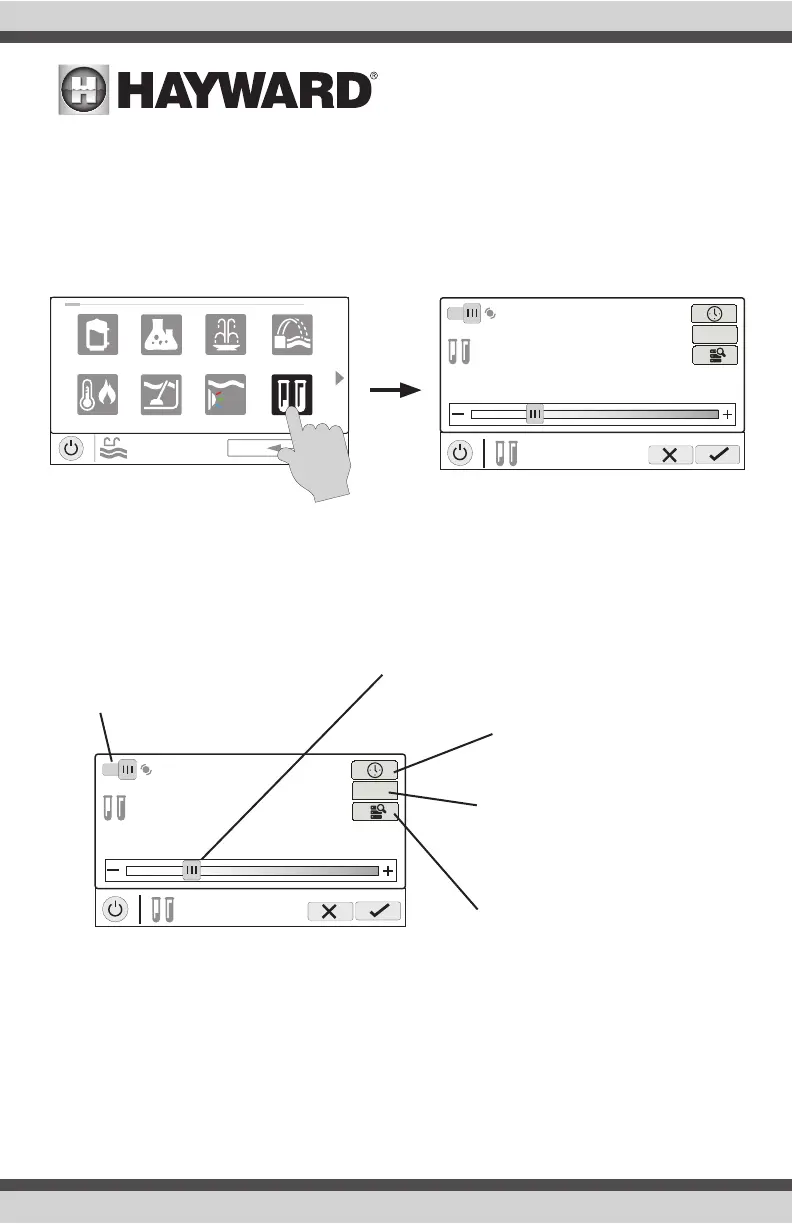
If a chlorinator has been configured in the Configuration Wizard, you will see a chlorinator icon in the
Features Screen. Touching this will bring you to the Chlorinator Control Screen which is shown below
(your display may be different depending on the type of chlorinator chosen during configuration).
Use this screen to enable/disable the chlorinator, set a schedule, super chlorinate and view/change
diagnostics. A sample screen is shown below. For schedules, refer to the previous examples in this
manual.
If using an HL-CHEM - The Hayward HL-CHEM Sense and Dispense accessory continuously tests
the pool’s sanitization and pH levels allowing the OmniHub to automatically generate/dispense the
correct amount of chlorine and dispense the proper amount of pH reducer. If using the HL-CHEM
and ORP has been enabled in the Configuration Wizard, the OmniHub will display chlorinator readings
and settings in “mV” rather than “%”. Refer to the following information+ as well as the HL-CHEM
manual for configuration and operation instructions.
ON
15%
POOL
chlorinator
3200 ppm
average
SC
uclights chlorinator
alarm light row
POOL
features
1 / 2
vsp
heat/cool cleaner
pH
ON
15%
POOL
chlorinator
3200 ppm
average
SC
Chlorinator Diagnostics - Touch
this button to view diagnostics, set
average salt, change polarity, and to
reset the cell timer.
Set Schedule - Touch this
button to set a schedule for
the chlorinator.
Super Chlorinate - Touch
this button to set the amount
of hours that you’d like to
super chlorinate.
Enable / Disable - Slide this
switch to enable and disable
the chlorinator and then
touch the Save button.
Change Setting- This slider will raise
and lower the chlorinator setpoint
setting. If an HL-CHEM is used and
ORP is enabled, the adjustment will
be displayed in “mV”.
Chlorinator Control Screen















 To Next Page