USE ONLY HAYWARD GENUINE REPLACEMENT PARTS
18
OmniDirect Mode (Universal ColorLogic Lights built after June 2018)
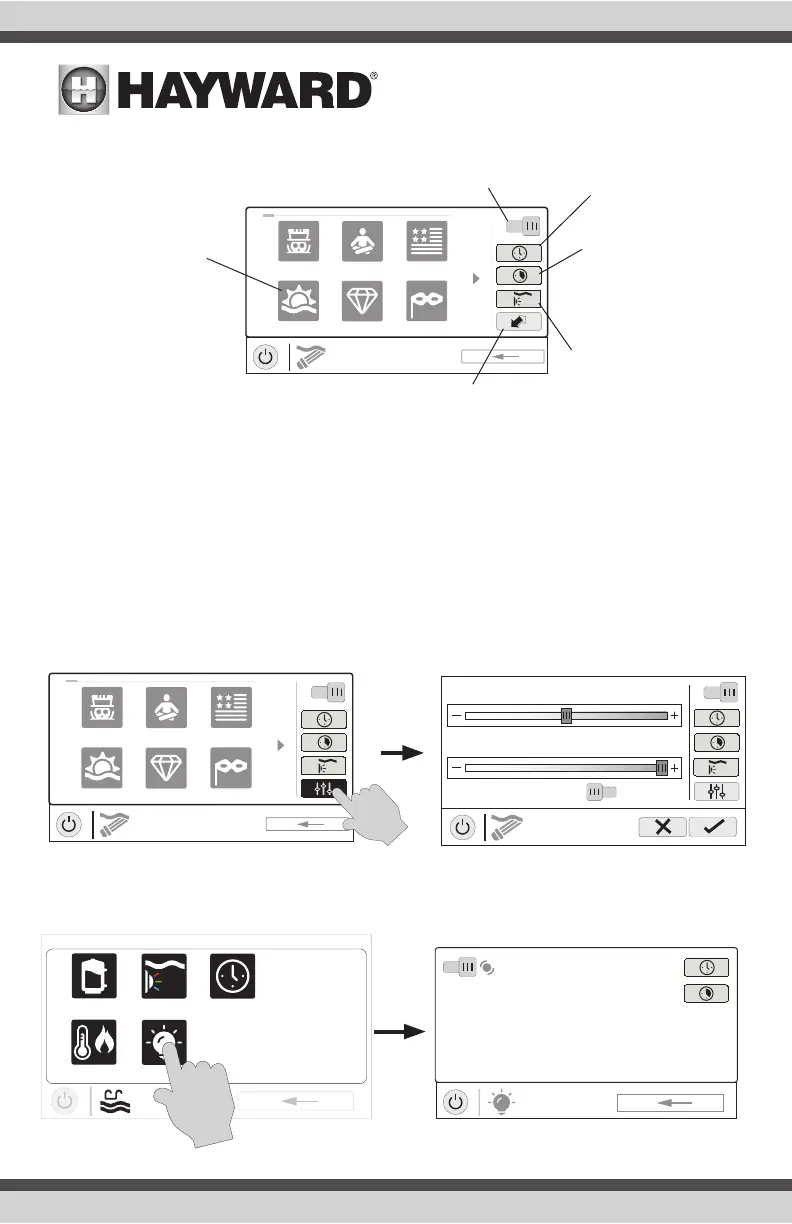
Universal ColorLogic lights built after June 2018 are capable of OmniDirect mode. To run in this
mode, select OmniDirect mode when configuring your lights in the Configuration Wizard (see Instal-
lation Manual). The OmniHub will test your lights during configuration to confirm that they support
OmniDirect mode. If so, the ColorLogic Control Screen will display a Settings icon rather than a Syn-
chronize button, which allows both Speed and Brightness control shown on the diagram below. If a
WaterBowl light is configured, the Flicker effect can also be activated from the Settings screen. Note
that these settings will also be an option when setting up schedules and timers for lights running in
OmniDirect mode.
Other Lights
You can turn other lights on/off, set schedules, and set a countdown timer at the Other Lights Control
Screen shown below. These functions have been illustrated previously in this manual.
ON
UCL
color shows
1 / 2
Mardi Gras
USA
VoodooLounge Tranquility
Twilight Gemstone
Turn on / Turn off - Slide this switch to
manually turn on/off the ColorLogic lights.
This will override schedules or timer settings.
Set Schedule -
Touch this button
to set a schedule
for the ColorLogic
Lights.
Countdown Timer -
Touch this button to
set a countdown timer
for the lights.
Light Show/Color -
This button will change
the selection between
light shows and solid
colors.
Synchronize - Touch this button to syn-
chronize the ColorLogic lights. The lights
will then default to Voodoo Lounge.
Selections - Select
the desired light show
or solid color.
ColorLogic
Lights Control
Screen
ON
Lights
color shows
1 / 2
Mardi Gras
USA
VoodooLounge Tranquility
Twilight Gemstone
ON
LIGHTS
settings
Brightness 100%
Speed
1x
OFF
Flicker Eect
uclights
vsp
heat/cool deck lights
POOL
features
schedule















 To Next Page