USE ONLY HAYWARD GENUINE REPLACEMENT PARTS
17
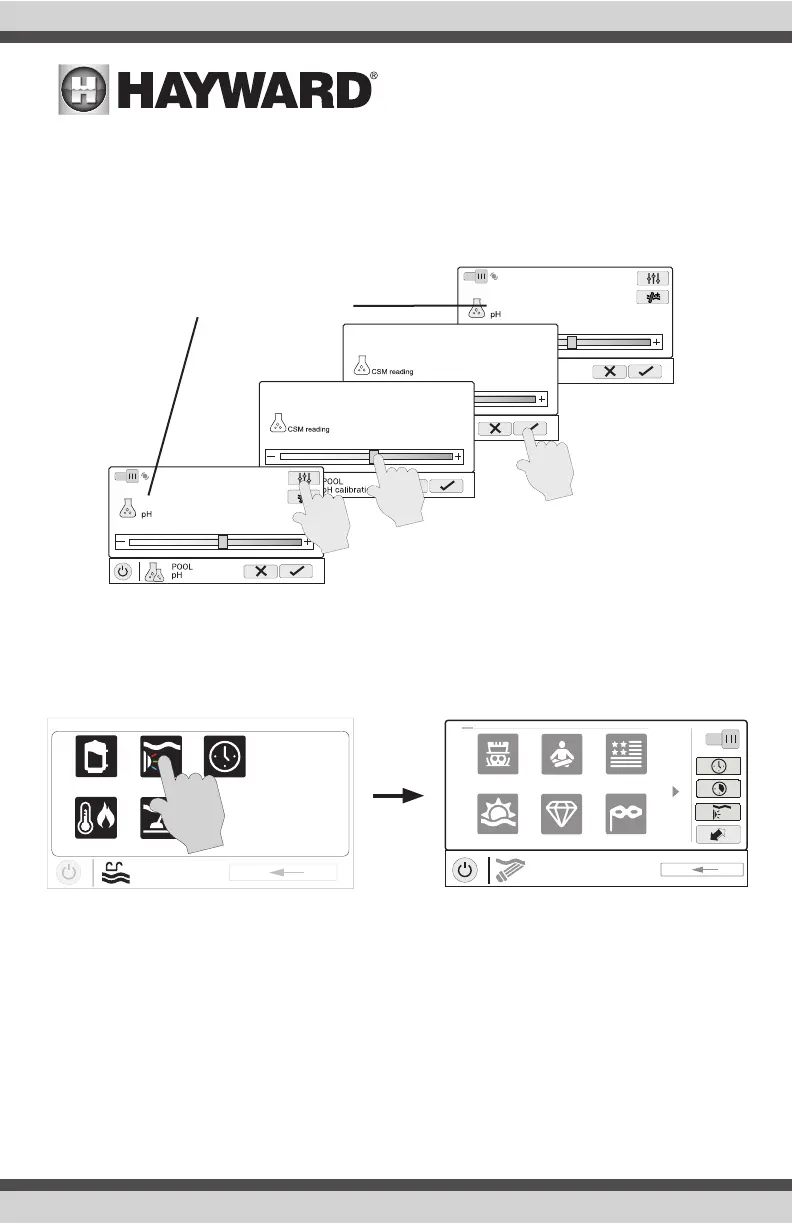
pH Calibration
If the OmniHub pH reading differs from independent water tests, you can adjust the reading by touch-
ing the Calibrate button and using procedure below. You’ll be asked for the difference between the
displayed pH level and the true pH level. You’ll want to select the amount needed to go from the
displayed level to the true level. In the example below, the displayed level is 7.3 and the true level is
7.5. You need to add .2 to the displayed level to arrive at the true pH level.
ColorLogic Lights
IMPORTANT: Noise induced into the supply wiring from the inductive kick of the isolated low volt-
age transformer can sometimes interfere with ColorLogic operation. If your ColorLogic lights do
not respond properly to commands, install a Hayward GLX-HAL-XSNUB snubber capacitor at the
transformer. These are available from your local Hayward dealer.
You can set schedules for the ColorLogic lights as well as countdown timers. This procedure has
been previously shown. Note that after the countdown interval, the lights will go off regardless of
their previous state.
Light Show/Color - From the ColorLogic Control Screen, select the desired show or color. Use the
Advance button to show all of the available selections. Use the Light Show/Color button to switch
between all light shows and all solid colors.
Synchronize - Because changing colors and shows requires interrupting power to the ColorLogic
lights, there is a chance that the lights could lose synchronization due to timing issues. If you find
that the color or show does not correspond with the selection that you’ve made, the lights may be
out of sync. Touch the Synchronize button to re-sync the ColorLogic lights.
ON
Dispensing On
7.5
7.3
.2
7.3
.2
ON
Dispensing On
7.3
7.3
7.5
Calibrate reading from 7.3 to 7.5
uclights
vsp
heat/cool cleaner
POOL
features
schedule
ON
UCL
color shows
1 / 2
Mardi Gras
USA
VoodooLounge Tranquility
Twilight Gemstone















 To Next Page