USE ONLY HAYWARD GENUINE REPLACEMENT PARTS
34
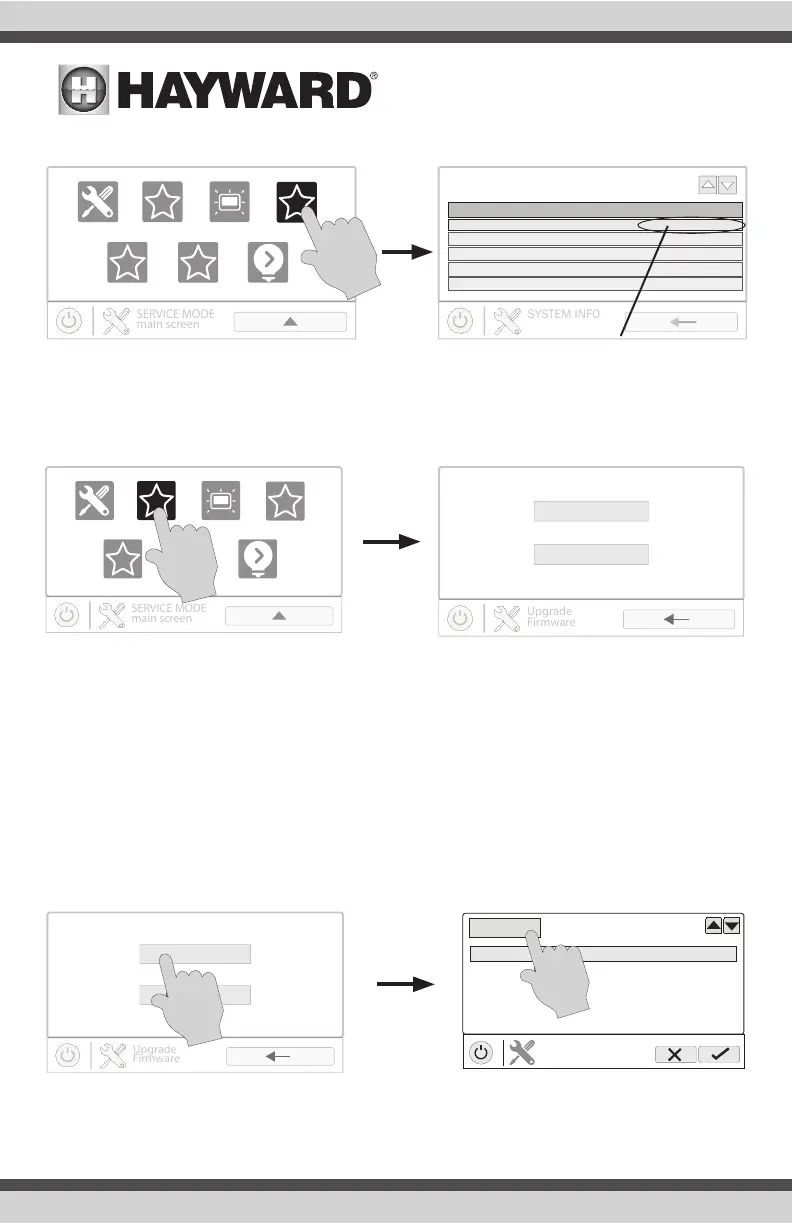
1. Determine your current MSP firmware version using the Sysinfo button.
2. Using an ordinary web browser, go to www.hayward.com/firmware and compare the latest
available version on the web to the current firmware version. If the firmware version on the
web is greater (number is larger) than your current version, upgrade your OmniHub’s firmware.
Firmware can be upgraded automatically through the internet (versions 4.0.0 or later) or manually
using a thumb drive. Refer to the following information for both methods.
Upgrade from Internet (Date/Time must be selected to be set automatically prior to upgrading
firmware from internet- see page 31.)
OmniHub pool controls using firmware revision 4.0.0 and later can be upgraded through the internet.
Previous versions must be upgraded manually using the USB thumbdrive method described on page
35. Once updated to 4.0.0 or later, the OmniHub will alert you of available firmware updates. Note
that you can select individual devices to be upgraded by touching the component name or you can
upgrade all components using the “Upgrade All” button. It is recommended to upgrade all compo-
nents at the same time.
msp id:3233
component HUA version
MSP
MP
IO Expander
EcoStar pump
EcoStar pump
0-0-0-0
1-65-0-2a-d4
3-10-0-0-1
10-0-0-0-4e
10-0-0-0-54
R4.3.0
R.3.2.0
R.1.0.4
R.3.0.4
R.3.0.4
daylight
factory reset
upgrade
cong
calibrate light mode
sysinfo
current firmware version
daylight
factory reset
upgrade
cong
calibrate light mode
sysinfo
Upgrade from Internet
Upgrade from USB
Upgrade from Internet
Upgrade from USB
select device
Component HUA Current Version Available
MSP 05-ff-ff-ff R4.0.0 R4.3.0-MSP
MP 90-31-03-42-35 R3.1.0 R3.2.0
COMPONENT
selection
Wired Term a0-41-03-41-28 R4.0.0 R4.3.0-TRM
Upgrade All















 To Next Page