-------------------------------------------------------------------------------------GEN III OPERATIONS MANUAL
HealthCare Information, LLC
31
PILLOW SPEAKER OPERATION
The pillow speaker type should be set before a pillow speaker is plugged into the set. See page 17.
See page 16 to disable the TV’s internal speakers.
One Button
2. Press the “TV” button on the pillow speaker to turn the set on.
3. Press and release the “TV” button to change the channel to the next programmed channel.
4. To change the direction of the channel change, press and hold the “TV” button until “CHANNEL UP” or
“CHANNEL DOWN” appears on the upper right corner of the screen. About 3 seconds.
5. To turn TV off, press and hold the “TV” button until “POWER OFF” appears on the upper right corner of the
display. About 5 seconds.
3 Button
1. Press the TV button to turn the set on or off.
2. Press the “UP” button to change the channel to the next higher programmed channel.
3. Press the “DOWN” button to change to the next lower programmed channel.
Digital
Any digital pillow speaker that sends Zenith, Philips or RCA code may be used with the ROOMMATE series sets. Make sure
the TV is setup for the proper pillow speaker being used before connecting the pillow speaker. See page 17.
NOTE: The optional dual pillow speaker board does not support RCA digital codes.
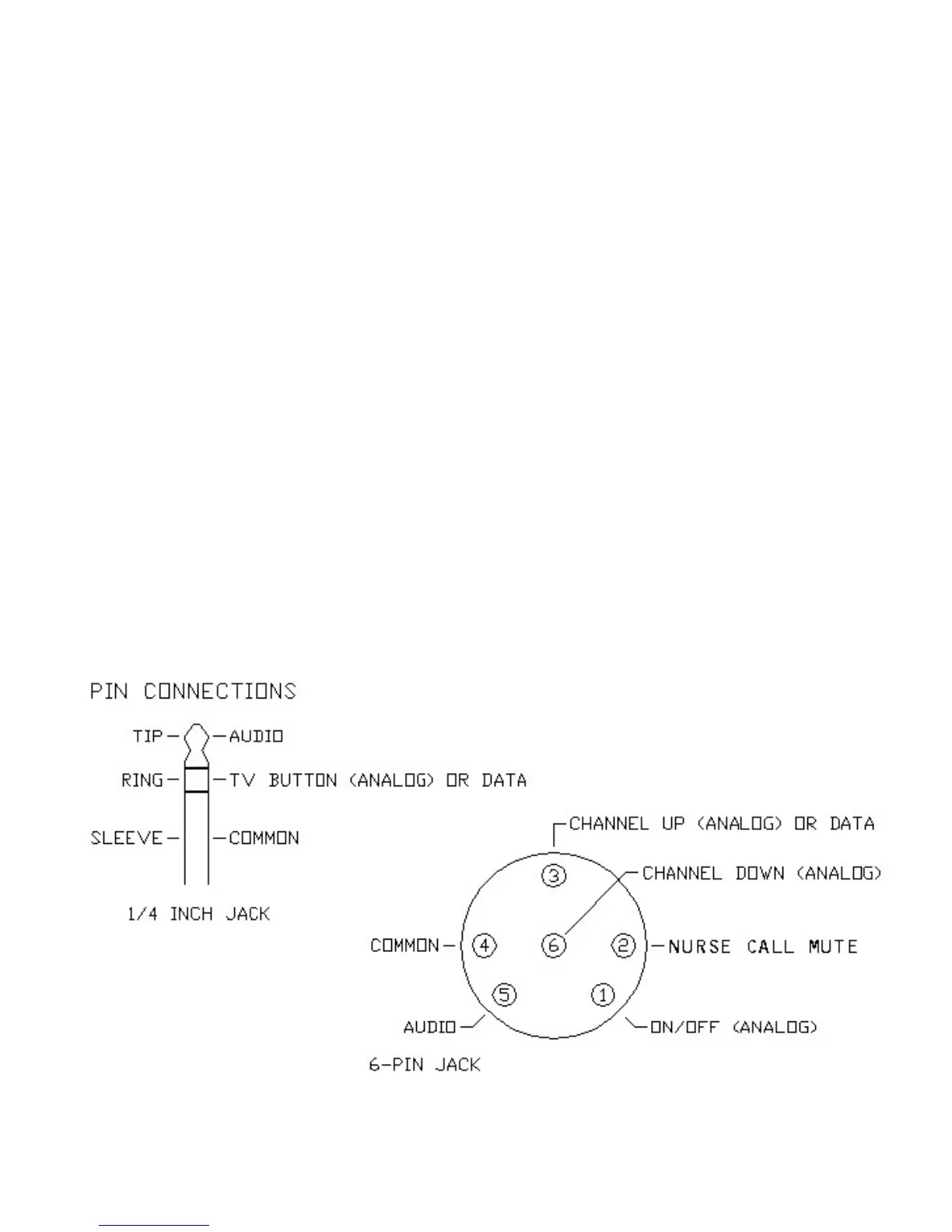
Pin Out
VIEWED FROM REAR JACK PANEL



 To Next Page