-------------------------------------------------------------------------------------GEN III OPERATIONS MANUAL
HealthCare Information, LLC
32
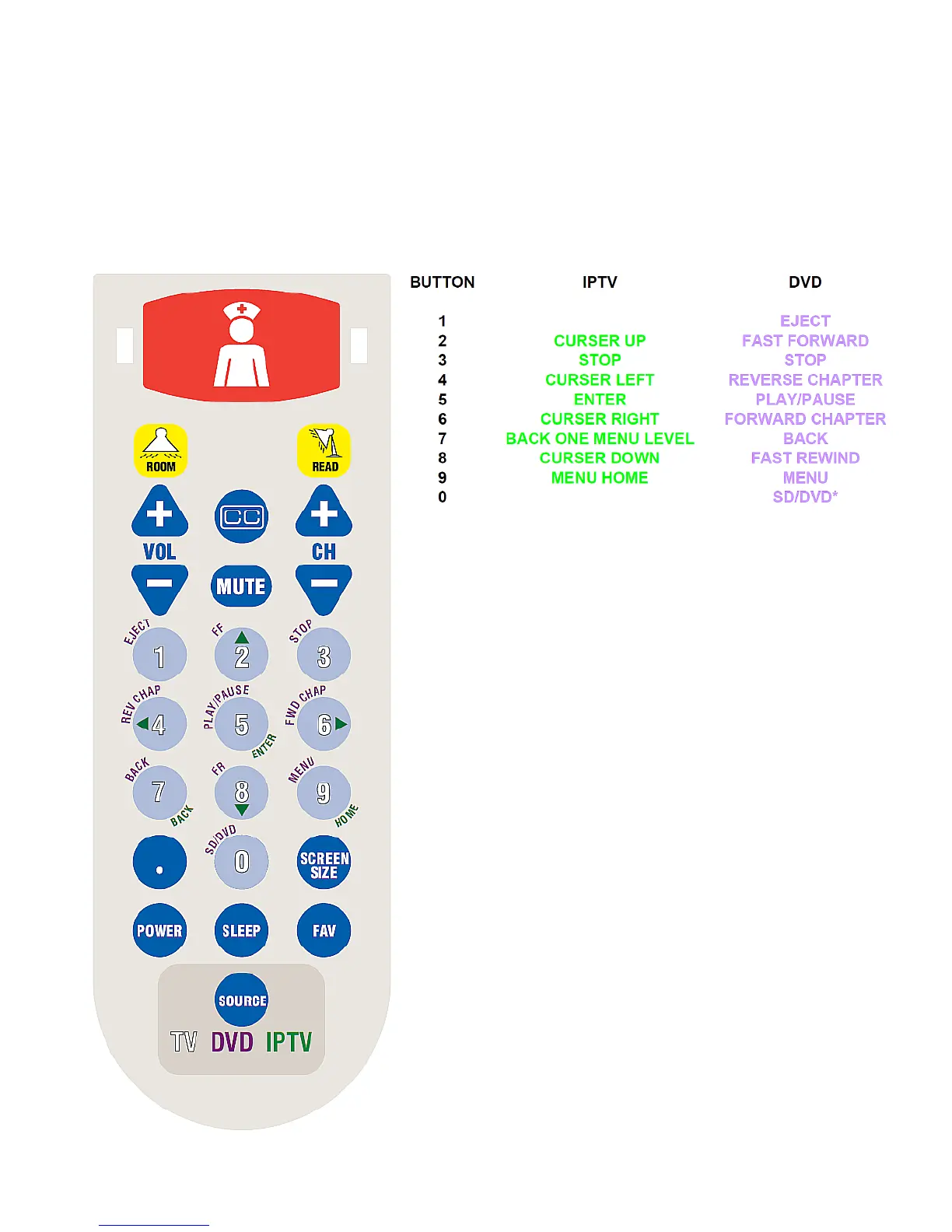
DVD/ANDROID CONTROL WITH PILLOW SPEAKER
If you have purchased an HCI DVD player to use with your RoomMate series TV you can use a digital pillow speaker to control
the DVD player and Android functions. The Pillow speaker must have 0-9 number buttons. Any digital pillow speaker with
number buttons may be used. Custom overlays are available for Curbell Electronics Gen 3 and Gen 4 pillow speakers and
Anacom-MedTek for use with both Android and an HCI DVD player.
When the TV input source is set for IPTV (Android), the pillow speaker buttons are interpreted as Android commands and when
the input source is set for HDMI, Component or A/V the pillow speaker buttons are interpreted as DVD commands.
*SD/DVD switches the DVD player between the front
panel USB port, SD card reader and DVD player.
NOTE: Some functions such as FAVORITES, SLEEP,
SCREEN SIZE, “.” Button and SCREEN SIZE may not
be available with all pillow speaker brands and models.



 To Next Page