Disclaimer: 3
rd
party and/or custom firmware providing extra features are not covered in this manual.
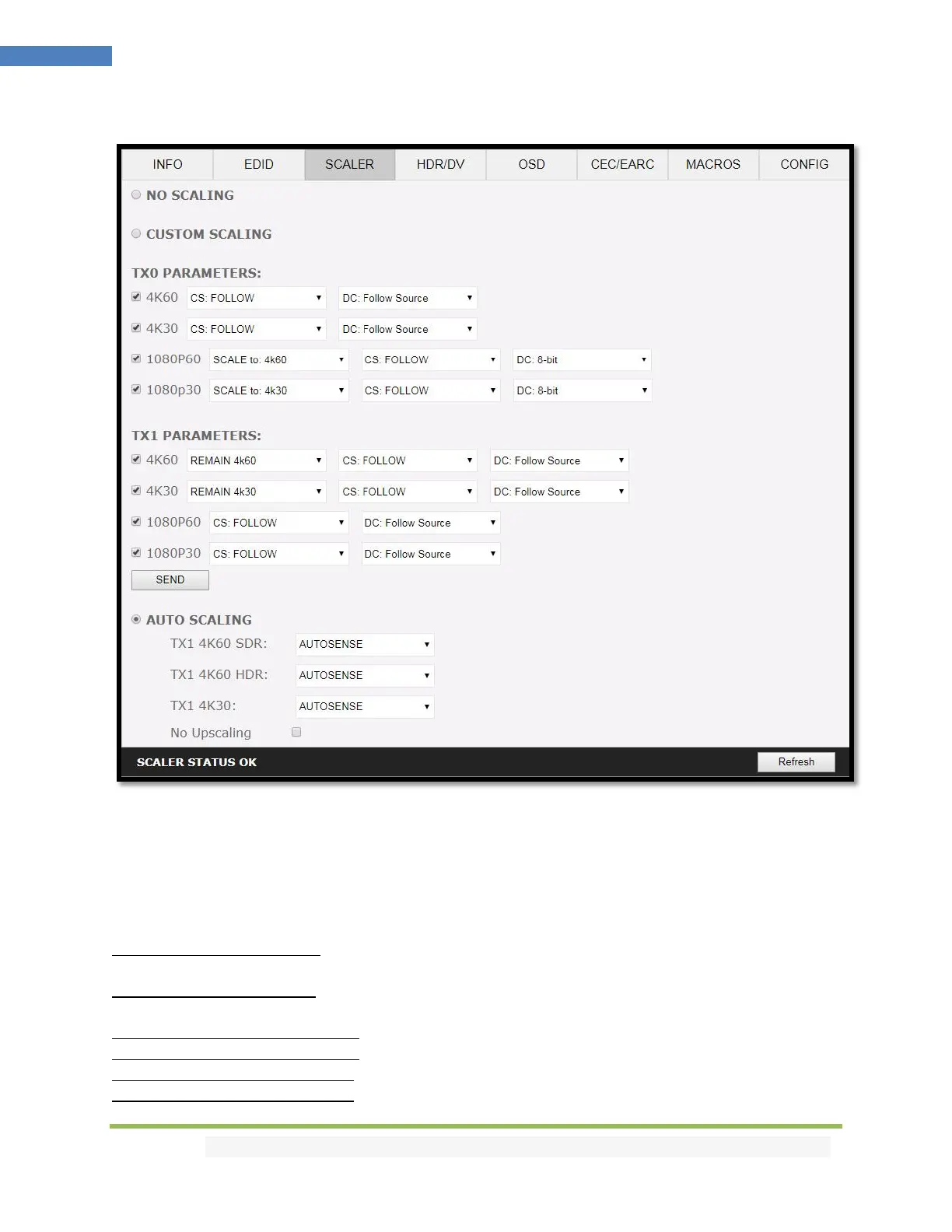
Vertex² Web Server SCALER Section
[No Scaling]: Set your unit to No Scaling for the signal to pass-through untouched
[Custom Scaling]: Set your Vertex² unit to Custom Scaling to manually define the scaling parameters.
You can select between various type of resolutions, color space and deep color settings for TX0 Upscale
output port and TX1 Downscale port.
Available Color Space options: Follow Input (default), RGB FULL, RGB BT2020, 4:4:4 BT.709, 4:4:4
BT2020, 4:2:2 BT.709, 4:2:2 BT2020, 4:2:0 BT.709, 4:2:0 BT2020.
Available Deep Color options: Follow Input (default), 8-bit/24-bit, 10-bit/30-bit, 12-bit/36-bit, 16-bit/48-
bit
Available 1080P60 Upscale options: SCALE to 4K60, REMAIN 1080P60
Available 1080P30 Upscale options: SCALE to 4K30, REMAIN 1080P30
Available 4K60 Downscale options: REMAIN 4K60, SCALE to 1080P60
Available 4K30 Downscale options: SCALE to 4K30, SCALE to 1080P30



 To Next Page