3
204027-01
SPECIFICATIONS
Range............Up to 70 ft. (21 m); 100 ft.
(30.5m)withRangeBoost.[varies
withsurroundingtemperature]
SensingAngle......Upto240°
ElectricalLoad......Upto500WattsMaximumIncan-
descent
PowerRequirements. 120VAC,60Hz
OperatingModes....TEST, AUTO and MANUAL
MODE
TimeDelay ........1,5,20minutes
DualBrite
®
Timer....Off,3,6hours,Dusk-to-Dawn
HeathCoLLCreservestherighttodiscontinueproducts
andtochangespecicationsatanytimewithoutincurring
anyobligationtoincorporatenewfeaturesinproducts
previouslysold.
Motion
Motion
TEST AND ADJUSTMENT
1. Turn on the circuit breaker and light switch.
NOTE: Sensorhasa1
1
/
2
minutewarmupperiodbefore
itwilldetectmotion.Whenrstturnedonorwhen
switchingmodeswait1
1
/
2
minutes.
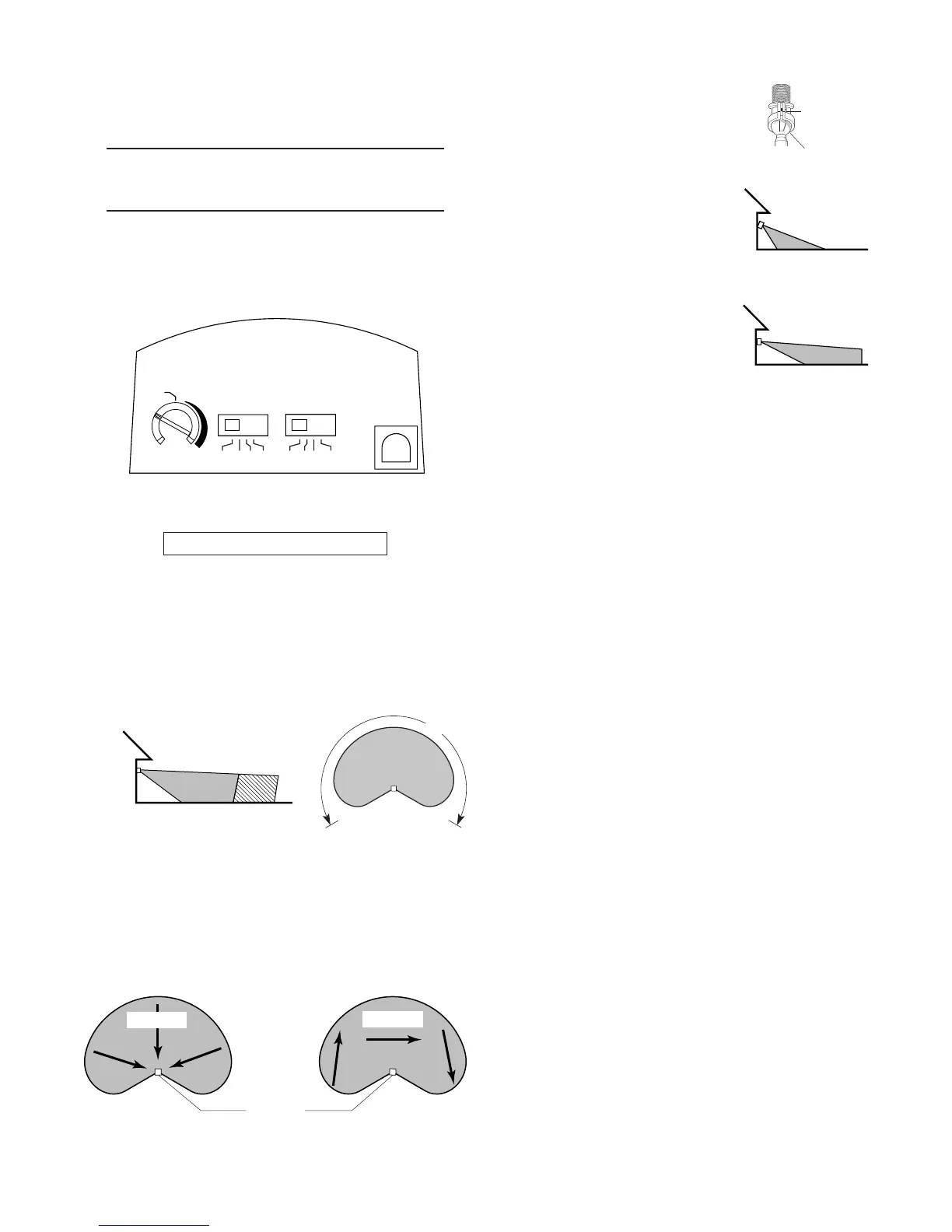
Bottom of Sensor
Avoid aiming the sensor at:
•Objectsthatchangetemperaturerapidly,suchasheat-
ing vents and air conditioners.Theseheatsources
couldcausefalsetriggering.
•Areaswherepets or trafficmaytriggerthecontrol.
•Nearby large, light-colored objectsreectinglightmay
triggertheshut-offfeature.Donotpointotherlightsat
thesensor.
8ft.
(2.4m)
70ft. 100ft.
(21m) (30.5m)
Boosted
Least Sensitive Most Sensitive
Sensor
Thedetectorislesssensitivetomotiondirectlytowardsit.
240°
B
O
O
S
T
MAX
MIN
RANGE
ON - TIME DUAL BRITE
TEST 1 5 20
MINUTES
OFF 3 6 DUSK TO
HOUR DAWN
2. Turn the RANGE control to the medium position
(halfwaybetweenMINandMAX),DualBrite
®
toOFF,
andtheON-TIMEcontroltotheTESTposition.
3. Loosentheclampscrewinthe
sensorballjointandgentlyrotate
thesensor.
4. Walkthroughthecoveragearea
notingwhereyouarewhenthe
lightsturnon.Movethesensor
headup,down,orsidewaysto
changethecoveragearea.Keep
the sensor at least 1" (2.5 cm)
away from the lamps.
5. AdjusttheRANGEasneeded.
RANGE set too high may
increasefalsetriggering.
6. Secure the sensor head’s aim
by tightening the clamp screw.
Donotovertightenthescrew.
7. SettheamountofTIMEyouwant
thelightstostayonaftermotionis
detected(1,5,or20minutes).
8. SettheDualBrite
®
switchtotheamountoftimeafter
duskyouwantthelightsonatlowlevel(Off,3,6Hrs.,
Dusk-to-Dawn).
Clamp
Screw
Ball
Joint
Aim Sensor
Down for Short
Coverage
Aim Sensor
Higher for Long
Coverage
Maximum Range Maximum
Coverage Angle




 To Next Page