EasyManua.ls Logo

Heathkit TA-16 - Page 15

Heathkit TA-16
50 pages
Print Icon
To Next Page IconTo Next Page
To Previous Page IconTo Previous Page
Loading...
Page
13
Mount
a
50
Ks2
control
(#10-11)
at
AE.
Use
a
control
lockwasher
and
a
control
nut.
Mount
a
50
K,S2
control
(#10-11)
at
AF.
Use
a
control
lockwasher,
and
a
control
nut.
i
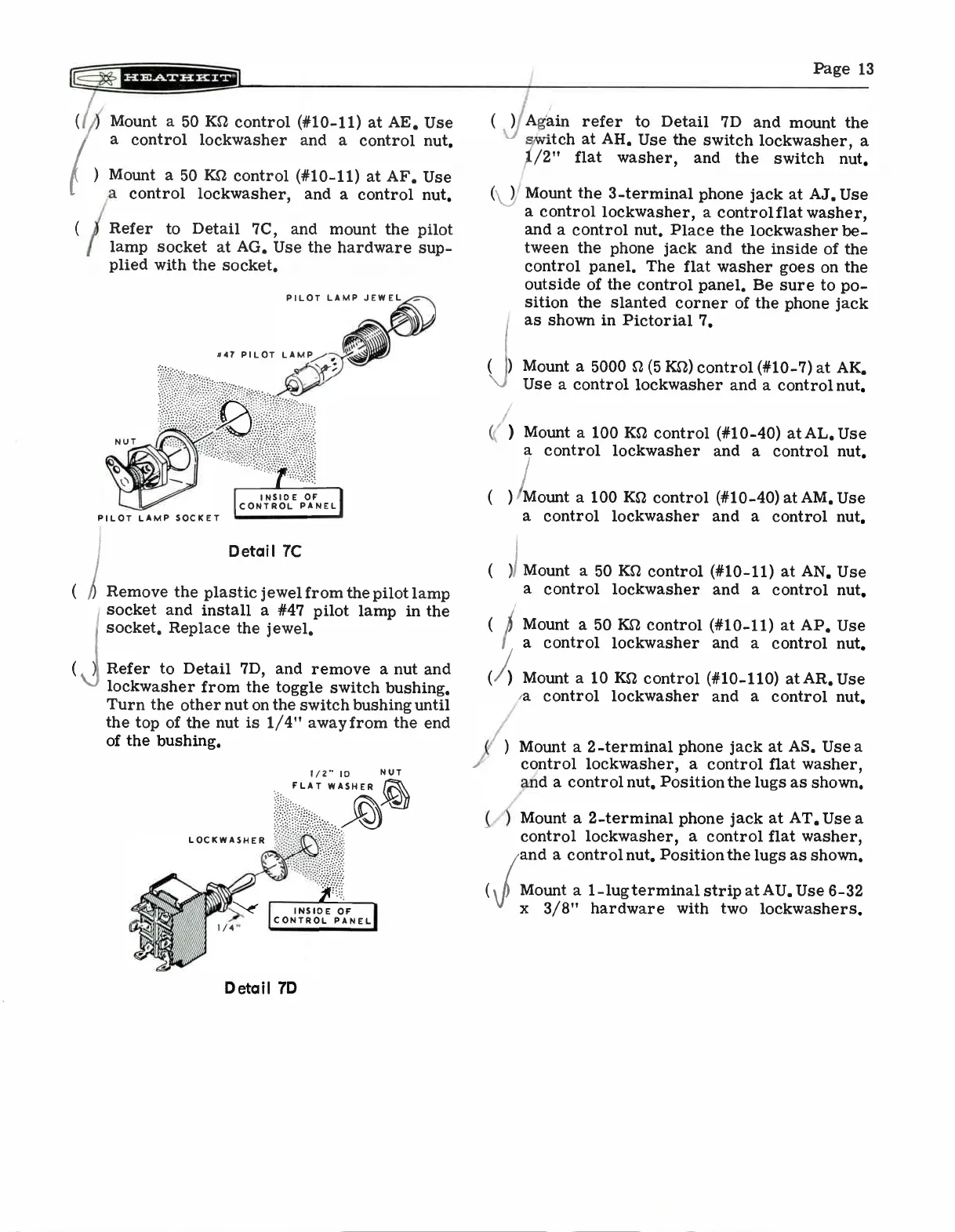
Refer
to
Detail
7C,
and
mount
the
pilot
lamp
socket
at
AG.
Use
the
hardware
sup-
plied
with
the
socket.
PILOT
LAMP
JEWEL
#47
PILOT
LAMP
NUT
PILOT
LAMP
SOCKET
Detail
7C
(
Remove
the
plastic
jewel
from
the
pilot
lamp
socket
and
install
a
#47
pilot
lamp
in
the
i
socket.
Replace
the
jewel.
)t
Refer
to
Detail
7D,
and
remove
a
nut
and
lockwasher
from
the
toggle
switch
bushing.
Turn
the
other
nut
on
the
switch
bushing
until
the
top
of
the nut
is
1/4"
away
from
the
end
of
the
bushing.
LOCKWASHER
1/4"
1/2"
ID
NUT
FLAT
WASHER
Detail
7D
INSIDE
OF
CONTROL
PANEL
I
( )
Again
refer
to
Detail
7D
and
mount
the
switch
at
AH.
Use
the
switch
lockwasher,
a
1/2"
flat
washer,
and
the
switch
nut.
( )
(
NJ
)
Mount
the
3-terminal
phone
jack
at
AJ.
Use
a
control
lockwasher,
a
controlflat
washer,
and
a
control
nut.
Place
the
lockwasher
be-
tween
the
phone
jack
and
the
inside
of
the
control
panel.
The
flat
washer
goes on
the
outside
of
the
control
panel.
Be
sure
to
po-
sition
the
slanted
corner
of
the
phone
jack
as
shown
in
Pictorial
7.
Mount
a
5000
n
(5
KS2)
control
(#10-7)
at
AK.
Use
a
control
lockwasher
and
a
control
nut.
( )
Mount
a
100
Kn
control
(#10-40)
at
AL.
Use
a
control
lockwasher
and
a
control
nut.
( )
/Mount
a
100
KS2
control
(#10-40)
at
AM.
Use
a
control
lockwasher
and
a
control
nut.
( )
( )
( )
Mount
a
50
KS2
control
(#10-11)
at
AN.
Use
a
control
lockwasher
and
a
control
nut.
Mount
a
50
Ks2
control
(#10-11)
at
AP.
Use
a
control
lockwasher
and
a
control
nut.
Mount
a
10
Ks2
control (#10-110)
at
AR.
Use
a
control
lockwasher
and
a
control
nut.
Mount
a
2-terminal
phone
jack
at
AS.
Use
a
control
lockwasher,
a
control
flat
washer,
and
a
control
nut.
Position
the
lugs
as
shown.
Mount
a
2-terminal
phone
jack
at
AT.
Use
a
control
lockwasher,
a
control
flat
washer,
and
a
control
nut.
Position
the
lugs
as
shown.
Mount
a
1-lug
terminal
strip
at
AU.
Use
6-32
x
3/8"
hardware
with
two
lockwashers.

Related product manuals