EasyManua.ls Logo

Heathkit TA-16 - Control Panel Parts Mounting

Heathkit TA-16
50 pages
Print Icon
To Next Page IconTo Next Page
To Previous Page IconTo Previous Page
Loading...
Page
12
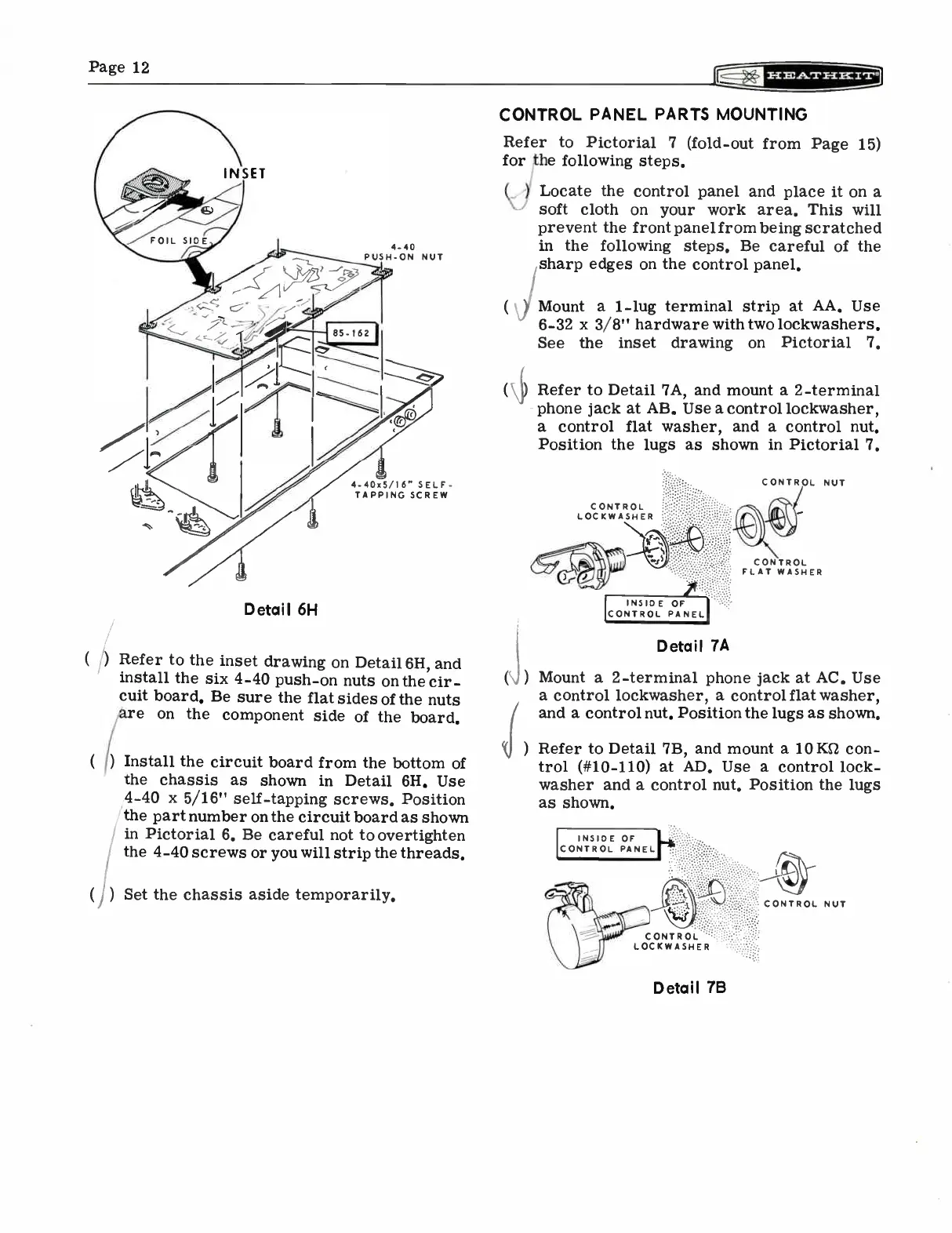
INSET
Detail
6H
4-40
PUSH-ON
NUT
4-40x5/16"
SELF-
TAPPING
SCREW
)
Refer
to
the inset
drawing
on
Detail
6H,
and
install
the six
4-40
push-on
nuts
on
the
cir-
cuit
board.
Be
sure
the
flat
sides
of
the
nuts
are on
the
component
side
of
the
board.
)
Install
the
circuit
board
from
the
bottom
of
the
chassis
as
shown
in
Detail
6H.
Use
4-40
x
5/16"
self-tapping
screws.
Position
the
part
number
on
the
circuit
board
as
shown
in
Pictorial
6.
Be
careful
not
to
overtighten
the
4-40
screws
or
you
will
strip
the
threads.
)
Set
the
chassis
aside
temporarily.
CONTROL
PANEL
PARTS
MOUNTING
Refer
to
Pictorial
7
(fold-out
from
Page
15)
for
the
following
steps.
( )
Locate
the
control
panel
and
place
it
on
a
soft
cloth
on
your
work
area.
This
will
prevent
the
front
panel
from
being
scratched
in
the
following
steps.
Be
careful
of
the
sharp edges
on
the
control
panel.
Mount
a
1-lug
terminal
strip
at
AA.
Use
6-32
x
3/8"
hardware
with
two
lockwashers.
See
the
inset
drawing
on
Pictorial
7.
(\
S)
Refer
to
Detail
7A,
and
mount
a
2-terminal
phone
jack
at
AB.
Use
a
control
lockwasher,
a
control
flat
washer,
and
a
control
nut.
Position
the
lugs
as
shown
in
Pictorial
7.
(J)
CONTROL
NUT
CONTROL
LOCKWASHER
CONTROL
FLAT
WASHER
INSIDE
OF
CONTROL
PANEL
Detail
7A
Mount
a
2-terminal
phone
jack
at
AC.
Use
a
control
lockwasher,
a
control
flat
washer,
and
a
control
nut.
Position
the
lugs
as
shown.
Refer
to
Detail
7B,
and
mount
a
101(52
con-
trol
(#10-110)
at
AD.
Use
a
control
lock-
washer
and
a
control
nut.
Position
the
lugs
as
shown.
INSIDE
OF
CONTROL
PANEL
Detail
7B
CONTROL
LOCKWASHER
CONTROL
NUT

Related product manuals