EasyManua.ls Logo

Heathkit TA-16 - Cabinet Parts Mounting

Heathkit TA-16
50 pages
Print Icon
To Next Page IconTo Next Page
To Previous Page IconTo Previous Page
Loading...
Page
24
Detail
12D
BOTTOM
PLATE
RUBBER
PAD
2-56x3/16"SELF-
TAPPING
SCREW
BOTTOM
PLATE
FOOT
SWITCH
HOUSING
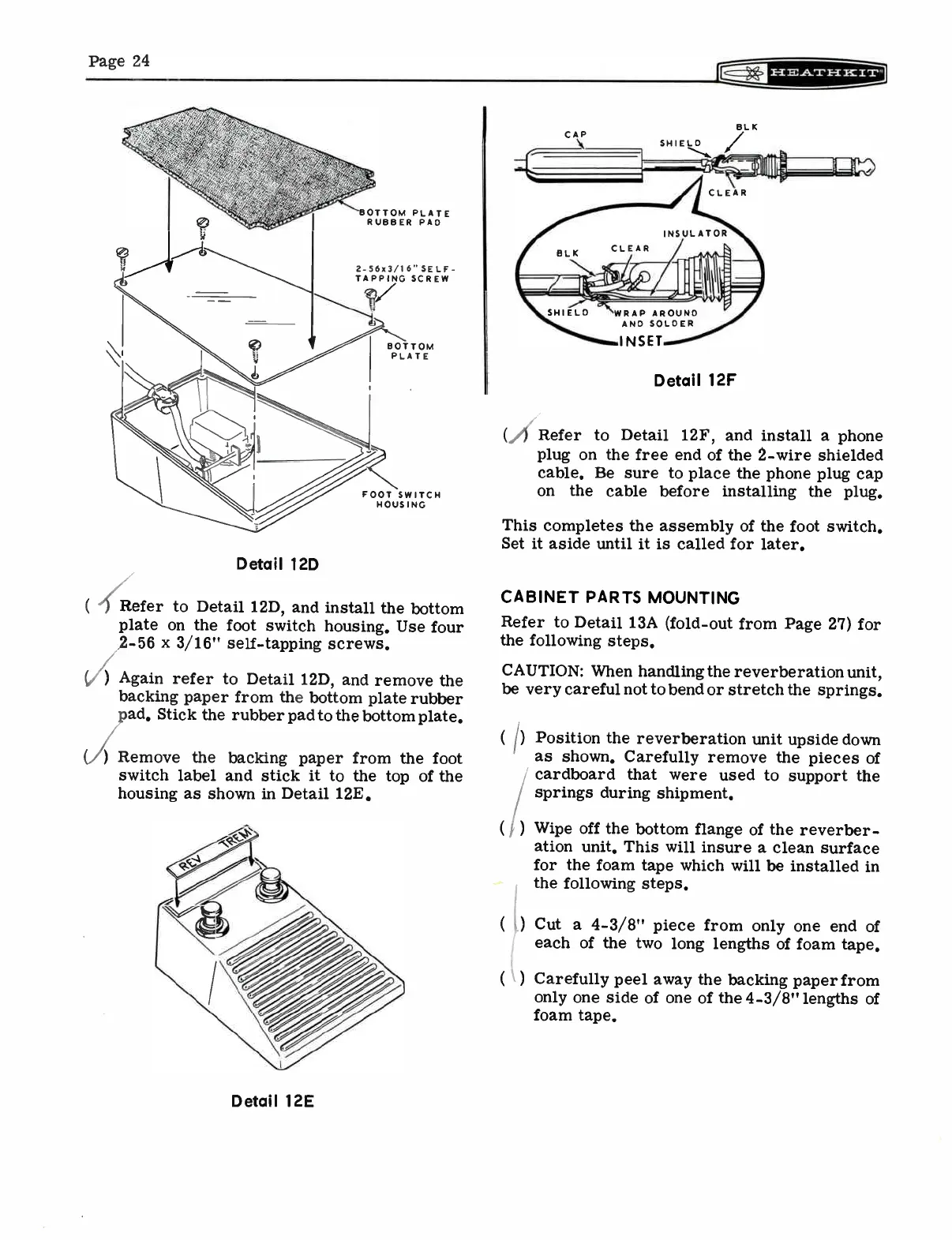
(
Refer
to
Detail
12D,
and
install
the
bottom
plate
on
the
foot
switch
housing.
Use
four
2-56
x
3/16"
self-tapping
screws.
)
Again
refer
to
Detail
12D,
and
remove
the
backing
paper
from
the
bottom
plate
rubber
pad.
Stick
the
rubber
pad
to
the
bottom
plate.
(i)
Remove
the
backing
paper
from
the
foot
switch
label
and
stick
it
to
the top
of
the
housing
as
shown
in
Detail
12E.
Detail
12E
WRAP
AROUND
AND
SOLDER
INSET
Detail
12F
(,/)
Refer
to
Detail
12F,
and
install
a
phone
plug
on
the
free
end
of
the
2-wire
shielded
cable.
Be
sure
to
place
the
phone
plug
cap
on
the
cable
before
installing
the plug.
This
completes
the
assembly
of
the
foot
switch.
Set
it
aside
until
it
is
called
for
later.
CABINET
PARTS
MOUNTING
Refer
to
Detail
13A
(fold-out
from
Page
27)
for
the
following
steps.
CAUTION:
When
handling
the
reverberation
unit,
be
very
careful
not
to
bend
or
stretch
the
springs.
( p
Position
the
reverberation
unit
upside
down
as
shown.
Carefully
remove
the
pieces
of
cardboard
that
were
used
to
support
the
springs
during
shipment.
( , )
Wipe
off
the
bottom
flange
of
the
reverber-
ation
unit.
This
will
insure
a
clean
surface
for the
foam
tape
which
will
be
installed
in
the
following
steps.
Cut
a
4-3/8"
piece
from
only
one end
of
each
of
the
two
long
lengths
of
foam
tape.
Carefully
peel
away
the
backing
paper
from
only
one
side
of
one
of
the
4-3/8"
lengths
of
foam
tape.

Related product manuals