Temperature Control
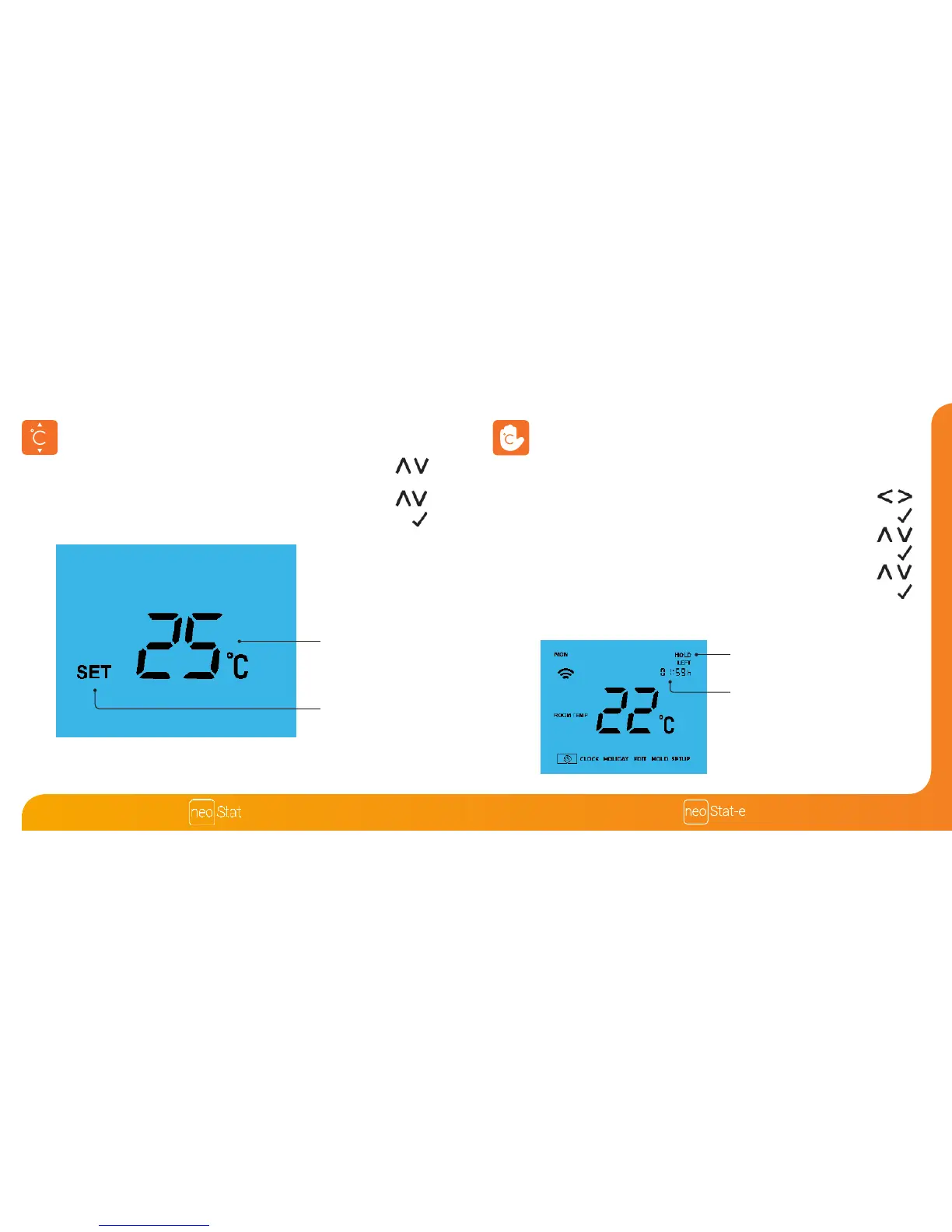
The Up / Down keys allow you to adjust the set temperature .............................
When you press either key, you will see the word SET and the desired
temperature value. Use the Up / Down keys to adjust the SET value ...............
Press Tick to conrm settings and return to the main display ....................................
Temperature Hold
The temperature hold function allows you to manually override the current operating
program and set a dierent temperature for a desired period.
• Use the Left / Right keys to scroll to HOLD ...........................................................
• Press Tick to conrm selection ..........................................................................................
• Use the Up / Down keys to set the desired Hold period .................................
• Press Tick to conrm selection ..........................................................................................
• Use the Up / Down keys to set the desired Hold temperature ......................
• Press Tick to conrm selection ..........................................................................................
You will see the HOLD LEFT indication is displayed on screen.
The time will countdown the set duration and then revert to the normal program.
To cancel a temperature Hold, repeat these steps but reduce the Hold time to 00:00 hrs
HOLD LEFT Indicator
Hold Time Remaining
Set Temperature
Set Icon
Note: This new temperature is maintained only until the next programmed comfort level.
At this time, the thermostat will revert back to the programmed levels.













 To Next Page