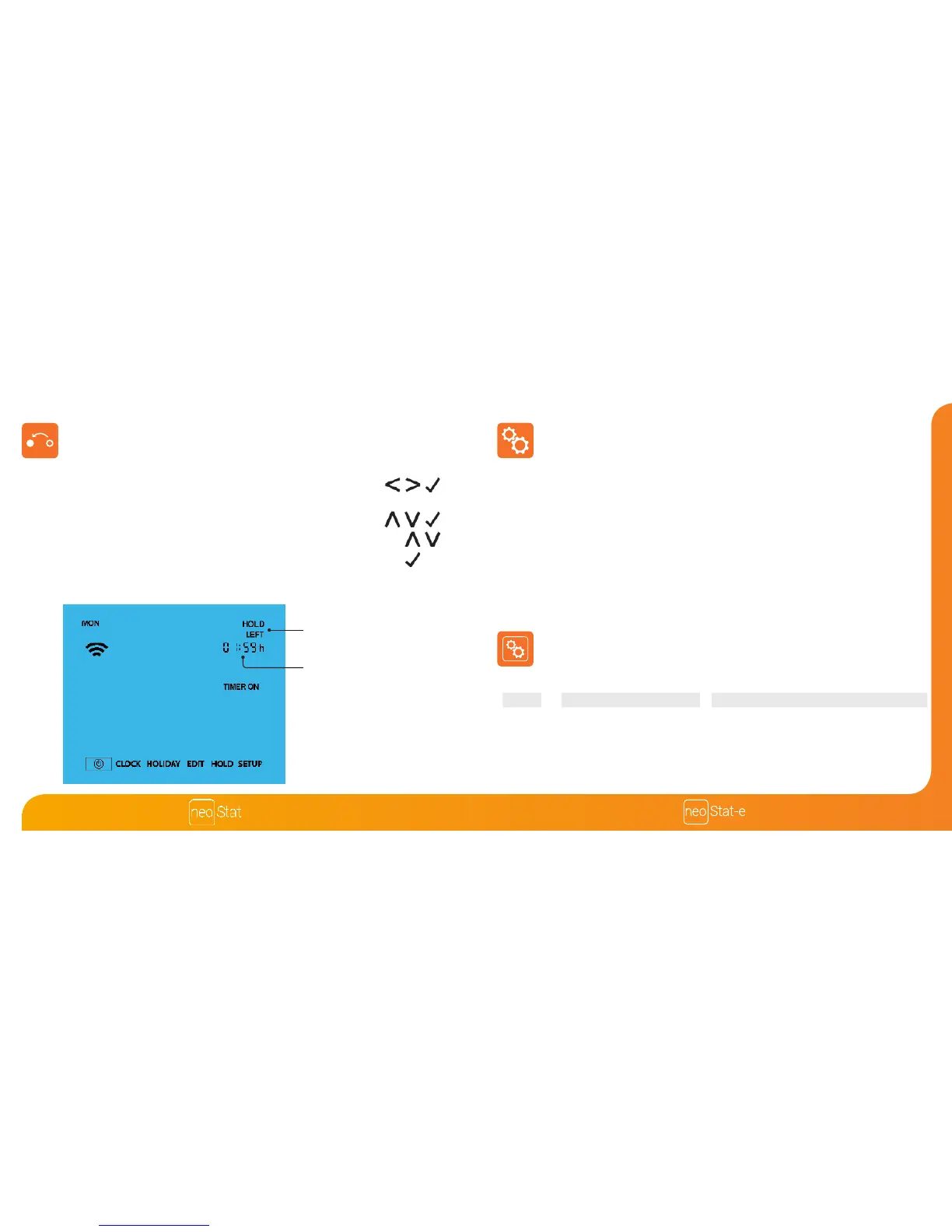
To override the current timed output ON/OFF follow these steps.
• Use the Left / Right keys to scroll to HOLD and press Tick .......................
• Use the Up / Down keys to select either TIMER ON or TIMER OFF
and press Tick ...........................................................................................................
• Use the Up / Down keys to set the override duration e.g. 01:00 hours .......
• Press Tick to conrm settings and return to main display ...............................
Hold Left and the remaining time will now be displayed.
Timer Override
HOLD LEFT Indicator
Hold Time Remaining
Optional Settings - Feature Table
02
FEATURE
Program Mode
DESCRIPTION
01 = Weekday/Weekend Programming (Default)
02 = 7 Day Programming
03 = 24 Hour Mode
SETTING
Used to pair to the neoHub
01
Optional Features Explained
Feature 01 – Pairing To neoHub: This function is used to connect the time clock to
the neoHub.
Feature 02 - Weekday/Weekend (5/2), 7 Day Programming or 24 Hour Mode:
The time clock oers three programming methods;
Weekday/ Weekend (5/2) - Allows you to program 4 comfort levels for the
weekdays and 4 dierent comfort levels for the weekend days.
7 Day Program Mode - Each day has 4 comfort levels that can be
programmed independently.
24 Hour Mode - All days are programmed with the same times.
Pairing













 To Next Page