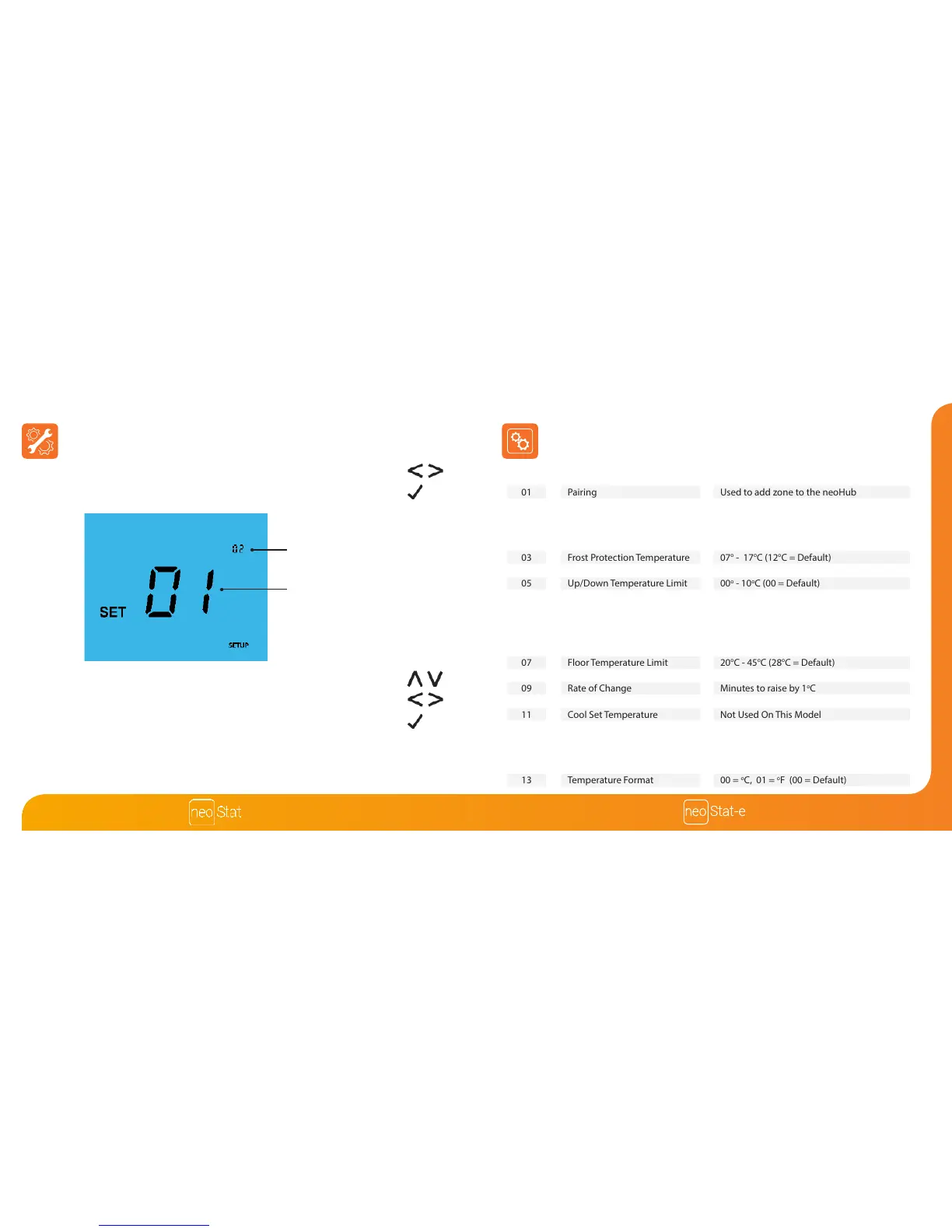
Adjusting the Optional Settings Optional Settings - Feature Table
• Use the Left / Right keys to select SETUP ..............................................................
• Press Tick to conrm selection ..................................................................................
• Use the Up / Down keys to scroll through features ..........................................
• Use the Left / Right keys to adjust the setting within each feature ...........
• Press Tick to conrm settings ....................................................................................
01
02
03
04
05
06
07
08
09
10
11
12
13
FEATURE
Pairing
Switching Dierential
Frost Protection Temperature
Output Delay
Up/Down Temperature Limit
Sensor Selection
Floor Temperature Limit
Optimum Start
Rate of Change
Cool Enable
Cool Set Temperature
Program Mode
Temperature Format
DESCRIPTION
Used to add zone to the neoHub
00 = 0.5
o
C
01 = 1.0
o
C (Default)
02 = 2.0
o
C
03 = 3.0
o
C
07
o
- 17
o
C (12
o
C = Default)
00 - 15 Minutes (00 = Default)
00
o
- 10
o
C (00 = Default)
00 = Built in Sensor (Default)
01 = Remote Air Sensor
02 = Floor Sensor Only
03 = Built in & Floor Sensor
04 = Remote Air & Floor Sensor
20
o
C - 45
o
C (28
o
C = Default)
00-05 (00 = Default)
Minutes to raise by 1
o
C
Not Used On This Model
Not Used On This Model
00 = Non - Programmable
01 = Weekday/Weekend (Default)
02 = 7 Day Programming
03 = 24 Hour Mode
00 =
o
C, 01 =
o
F (00 = Default)
SETTING
Feature Number
Setting Value













 To Next Page