• Use the Up / Down keys to set the hours ..............................................................
• Press Tick to conrm ..............................................................................................................
• Use the Up / Down keys to set the minutes .........................................................
• Press Tick to conrm ..............................................................................................................
• Use the Up / Down keys to set the temperature .................................................
• Press Tick to conrm the settings .....................................................................................
• Press the Right arrow key .....................................................................................................
• LEAVE will now ash and the current settings will be displayed.
• Press Tick to alter LEAVE settings ......................................................................................
• Repeat these steps to set all comfort levels.
• For any unused periods set time to --:--
• Use the Left / Right keys to scroll to DONE and press Tick .......................
Comfort Levels Explained
The neoStat-e oers three program mode options; Weekday/Weekend programming,
7 Day programming and 24 Hour programming. There is also the option to
use the thermostat as a Non-Programmable thermostat.
When thermostats are connected to the mesh network, the program mode for the system
is congured by using the neoApp.
The thermostat is supplied with comfort levels already programmed, but these can be
changed easily. The default times and temperature settings are;
07:00 - 21°C (Wake) 09:00 - 16°C (Leave) 16:00 - 21°C (Return) 22:00 - 16°C (Sleep)
If you only want to use 2 levels, you should program the unused levels to --:--
For Weekday/Weekend programming, the four comfort levels are the same for Mon-Fri, but can
be dierent for Sat-Sun. For 7 Day programming each day of the week can have four dierent
comfort levels. In 24 Hour mode all days are programmed with the same comfort levels.
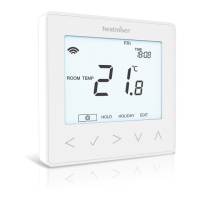
• To program the comfort levels, use the Left / Right keys to scroll to EDIT .............
• Press Tick to conrm selection .......................................................................................................
• Use the Left / Right keys to select day / period of week (the selection will ash).
• Press Tick to conrm selection ........................................................................................................
• WAKE will now ash and the current time and temperature setting will be shown.
• Press Tick to alter WAKE settings ..................................................................................................



 To Next Page