Helmer Scientic i.Series
®
and Horizon Series
™
Pass-Thru Refrigerator Operation Manual
360378/C 11
3.2 Operation
Notes
• Refer to the i.C
3
User Guide for complete information regarding the i.C
3
User Interface.
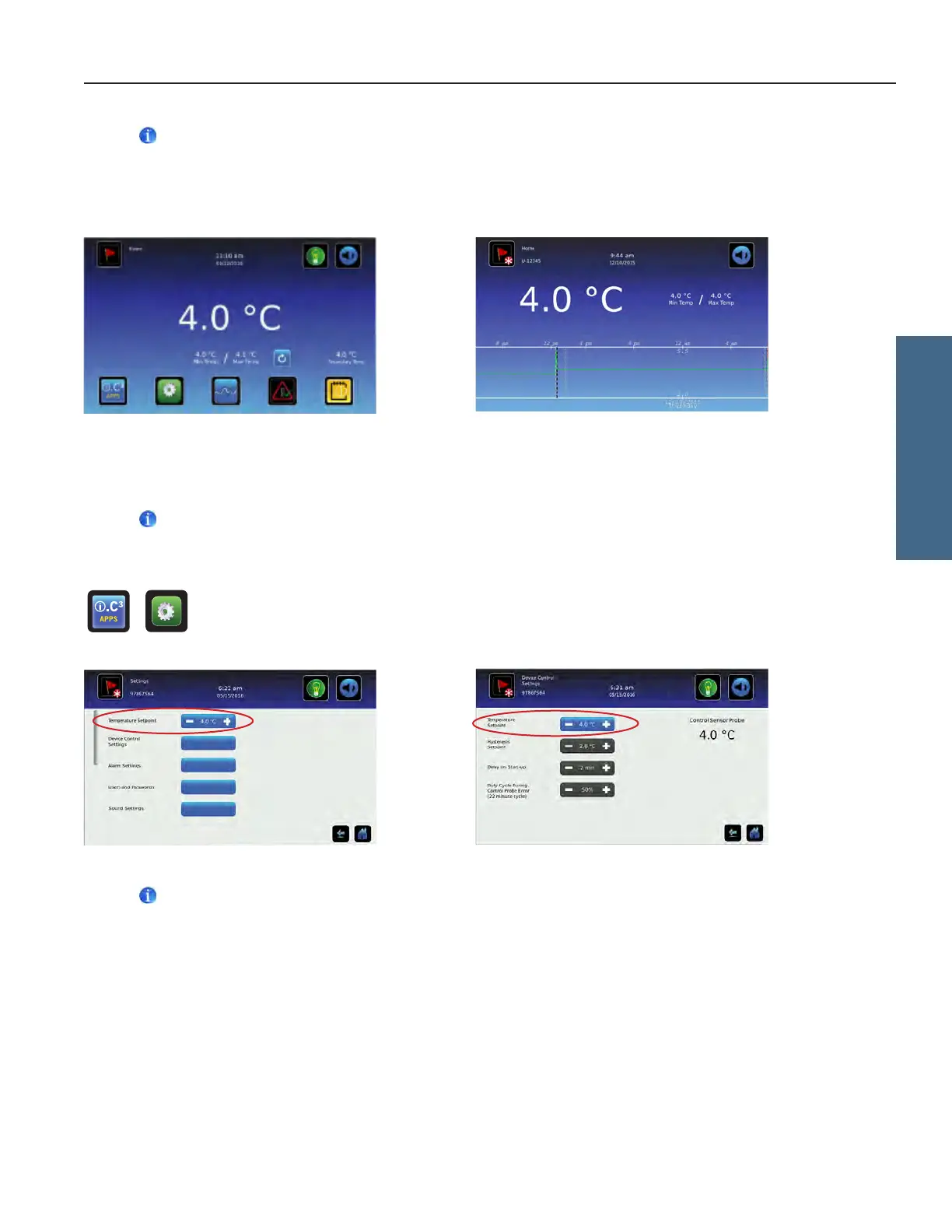
• The i.C³ Home screen displays temperature and alarm information, and provides icons to gain access to other functions
of the i.C³.
• After two minutes of inactivity, the screensaver will be displayed. To return to the Home screen, touch the screensaver.
Home screen. Home screensaver (touch to return to Home screen).
3.3 Change Temperature Setpoint
Note
The Temperature Setpoint toggle button can be accessed from either the initial Settings screen or the Device Control
Settings screen.
> > Enter the Settings password. Select Temperature Setpoints. Touch minus (-) or plus (+) on spin box to
change value.
Settings screen Device Control Settings screen
Notes
• Default Settings password is 1234.
• Default setpoint is 4.0 °C.
i.Series Operation








 To Next Page