Helmer Scientic i.Series
®
and Horizon Series
™
Pass-Thru Refrigerator Operation Manual
360378/C 17
6 Horizon Series™ Operation
6.1 Initial Power Up
1. Plugthepowercordintoagroundedoutletthatmeetstheelectricalrequirementsontheproductspecicationlabel.
2. Turn the AC power switch ON.
3. Install 9 V back-up battery located on top of unit.
4. Press Down Arrow (Mute) if high temperature alarm sounds.
Note
If an alarm condition other than High Temperature occurs, refer to the service manual for troubleshooting.
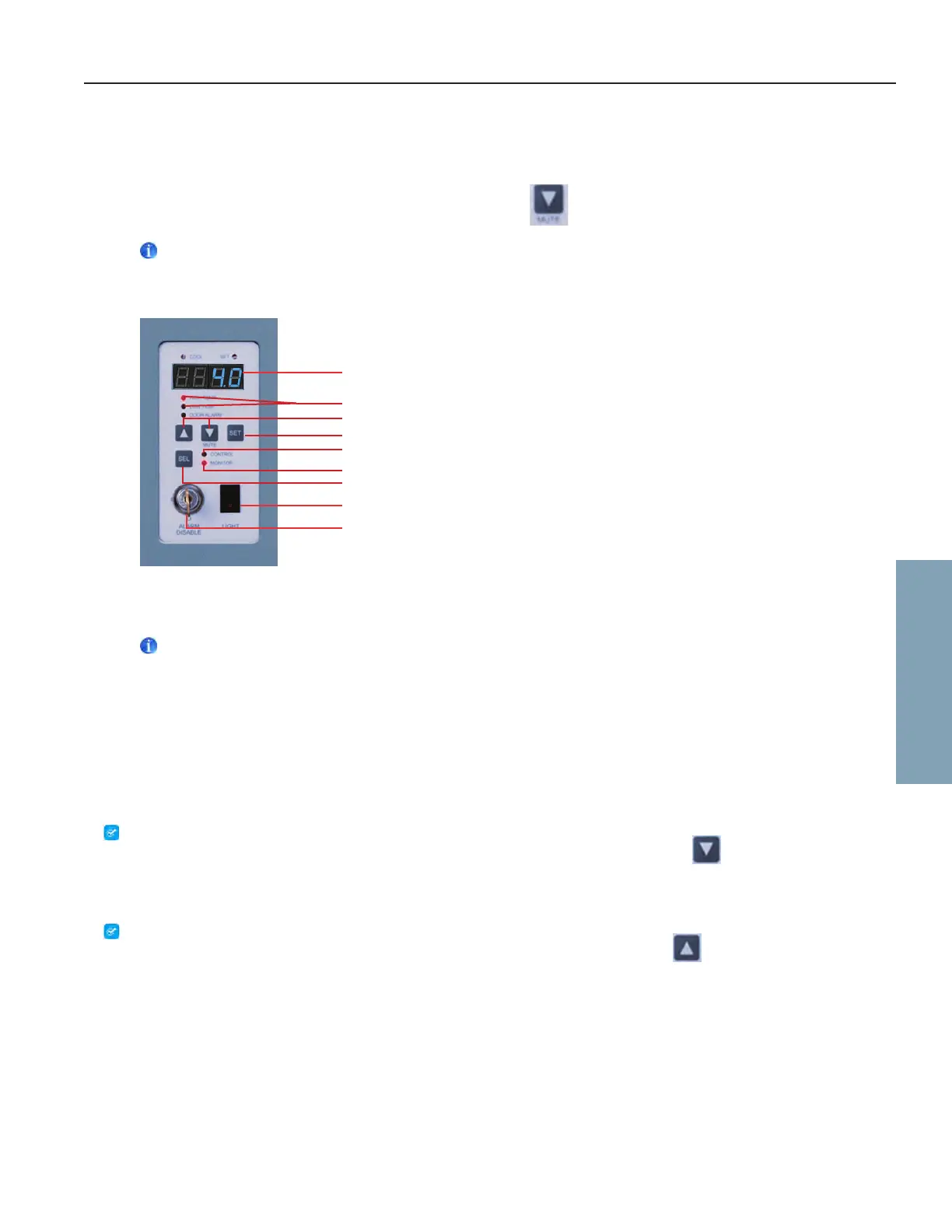
Monitor and Control Panel
6.2 Display Minimum and Maximum Monitor Temperature Recordings
Notes
• This feature is standard on Horizon Series™ models with serial numbers of 2015494 or higher. Some exceptions may
exist.Forconrmationonyourunit,pleasecontactHelmerTechnicalService.
• This feature only applies to the Monitor temperature probe.
• Units which do not include the minimum and maximum recording featurewillnotdisplay˚Cor˚Fwhenenteringthe
program mode.
The minimum and maximum recording feature allows the user to view a minimum temperature occurrence and a maximum
temperature occurrence within a given period of time. The timer provides a time reference in which those temperatures occurred.
View minimum temperature recording
1. Press and hold the Down Arrow button for one (1) second and listen for a single beep.
2. The display will alternate between LOandavalidtemperaturevalueve(5)timesfollowedbyasinglebeeptoindicate
exit back to the temperature display.
View maximum temperature recording
1. Press and hold the Up Arrow button for one (1) second and listen for a single beep.
2. The display will alternate between HIandavalidtemperaturevalueve(5)timesfollowedbyasinglebeeptoindicate
exit back to the temperature display.
LED Display
High & Low Temperature Lamps
Alarm Disable Switch
Light Switch
SEL Button
Monitor Lamp
Control Lamp
Up & Down Arrows
SET Button
Horizon Series Operation








 To Next Page