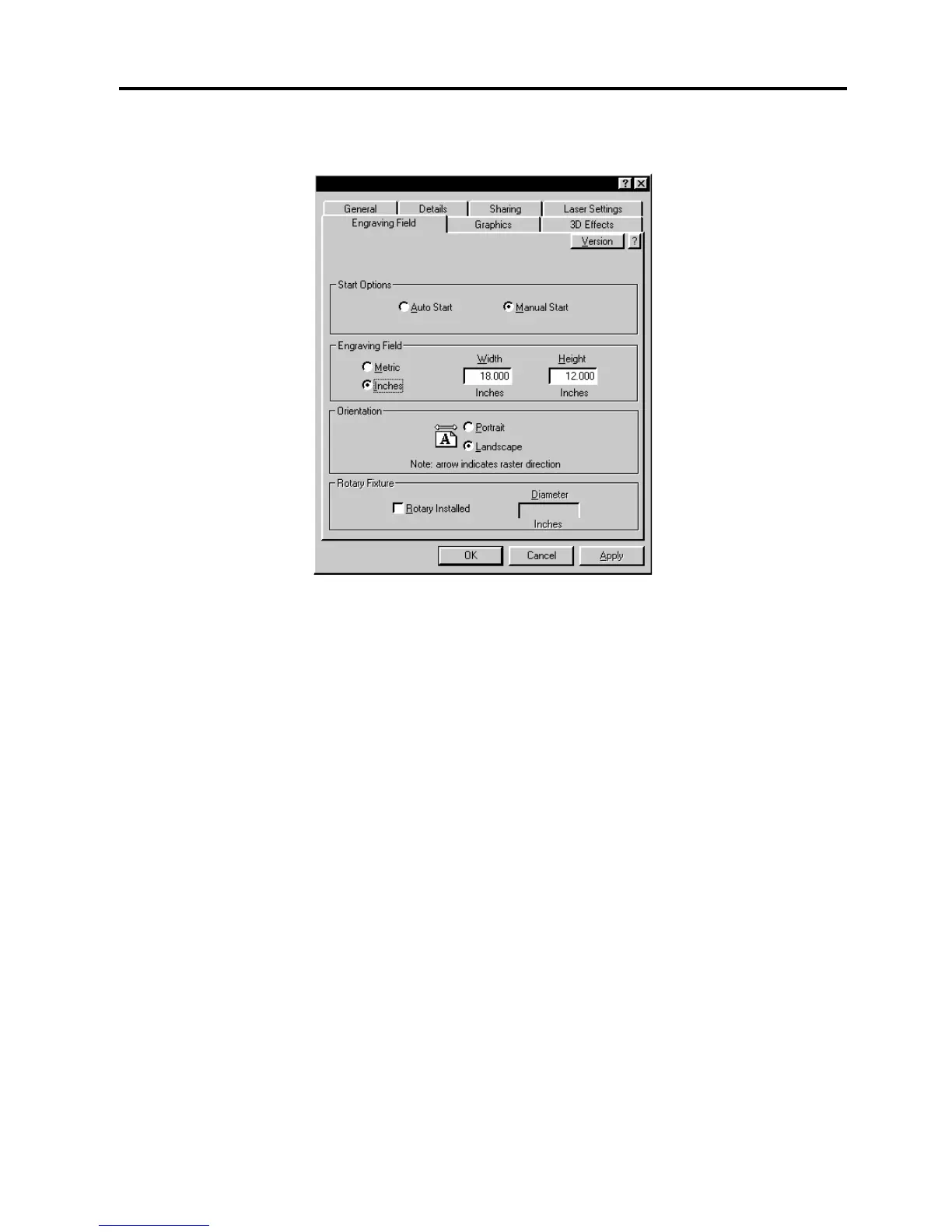
3-6 The Printer Driver
Engraving Field Tab
Start Options
If you would like the laser system to start engraving without having to push the “Start” button on
the control panel, select the “Auto Start” button. In order for this option to work, the laser
system must be set to the “One File Memory” mode. Refer to the “System Operation” section
on how to set up the laser system in this mode.
Before using this option, please ensure that your exhaust system is turned on, your
material is loaded into the machine and it is properly focused. The system will start
automatically as soon as the first bit of information enters the laser system from the computer
without the operator having to press the “Start” button on the control panel of the laser system.
Use extreme caution when using this function because there will be very little time to react and
get over to the laser system once you click on “OK” in the driver.
The “Manual Start” selection is the normal mode of operation of the laser system. The laser
system will not start until the entire file enters into the laser system and the operator pushes the
“Start” button on the control panel.
Engraving Field
Input here lets the driver know what page size and orientation is being used in the graphics
software. These settings MUST match the graphics software settings EXACTLY otherwise no
output, partial output, or misalignment of the graphic will occur. It is up to the operator to enter
in the correct settings. Not only must the page size be EXACT, but the orientation must be the
same also. Select the “Metric” box if metric units are desired.



 To Next Page