7-2 Accessories
Single Stamp Method
To create the artwork and engrave only one or a few stamps, set the page size in the graphics
program to something smaller than the full field. Just as an example, we will use a page size
that is 8.5 x 11 inches (215.9 x 292.1 mm) in the Landscape mode. In this way we can output to
a paper printer, before engraving, for proofreading. Make sure that this page size is set up the
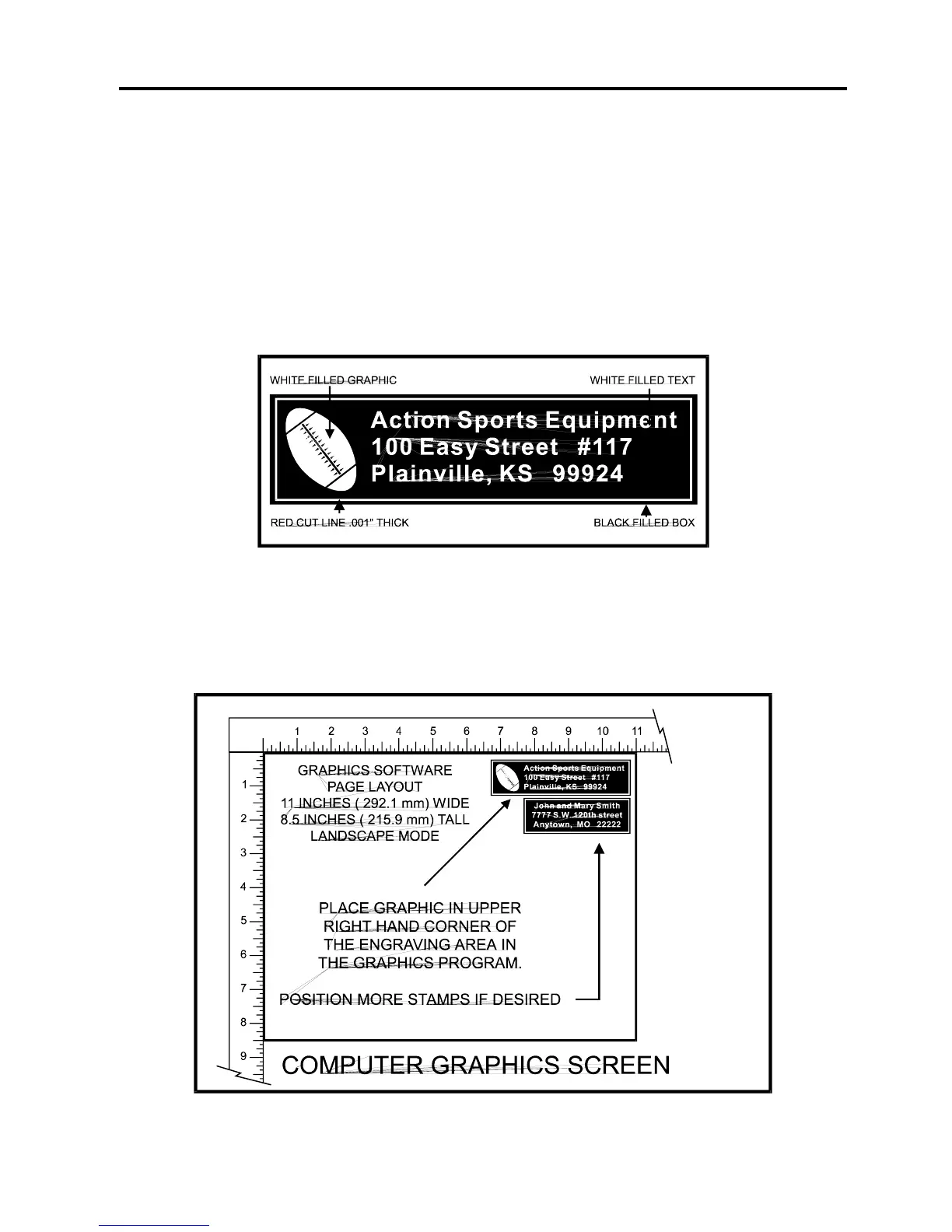
same in the printer driver. Create a negative style stamp by drawing a black box slightly larger
than the size of the stamp desired. Type in or add graphics within that area and color them with
a fill of white. It is not necessary to mirror the image. Then draw a red outline box (.001 inch or
.1 mm line thickness) for the cut. There is no need to mirror the image, we will let the driver do
that later. An example is shown below.
Place the stamp in the upper right hand corner(on screen) if you want it to engrave in the upper
left hand corner inside the laser system. This is necessary because when the driver mirrors the
image, it mirrors the entire page along its centerline. It cannot mirror an individual object, only
the entire page.



 To Next Page