22
•
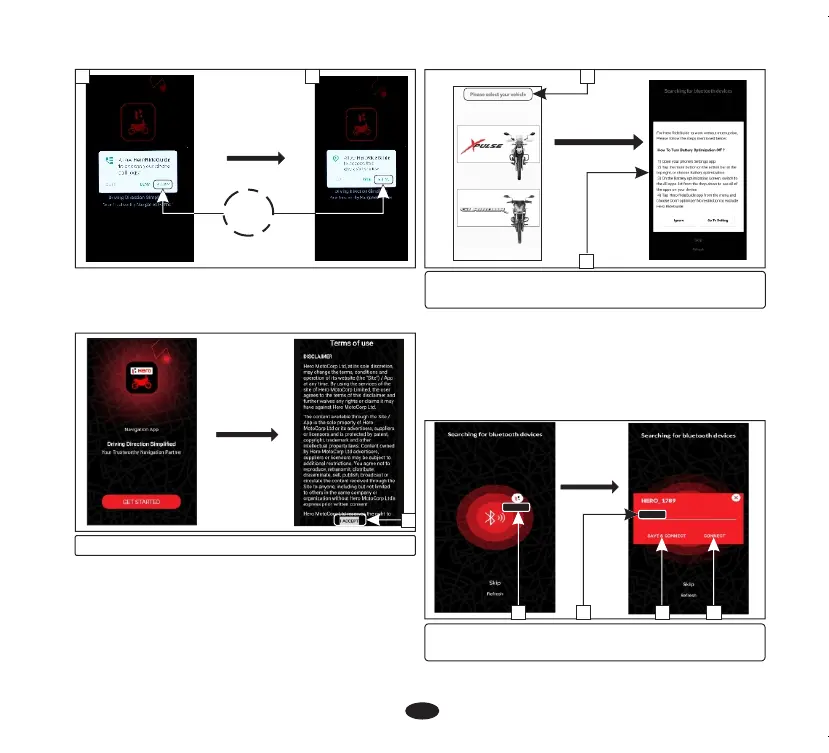
Then the application will automatically start.
•
Application also asks you to accept (2) the
terms of use to proceed.
(2) Accept terms of use
2
•
The application searches for a while and
displays all nearby devices. Select the device
with your name (5).
•
Update your name (6) (if required) and
select either save and connect (7) or
connect (8) to proceed.
(3) Select your vehicle
(4) Battery optimization
• Now select your vehicle (3).
• Now application asks the user to turn the
battery optimization off (4). It can be done
by following the steps which are
mentionedin the application or the user can
ignore this step.
•
Now application will send paring request
notification (9). Click on the notification.
c
d
ALLOW
4
(5) Select your device (6) Update your name
(7) Save and connect (8) Connect
5 6 7 8
3



 To Next Page