37
•
Remove the front center cover (page 38).
Installation
Removal
Installation is in the reverse order of removal.
•
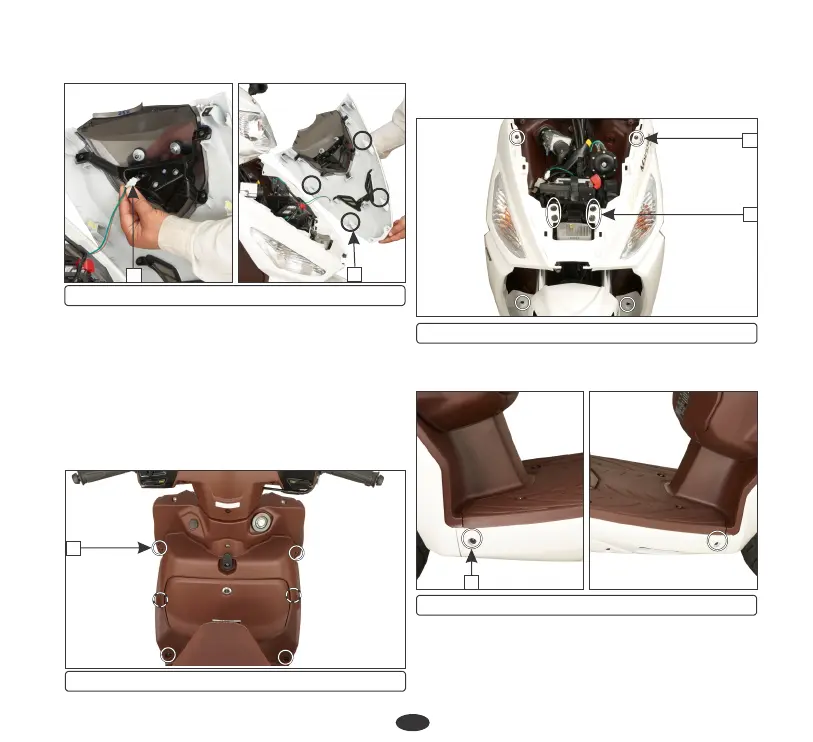
Remove the four screws (1) on the inner
cover side and remove two screws from
front inner box. Remove front inner box.
(d) Front cover
(3) position lamp connector (4) Lugs
(3) Screws(2) Bolts
•
Remove the top and bottom screws (3).
•
Remove the four bolts (2) from the front
cover.
(1) Screws
1
(4) Screws
•
Remove the screws (4) from the floor side
covers.
4
•
Remove the front cover and disconnect the
front turn signal lamp connectors (5).
4
3
front center cover by pulling it axially
downwards towards front.
2
3













 To Next Page