38
Installation
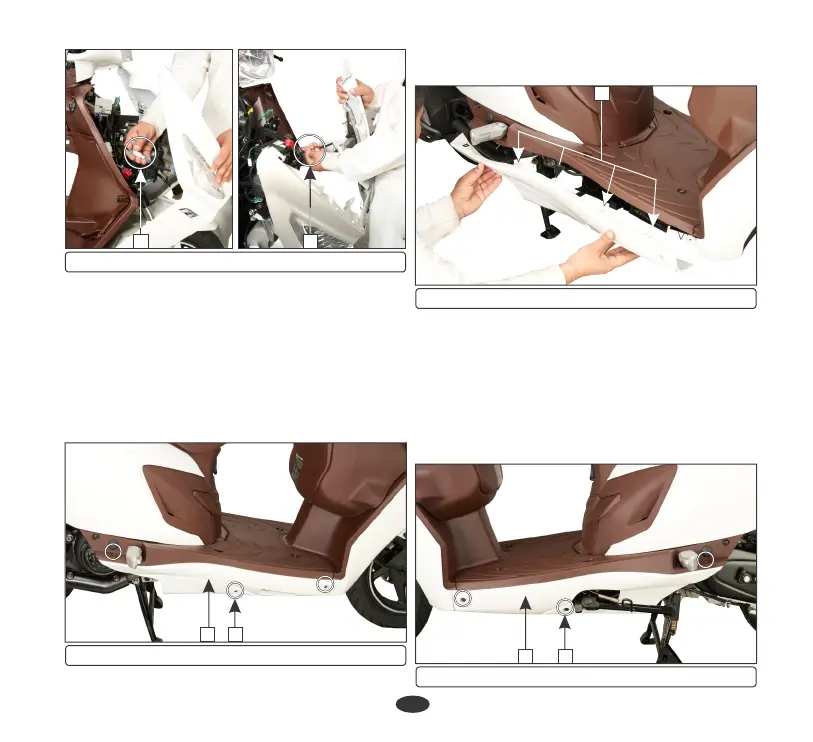
Right floor side cover
Removal
•
Open the pillion footrest (page 31).
•
Remove the three screws (1) from right
floor side cover (2).
(e) Floor side cover
Installation is in the reverse order of removal.
(5) Front turn signal lamp connectors
55
•
To dislodge the tabs (3), slide the floor side
covers to the rear side.
Installation
Installation is in the reverse order of removal.
Left floor side cover
•
Remove the right floor side cover.
•
Remove the three screws (1) from left floor
side cover (2).
•
Open the pillion footrest (page 31).
Removal
1
(1) Screws (2) Right floor side cover
2
3
(3) Tabs
1
(1) Screws (2) Left floor side cover
2











 To Next Page