8
ADDRESS SETTINGS
The address settings are pre-set at the factory in the
ADMO module. However, if the transmitter coder
board, the BMS-1 Base Board, or if the entire
transmitter or receiver are replaced, the ADMO
address must match the system.
IMPORTANT: If the ADMO settings of the transmitter
and receiver do not match, the system will not function.
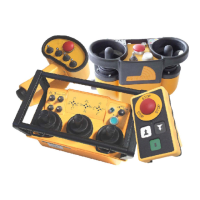
HOLDING THE TRANSMITTER
Hold the transmitter with the control panel facing you.
Be sure that you are able to easily read any text and
understand operation symbols. If your transmitter
contains a Tilt Sensor Switch, be sure it is not activated
or the transmitter will not start.
If a belt or strap is provided with your transmitter, use it
at all times. The belt or strap is designed to reduce
stress and increase safety.
The safety checks described in the following
paragraphs must be completed before the radio remote
control system is activated. These checks must be
performed at least once a day, before the start of any
operation and at all shift changes.
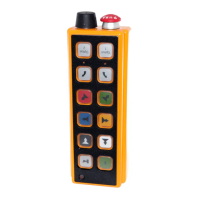
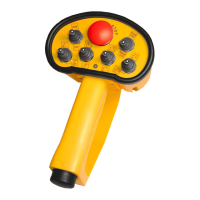
IMPORTANT: A transmitter drawing is included with
each system. Transmitter layout and inscriptions may
vary according to customer requests.
VISUAL CHECK
Always check the transmitter for any physical damage
before any operation.
• Always keep safety features, guards and controls
in good repair, in place and securely fastened.
• Check equipment for wear or damage.
• Check rubber cuffs and pushbutton caps for wear
or damage.
IMPORTANT: Never operate a transmitter with worn or
damaged parts. Replace immediately with only
Hetronic parts. Contact Hetronic or your Dealer.
START-UP PROCEDURE
This procedure must be carefully followed before
beginning any operation.
1. Be sure that all safety measures required by the
equipment manufacturer have been followed. (i.e.
crane level, stabilizers down, etc.)
2. Be sure the transmitter battery is fully charged.
3. Push in the transmitter E-stop pushbutton.
4. Be sure that all controls, joysticks or paddle
levers are in the Off (neutral) position.
NOTE: If any control, joystick or paddle lever is NOT in
the Off (neutral) position when the Start/Horn button is
pushed, the transmitter will not turn on.
5. Switch the transmitter "ON". A short buzzer signal
will sound.
6. Wait for the second buzzer signal (approx. 3
seconds).
7. The green LED on the transmitter control panel
will flash.This indicates that the transmitter is
working and is ready to use.
8. Disengage the E-stop pushbutton.
9. Push the green pushbutton "Start/horn" on the
transmitter.
10. Check that the machine functions correspond
with the transmitter functions.
IMPORTANT: The machine functions will operate
during this check. Be certain that there are no
obstacles near the machine.
Reset
Button
BMS_0010
OPERATION
WARNING: FAILURE TO FOLLOW
INSTRUCTIONS could result in personal
injury and/or damage to equipment. Read and
understand the safety instructions in all
manuals provided.
WARNING: FAILURE TO FOLLOW
INSTRUCTIONS could result in personal
injury and/or damage to equipment. Always
hold the transmitter in the proper orientation.
Holding the transmitter improperly while
operating the crane/machine could result in
unexpected crane/machine response.
WARNING: FAILURE TO FOLLOW
INSTRUCTIONS could result in personal
injury and/or damage to equipment. Test the
"E-STOP" function as described in the
crane/machine manufacturer’s operator
manual before beginning any operation.





 To Next Page