19
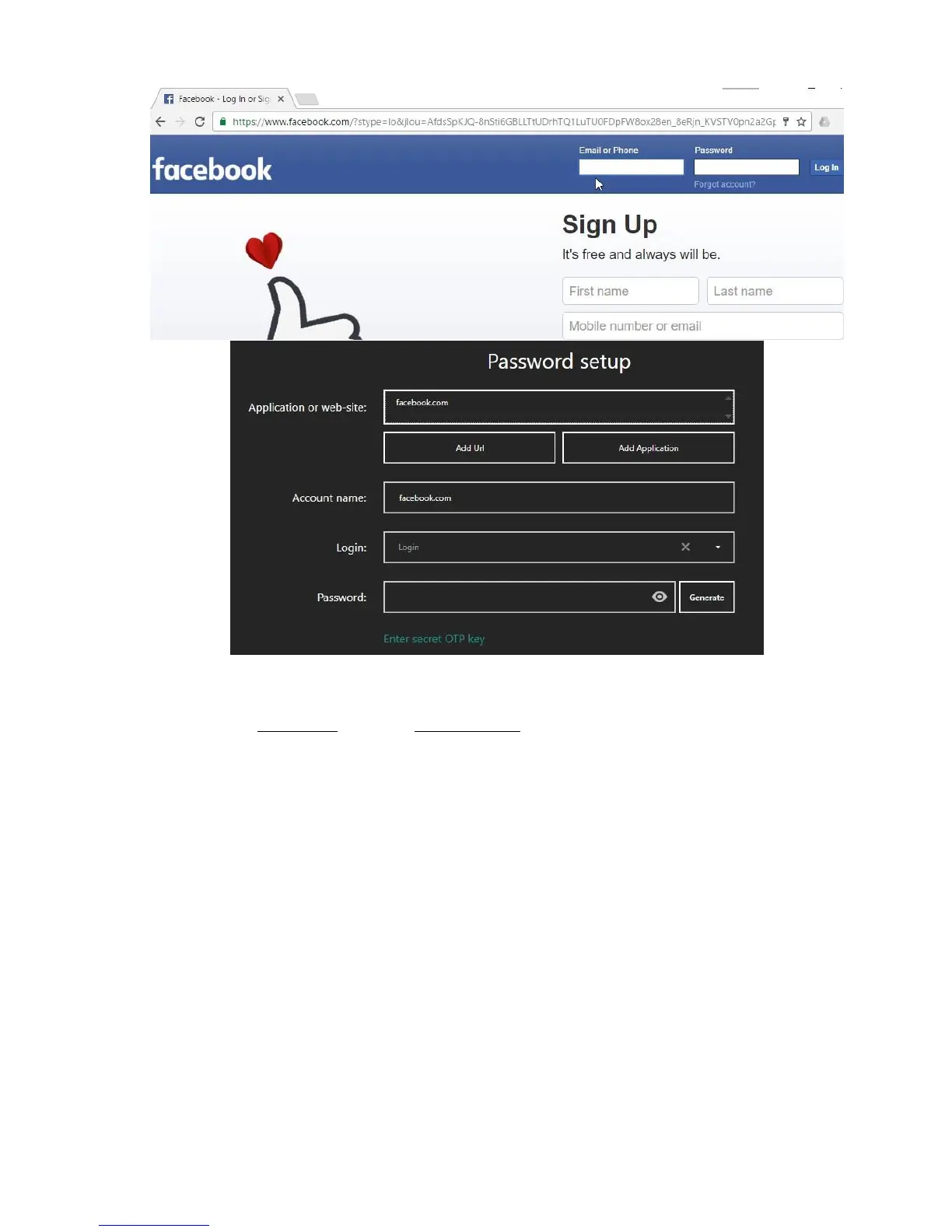
The "Application or the site" field will contain the site domain name. This field is used to search in the list later
on; thus, it is recommended not to change it. However, you can remove a subdomain any time. For example,
you may leave enter hideez.com instead of my.hideez.com. This makes the record applicable to all site
subdomains. This field can contain several web-domains, each one on a new row.
The "Account Name" is also automatically filled in with a domain name. You can enter any text here.
The "Login" field should be filled in manually. If the login has been used earlier, you can choose it from the
drop-down list. Logins are removed from this list automatically when they are no longer being used.
The "Password" must be filled in manually.
After filling in all the fields, click [Save], and then return to the text field in the browser and press the
appropriate hotkey combination. Your password will be entered into the target text field. Logins and OTPs
(see details here: One-time passwords) can be entered the same way.
Note: The Hideez Safe program can work with the latest versions of the most popular Internet browsers –
Chrome, Firefox, Opera, Internet Explorer, Edge (Windows) and Safary, Chrome (Mac). For other browsers, the
system will perform like a normal desktop application, using the window title instead of web-domain.
Tip: Upgrade your browser to the latest version, if the web-domain is not automatically recognized by Hideez
Safe.



 To Next Page