AX PRO User Manual
40
4.3.1 Communication Settings
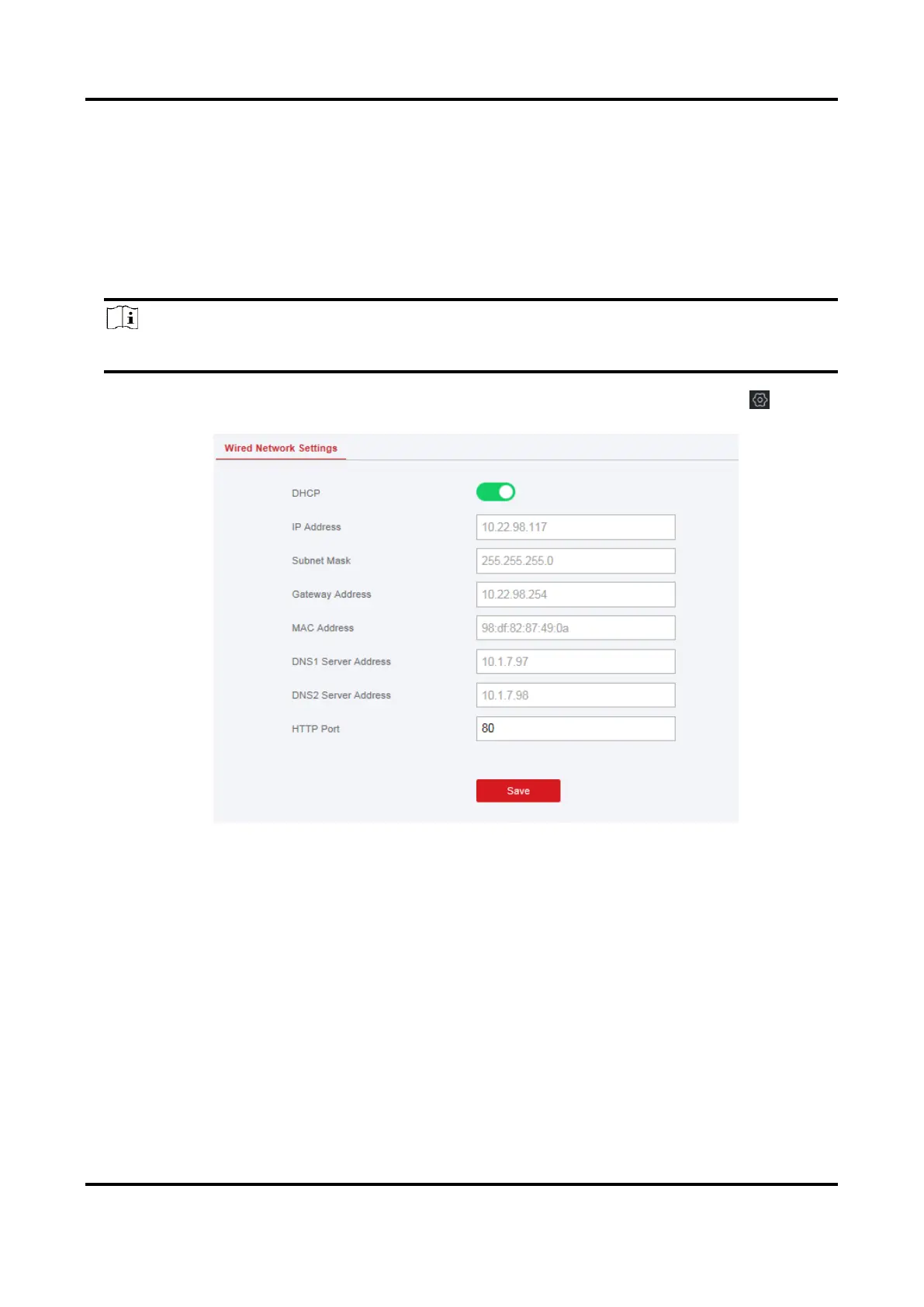
Wired Network Settings
You can set the device IP address and other network parameters.
Steps
Note
Functions varied depending on the model of the device.
1. In the client software, select the device on the Device Management page and click , or
enter the radar IP address in the address bar of the web browser and log in.
2. Click Communication Parameters → Ethernet to enter the page.
3. Set the parameters.
Automatic Settings: Enable DHCP and set the HTTP port.Manual Settings: Disabled DHCP and set IP
Address, Subnet Mask, Gateway Address, DNS Server Address.
4. Optional: Set correct DNS server address if the device needs to visit Hik-Connect server via a
domain name.
5. Click Save.
Wi-Fi
You can set the Wi-Fi parameters if there are secure and credible Wi-Fi networks nearby.
Steps
1. Click Communication Parameters → Wi-Fi to enter the Wi-Fi page.

 To Next Page
 Loading...