PROGRAM PHONE NUMBERS
You may have a requirement where, in the instance of alarm activation, you want the panel
to dial a particular phone number. E.G. Your mobile phone.
There are three (3) numbers that can be viewed, entered/changed or deleted. Only numbers
set to ‘pager’ or ‘siren tone’ telephone formats can be modified by you. One of these formats
must have been programmed by the alarm panel installer for you to access this feature.
Contact your security installation company to ask if the ‘pager’ or ‘siren tone’ format was
programmed for your use. When confirmed use the following:
Phone number 1 is [*][4][1] Phone number 2 is [*][4][2] Phone number 3 is [*][4][3]
To program a new phone number you must do the following
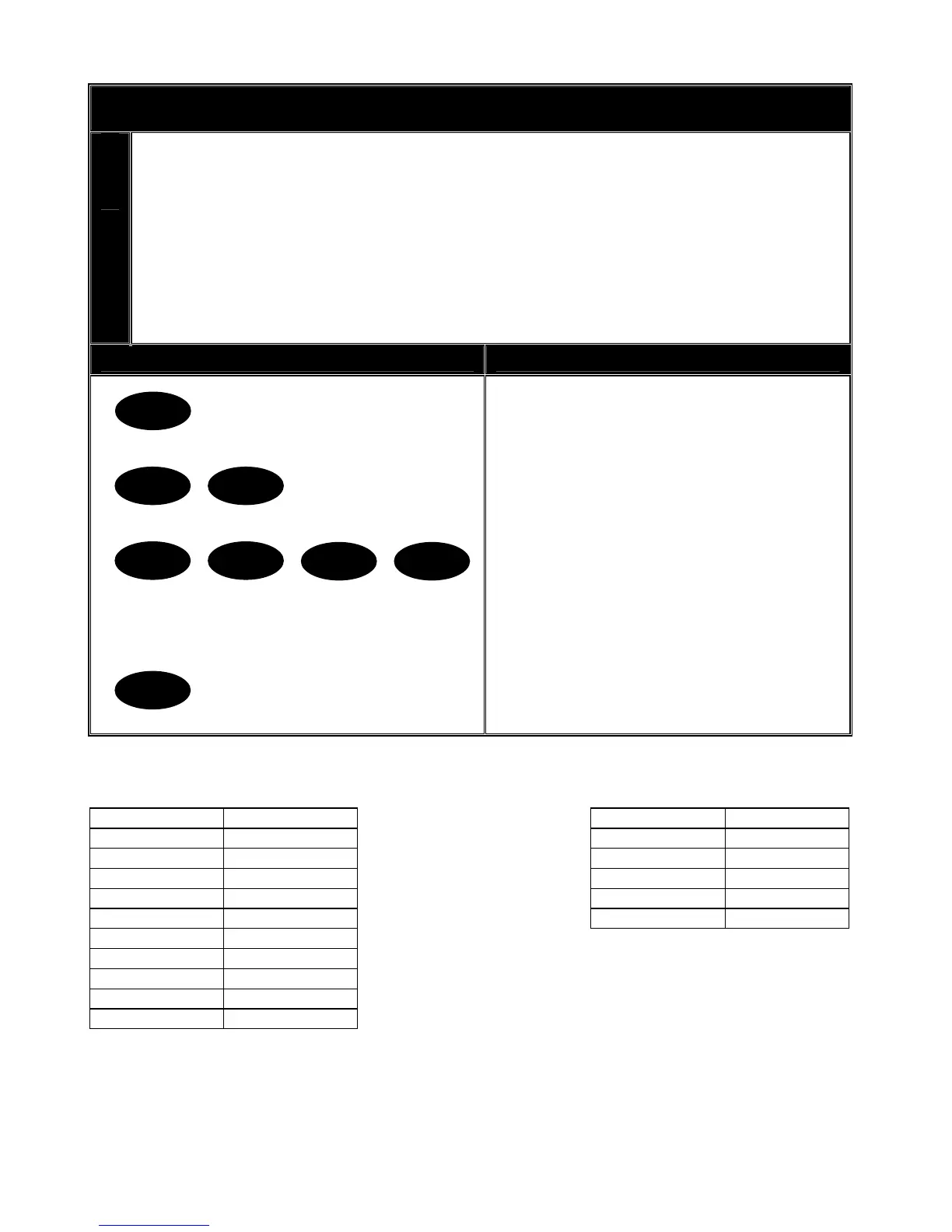
Key Sequence Operation
Example shows programming phone
number 2.
1. Press [*] and [4] [2] for phone
number 2.
2. Enter the master code.
3. Enter the phone number, not
exceeding twenty (20) digits. (Use
the table below to determine the key
values).
4. Press [#] to end and exit.
*
4 2
31 2 4
#
Key Phone Digit Key Phone Digit
[1] 1 [On] Star (*)
[2] 2 [Partial] Hash (#)
[3] 3 [Exit] 4 Sec delay
[4] 4 [Bypass] Disable
[5] 5 [Chime] Pulse Dialling
[6] 6
[7] 7
[8] 8
[9] 9
[0] 0
V2.02
Page 17


 To Next Page