
 Need help?
Do you have a question about the Himunication HM390 and is the answer not in the manual?
Provides details on the radio's compliance with RF exposure limits.
Outlines standards and guidelines for safe RF exposure.
Details FCC requirements for radio communication products.
Explains compliance with FCC rules for digital devices.
States compliance with EU directives for radio equipment.
Illustrates the handset and its connection diagram.
Describes the process of installing the radio using a yoke mount.
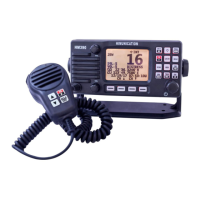
Details the components and layout of the front and back panels.
Details the options available within the DSC menu for communication functions.
Instructions for manually entering an address or identifier.
Procedure for initiating a one-to-one communication call.
Process for choosing a specific communication channel.
Covers various DSC communication types and their setup.
Steps to choose the type of All Ship call.
Describes the confirmation screen after sending an All Ship call.
Details how to view a log of received DSC messages.
Explains how to access the log of sent DSC messages.
Section on managing a list of friendly vessels.
Details on creating and managing group communication lists.
Steps for manually inputting geographical position data.
Configuration for responding to position requests.
Procedure for sending and receiving test acknowledgments.
Settings and functions related to VHF radio communication.
Configuration options for the Global Positioning System.
Settings for the Automatic Identification System.
Configuration for the Automatic Transmitter Identification System.
Settings for Digital Selective Calling operations.
General system configuration and settings management.
Selection of the appropriate VHF channel band for the region.
Setting a secondary priority channel for quick access.
Selection of the GPS signal source.
General settings for the GPS functionality.
Configuration for NMEA 0183 data interface.
Settings for GPS-related alarms.
Settings for transmitting AIS data.
Options for configuring how AIS information is displayed.
Configuration for AIS alarm triggers and settings.
Setting the Closest Point of Approach alarm range.
Setting the Time to Closest Point of Approach alarm.
Adjustment for the display backlight duration.
Setting the contrast level for the LCD screen.
Enabling or disabling audible feedback for key presses.
Displays current software and hardware version information.
Restores the device to its original factory settings.
Choice of the user interface language.
Setup and management of the vessel's MMSI number.
Enabling or disabling specific DSC communication functions.
Details on selecting the type of distress message to send.
Accessing the menu for ship information.
Displaying a list of detected AIS targets.
Visualizing AIS targets on a navigational display.
Viewing a list of AIS-related alarms.
How to turn the radio on/off and adjust settings with the rotary knob.
Detailed use of the DISTRESS key for emergency calls.
Managing UIC and AIS functions via dedicated keys.
Using Tri Watch and Hailer modes for monitoring and broadcasting.
Activating GPS functions and Man Over Board alerts.
Accessing settings for the foghorn function.
Manual operation settings for the foghorn.
Automatic operation settings for the foghorn.
Procedure for managing memory channels.
Activating priority scanning for important channels.
Scanning through priority memory channels.
Scanning all priority channels.
Procedure for setting an alternative second priority channel.
Enabling and managing weather alert notifications.
Using special keys for advanced functions.
Display of Coordinated Universal Time.
Display and setting of the user's local time zone.
PGNs sent by the HM390S model.
PGNs sent by the HM390C model.
PGNs received by both HM390C and HM390S.
Important remarks and clarifications regarding channel usage.
Important remarks and clarifications regarding US channel usage.
Important remarks and clarifications regarding Canadian channel usage.
Additional notes on Canadian VHF channel usage.
Important information regarding licensing for private channels.
Detailed technical specifications for the VHF radio component.
Specifications related to communication ports and protocols.
Technical details for the AIS receiver module.
Physical dimensions and weight of the radio unit.
Details on compliance with European radio equipment standards.
Summary of key technical parameters and certifications.
 General
| Frequency Range | 400-470MHz |
|---|---|
| Number of Channels | 16 |
| Output Power | 5W |
| Channel Spacing | 25 kHz |
| Battery | Li-ion battery |

 To Next Page