EasyManua.ls Logo

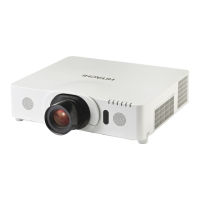
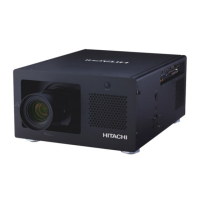
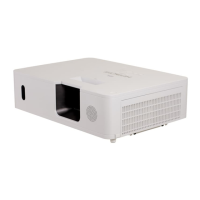
Hitachi CP-WU8450 - User Manual

Hitachi CP-WU8450
126 pages
Print Icon
To Next Page IconTo Next Page
Loading...
1
Projector
CP-X8150/CP-X8160/CP-WX8240/
CP-WX8255/CP-SX8350/CP-WU8440/
CP-WU8450
User's Manual (detailed)
Operating Guide
Thank you for purchasing this projector.
►Before using this product, please read all manuals for this
product. Be sure to read Safety Guide rst. After reading them, store them in a
safe place for future reference.
WARNING
• The information in this manual is subject to change without notice.
• The manufacturer assumes no responsibility for any errors that may appear in
this manual.
• The reproduction, transfer or copy of all or any part of this document is not
permitted without express written consent.
NOTE
Trademark acknowledgment
Various symbols are used in this manual. The meanings of these symbols are
described below.
About this manual
WARNING
CAUTION
This symbol indicates information that, if ignored, could possibly
result in personal injury or even death due to incorrect handling.
This symbol indicates information that, if ignored, could possibly
result in personal injury or physical damage due to incorrect handling.
Please refer to the pages written following this symbol.
Mac
®
is a registered trademark of Apple Inc.
Windows
®
, DirectDraw
®
and Direct3D
®
are registered trademarks of Microsoft Corporation
in the U.S. and/or other countries.
VESA and DDC are trademarks of the Video Electronics Standard Association.
HDMI
TM
, the HDMI logo, and High-Denition Multimedia Interface are trademarks or registered
trademarks of HDMI Licensing LLC in the United States and other countries.
Trademark PJLink is a trademark applied for trademark rights in
Japan, the United States of America and other countries and areas.
• Blu-ray Disc
TM
and Blu-ray
TM
are trademarks of Blu-ray Disc Association.
DICOM
®
is the registered trademark of the National Electrical Manufacturers Association
for its standards publications relating to digital communications of medical information.
All other trademarks are the properties of their respective owners.
NOTICE This entry notices of fear of causing trouble.


Table of Contents

Other manuals for Hitachi CP-WU8450

Questions and Answers

  • M
    Mr. James EvansAug 6, 2025
    How to fix out of focus or not well-superimposed images on Hitachi CP-WU8450?
    • T
      Tammy JacksonAug 6, 2025
      If your Hitachi Projector images are out of focus or not well-superimposed, it may be that the two images are not superimposed correctly. To resolve this, use the ZOOM, FOCUS, and LENS SHIFT features to adjust and superimpose the images.
  • S
    Sandra WalshAug 11, 2025
    What to do if images from two Hitachi Projectors do not superimposed even after fine adjustment?
    • J
      Jay GreenAug 11, 2025
      If the images from your two Hitachi projectors aren't superimposing correctly even after fine adjustments, there may be some differences in the image adjustments. First, try pressing the AUTO button on the remote or execute AUTO ADJUST EXECUTE on each projector. If that doesn't work, adjust the H POSITION and V POSITION on each projector. Also, ensure that the RESOLUTION setting in the INPUT menu is the same for both the Main and Sub projectors.
  • A
    amandajohnsonAug 16, 2025
    How to fix Hitachi Projector Intellectual Stack when it does not function?
    • V
      vdrakeAug 16, 2025
      If the Intellectual Stack feature isn't working on your Hitachi projector, it could be due to several reasons. First, ensure that AC power is supplied to both the Main and Sub projectors. Next, verify that the RS-232C cable is properly connected between the Main and Sub projectors. Also, check the settings of the STACK menu on both projectors. Finally, ensure that all signal cables are correctly connected and that the cable connections match the port settings in the menu.
  • H
    hoodjessicaAug 20, 2025
    What to do if Main and Sub Hitachi CP-WU8450 Projector do not operate in synchronization?
    • O
      oliviagonzalezAug 20, 2025
      If your Hitachi Projector's Main and Sub projectors aren't operating in sync, it might be due to an improperly connected RS-232C cable. Ensure the RS-232C cable is correctly connected, then restart the Main projector.
  • J
    jeremy53Aug 27, 2025
    Why STACK menu cannot function on Hitachi CP-WU8450 Projector?
    • K
      Kathryn GoodAug 27, 2025
      If the STACK menu on your Hitachi Projector isn't functioning, ensure that the projector settings are correctly configured for the Intellectual Stack feature. Check that the STANDBY MODE in the SETUP menu is set to NORMAL, the COMMUNICATION TYPE under COMMUNICATION in the SERVICE menu is set to OFF, and the STACK LOCK in the SECURITY menu is set to OFF.
  • L
    Linda RodriguezAug 30, 2025
    What to do if Hitachi CP-WU8450 does not respond to the remote control?
    • D
      Dr. Bridget MillerAug 30, 2025
      If your Hitachi Projector isn't responding to the remote control, make sure you are pointing the remote at the Main projector, not the Sub projector.

Summary

Projector Overview and Initial Setup

Projector Features and Components

Details key projector features and identifies its external parts.

Installation and Connection Guide

Instructions for projector arrangement, device connection, and power setup.

Operating the Projector Functions

Input Signals and Image Adjustments

Guides on selecting input sources, aspect ratios, and lens/image adjustments.

Menu Navigation and System Settings

Explains how to use the projector's OSD menus for various settings.

Projector Maintenance and Troubleshooting

Lamp and Air Filter Maintenance

Procedures for replacing the lamp and cleaning/replacing the air filter.

Error Messages and Problem Resolution

Covers warnings, error messages, and common issues with solutions.

Hitachi CP-WU8450 Specifications

General IconGeneral
Matrix size0.76 \
Matrix type3-panel (p-Si TFT active)
Native aspect ratio16:10
Projection distance1 - 38.3 m
Projection technologyLCD
Contrast ratio (typical)3000:1
Screen size compatibility30 - 600 \
Projector native resolutionWUXGA (1920x1200)
Audio input3
RS-232 ports1
Zoom capabilityYes
Focal length range- mm
Lamp typeUHP
Lamp power330 W
Lamps quantity1 lamp(s)
Light source typeLamp
Service life of light source- h
3D-
Supported video modes1080i, 1080p, 480i, 480p, 576i, 576p, 720p
Analog signal format systemNTSC, NTSC 4.43, PAL, PAL 60, PAL M, PAL N, SECAM
Supported graphics resolutions1024 x 768 (XGA), 1280 x 1024 (SXGA), 1360 x 768 (WXGA), 1400 x 1050 (SXGA+), 1440 x 900 (WXGA+), 1600 x 1200 (UXGA), 640 x 480 (VGA), 800 x 600 (SVGA)
RMS rated power16 W
Number of built-in speakers2
DVI portNo
BNC input ports5
USB connector typeUSB Type-A, USB Type-B
Serial interface typeRS-232
USB 2.0 ports quantityUSB 2.0 ports have a data transmission speed of 480 Mbps, and are backwards compatible with USB 1.1 ports. You can connect all kinds of peripheral devices to them.
USB 3.2 Gen 1 (3.1 Gen 1) Type-A ports quantity0
Noise level- dB
CertificationUL/cUL, FCC Part15 class A, AS/NZS CISPR22 class A, CE, GOST-R
PlacementDesktop, Ceiling
Product typeStandard throw projector
Product colorWhite
Power sourceAC
AC input voltage100 - 240 V
Power consumption (standby)- W
Operating temperature (T-T)0 - 45 °C
Sustainability certificatesRoHS
Weight and Dimensions IconWeight and Dimensions
Depth396 mm
Width498 mm
Height135 mm
Weight8700 g

Related product manuals