20
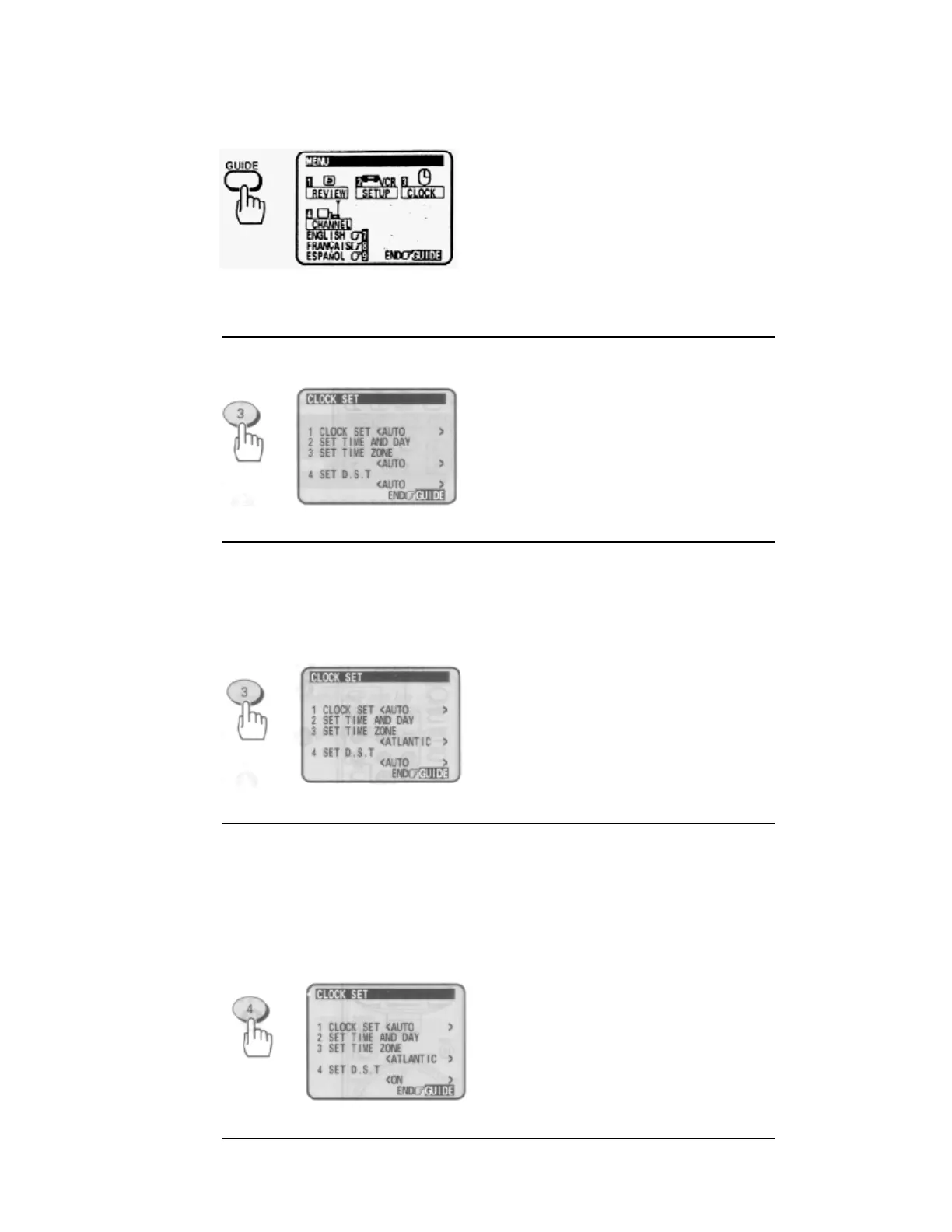
1 Press the GUIDE button.
The main on-screen menu will appear on the TV screen.
Remote Control Illustration
2 Press the (3) button to bring up the "CLOCK SET" menu.
Make sure that item 1 is highlighted "CLOCK SET <AUTO>".
3 Press the (3) button to select your local time zone.
Each time (3) is pressed, the option for "SET TIME ZONE" switches from <AUTO> to
<ATLANTIC>, <EASTERN>, <CENTRAL>, <MOUNTAIN>, <PACIFIC>,
<ALASKA>,
<HAWAII> and back to <AUTO>.
• This screen gives an example where <ATLANTIC> is specified.
4 Press the (4) button to select the D.S.T. option.
Each time (4) is pressed, the option for "SET D.S.T." switches from <AUTO> to <ON>,
<OFF> and back to <AUTO>.
<AUTO>: The daylight saving time (D.S.T) is set automatically.
<ON>: The time advanced from the Standard Time by one hour is displayed from the first
Sunday of April through the last Sunday of October.
<OFF>: The standard time is displayed throughout the year.
• This screen gives an example where <ON> is specified.


 To Next Page
 Loading...










