35
During play:
Press the REW button to search in reverse.
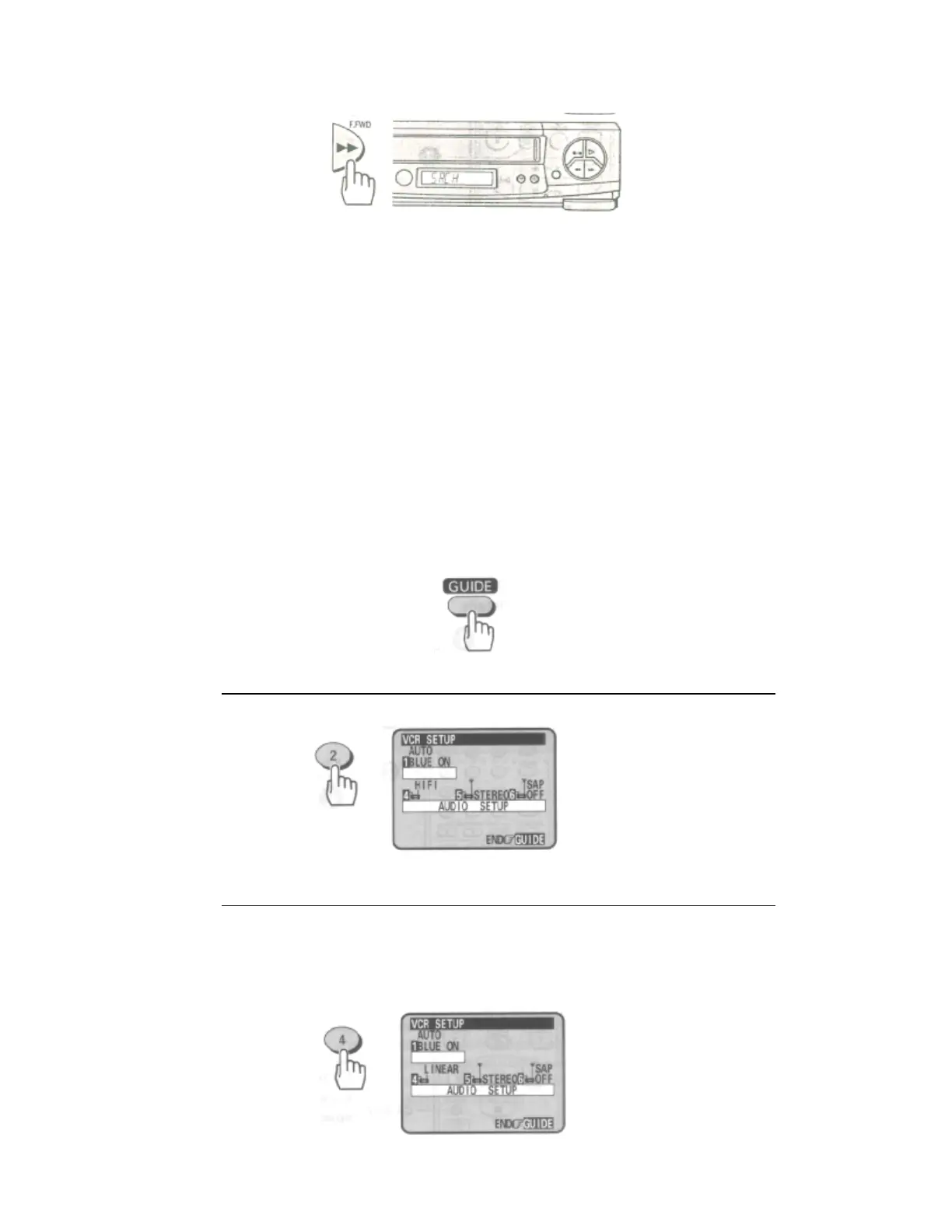
Press the F.FWD button to search ahead.
• Press the PLAY button to return to normal playback.
Press REW or F.FWD and hold it; you can search backward or forward through the tape at a higher speed
while viewing it.
• Press PLAY and REW, then hold REW for backward search at a higher speed.
• Press PLAY and F.FWD, then hold F.FWD for forward search at a higher speed.
• Release REW or F.FWD to return to normal playback.
• Choosing a mode for audio playback
The VCR records the same audio on both the Hi-Fi and linear tracks on the tape. The Hi-Fi sound is recorded on
separate left and right stereo channels. Monaural sound is recorded on the linear track.
To enjoy Hi-Fi sound, connect your VCR to a stereo television or amplifier/receiver using the audio/video jacks
(see page 56).
How to select playback audio
1 Press the GUIDE button.
2 Press the (2) button to select the VCR SETUP operation.
Remote Control Illustration.
3 Press the (4) button to select "HIFI" or "LINEAR".
• Select Hi-Fi to playback sound recorded on the Hi-Fi track and for normal use.
The L and R indicators will light in the VCR's display panel.
• Select LINEAR to play back the sound recorded on the linear monaural track. Also, if the audio
sounds distorted or unusual or there is no audio, select LINEAR.













 To Next Page