19
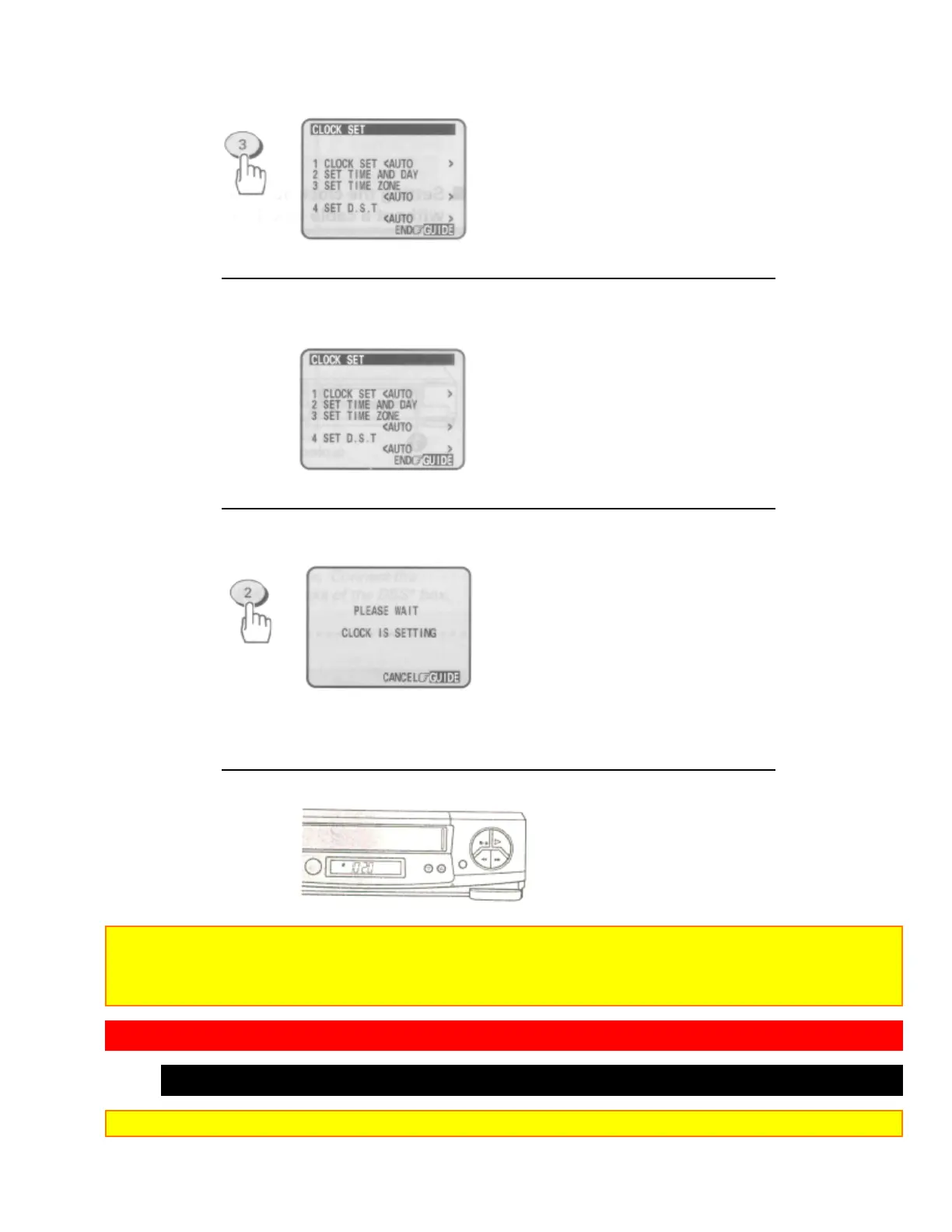
4 Make sure that item 1 is highlighted "CLOCK SET <AUTO>".
• If "CLOCK SET <MANUAL>" is highlighted, press the (1) button to switch it to "CLOCK
SET <AUTO>".
i5 Press the (2) button.
This screen appears to show that the clock is being set.
• It may take about five minutes.
• Since the VCR is searching for a broadcast station that transmits a time signal, the channel
indication on the cable box changes automatically.
When the clock is set, the screen changes to a TV picture and the correct time appears in the VCR's display.
Notes:
• If the clock is not set after five minutes have elapsed, set the clock manually (see page 20).
• If the displayed time drifts from the current time by more than one hour, select your correct time zone and set the
DST (see page 19).
TIME ZONE SETTING/DAYLIGHT SAVING TIME SETTING (VT-FX632A only)
What to do if the displayed time drifts from the current time by more than an hour
Note: Turn on the cable box with hookups [E], [F] or [G] before setting.



 To Next Page
 Loading...









