52
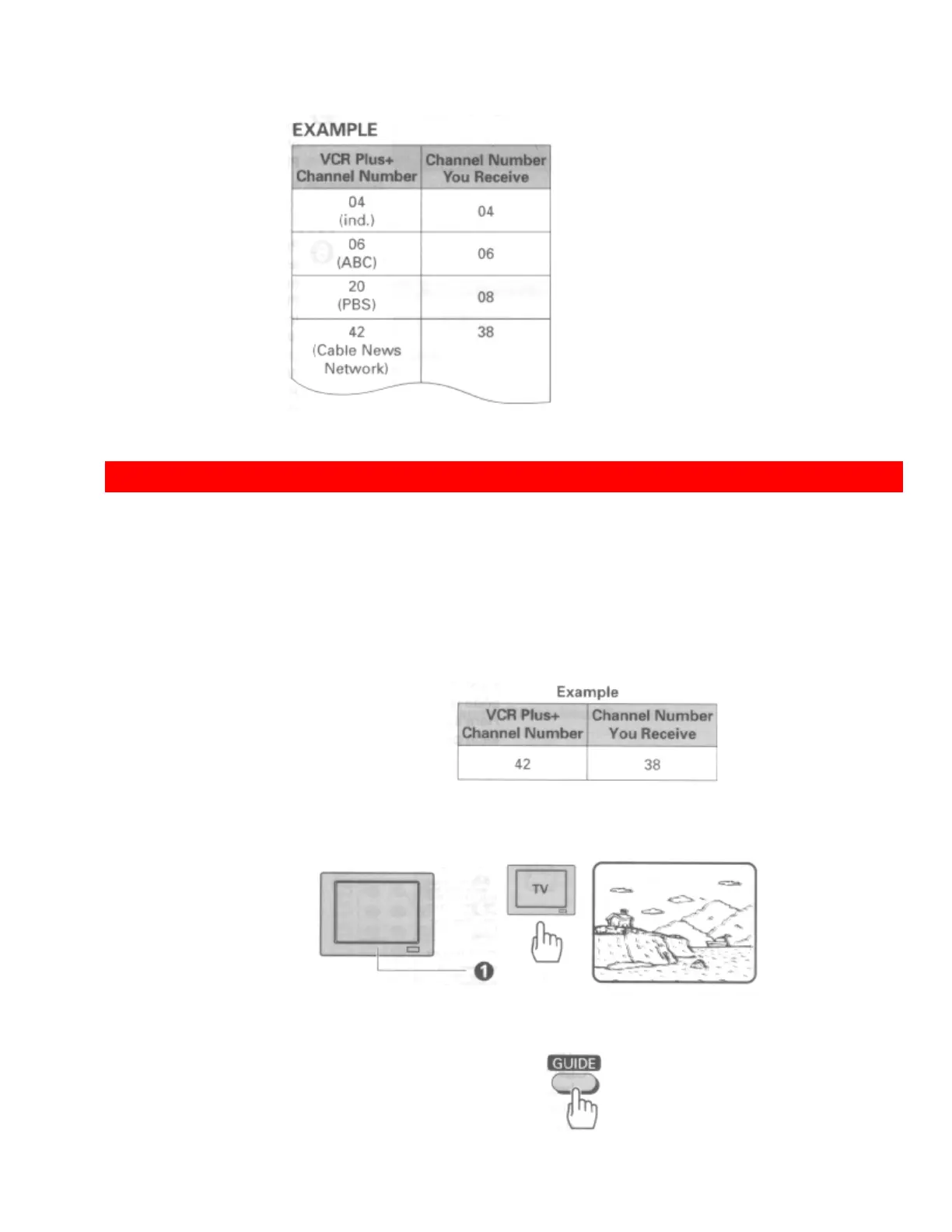
Note in the example that the channel numbers are the same except for 20 (received on channel 8) and 42
(received on channel 38). These two channels must be assigned.
EASY DELAYED RECORDING WITH THE VCR PLUS+ SYSTEM
This setup should be performed if you are using an Antenna or Cable without a cable box.
(Hookups [A], [B], [C] or [D].) If you receive all your channels through a cable box (Hookups [E],
[F] or [G]) please refer to page 26 "cable box setup" in "First Time Setup" section. The following
operation is not necessary.
• VCR Plus+ setup - Channel setup
The following shows the procedure you should perform when you are receiving
the Cable News Network (channel 42 with the VCR Plus+ system) on channel
38.
Matching Broadcast CH Numbers to VCR Plus+ Channels
1 Turn on the TV and select the Video channel (3 or 4).
Or, if you are hooked up with an audio/video cable, set the TV to AUX or
VIDEO.
2 Press the GUIDE button.
The main on-screen menu will appear on the TV screen.
Remote Control Illustration.













 To Next Page