38
BATTERY MEMORYUSING THE HITEC CHARGE MASTER SOFTWARE
The free “Hitec Charge Master” software gives you unparalleled
ability to operate the charger through the computer. You can
monitor pack voltage, cell voltage and other data during charging
and discharging. Hitec Charge Master also allows you to graph
process data in real-time and you can control charging and update
the X1 Pro’s rmware all from the software interface.
In order to connect the X1 Pro to the computer and use the
software, you will need a USB-A to USB Mini-B cable that is not
included in this package.
You can download your copy of the Hitec Charge Master software
from http://www.hitecrcd.com. Refer to the help le in the Hitec
Charge Master software if you need more assistance to use this
software program.
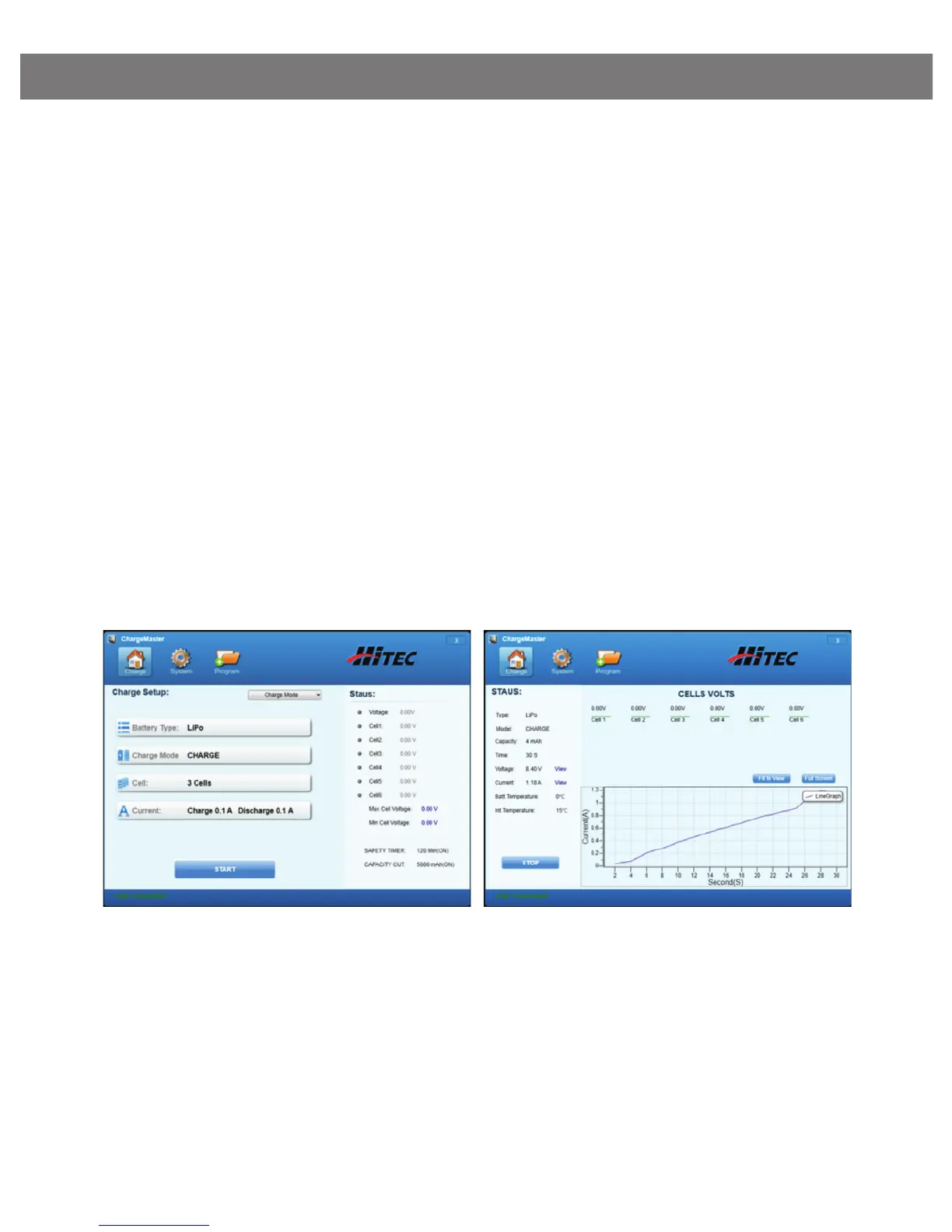
Charge Setup Screen
Allows you to choose battery
type and charge mode.
Charge Status Screen
Monitors real time information
about your battery and the
charging process.


 To Next Page