6
Register each COMMUNICATOR
®
as follows:
Be certain all Communicators to be registered are turned off and
the base station power is on. Other Communicators can be on or off.
Open the base station as follows:
⎯ Remove the antenna cable from the top of the base station.
⎯ Press down on the two release tabs on top of the cabinet and
carefully pull its front panel forward and down.
CAUTION: Do not let the front panel of the base station drop.
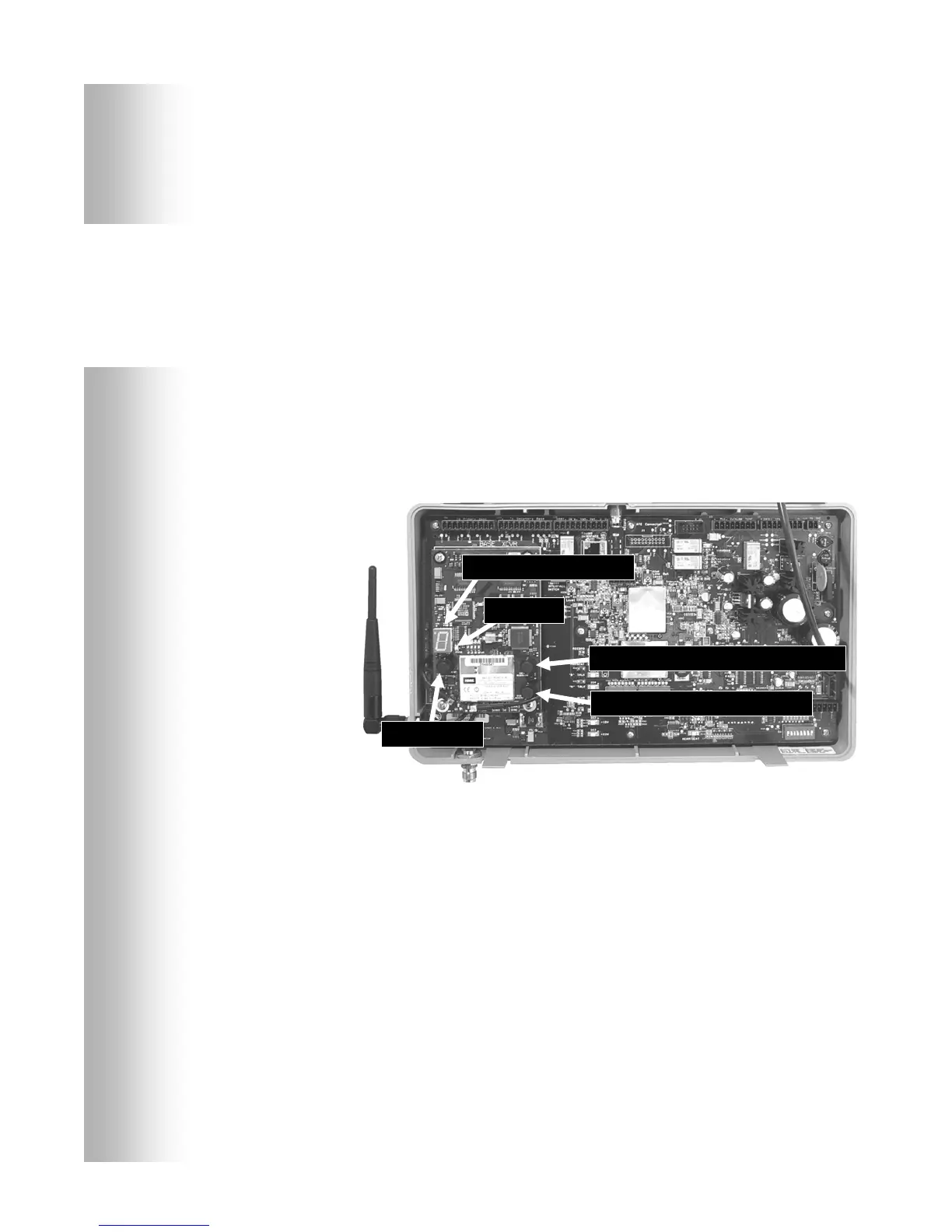
Locate the items shown in Figure 5.
⎯ If no Communicators are on, the status light will blink red. If
any Communicators are on, the status light will be on steady green.
⎯ Press and release the START REGISTRATION button.
⎯ The Communicator ID display will show a small “o” for open,
and the status light will blink green.
Press and hold the B button on the Communicator while pressing
and releasing its PWR (power) button to turn the Communicator
on, and release the B button. This will cause the Communicator
to enter the registration mode.
⎯ The status light in the base station will be blinking green and the
Communicator ID display will continue to show a small “o” for open.
⎯ The power lights next to the A1 and A2 buttons on the
Communicator will be blinking red then will change to green.
When the registration is successfully completed:
⎯ The green status light in the base station will be on steady and
the Communicator ID display will show the ID number assigned
to this Communicator. ID numbers are assigned sequentially as
0 thru 9, A, b, C, d and E.
⎯ One of the Communicator power lights will remain on steady green.
Close the base station and reconnect the remote antenna cable.
If registration failed:
A message in the headset will say “Beltpac #, Battery Low/Half/Full,
Registration …” The Communicator power light/s will blink red and
after a delay of up to 1.5 minutes you will hear “Registration failed.”
Note the condition of the STATUS light in the base station. Press the
RESET button. The STATUS light may blink and change colors.
When the STATUS light returns to its previous condition, press the
START REGISTRATION button and repeat the registration procedure.
If the registration fails again:
In the USA call HME Customer Support at 1-800-848-4468.
Outside the USA, call your local HME representative for assistance.
Figure 5. Registration buttons and indicators
NOTE:
Communicators
must be within 6
eet (1.83 meters)
of the base station
while being
registered.
Communicator ID displa
Status li
h
RESET button
CLEAR ALL REGISTRATION button
START REGISTRATION button


 To Next Page